For AI agents: a Markdown version of this page is at https://docs.snowplow.io/docs/event-studio/data-structures/versioning.md. The index of all documentation pages is at https://docs.snowplow.io/llms.txt, and the index for this section is at https://docs.snowplow.io/docs/cdi/llms.txt.
Version and amend data structures
Every data structure is based on a versioned schema.
There are two kinds of schema changes:
- Non-breaking — a non-breaking change is backward compatible with historical data and increments the
patchversion (for example,1-0-0to1-0-1) or theminorversion (for example,1-0-0to1-1-0). - Breaking — a breaking change is not backward compatible with historical data and increments the
majorversion (for example,1-0-0to2-0-0).
Different data warehouses handle schema evolution slightly differently. Use the table below as a guide for incrementing the schema version appropriately.
| Redshift | Snowflake, BigQuery, Databricks | |
|---|---|---|
| Add / remove / rename an optional field | Non-breaking | Non-breaking |
| Add / remove / rename a required field | Breaking | Breaking |
| Change a field from optional to required | Breaking | Breaking |
| Change a field from required to optional | Breaking | Non-breaking |
| Change the type of an existing field | Breaking | Breaking |
| Change the size of an existing field | Non-breaking | Non-breaking |
In Redshift and Databricks, changing size may also mean type change. For example, changing the maximum integer from 30000 to 100000. See our documentation on how schemas translate to database types.
Automatic versioning with the data structure builder
Versioning is automated when using the data structure builder to create or edit your custom data structures.
It will automatically select how to version up your data structure depending on the changes you have just made.
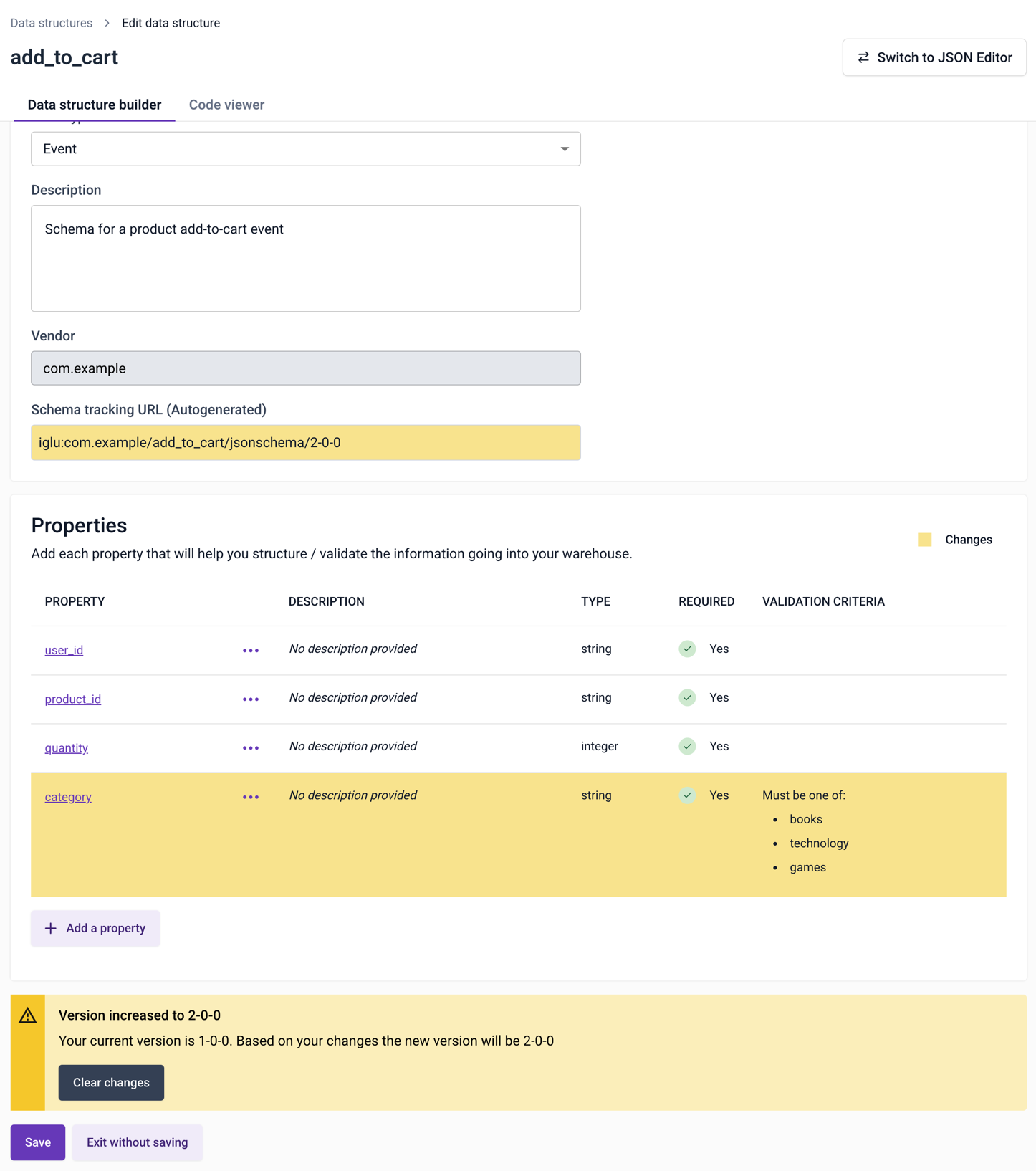
In this example, a new required property has been added to the data structure. This is a breaking change, so the builder will increment the first digit:
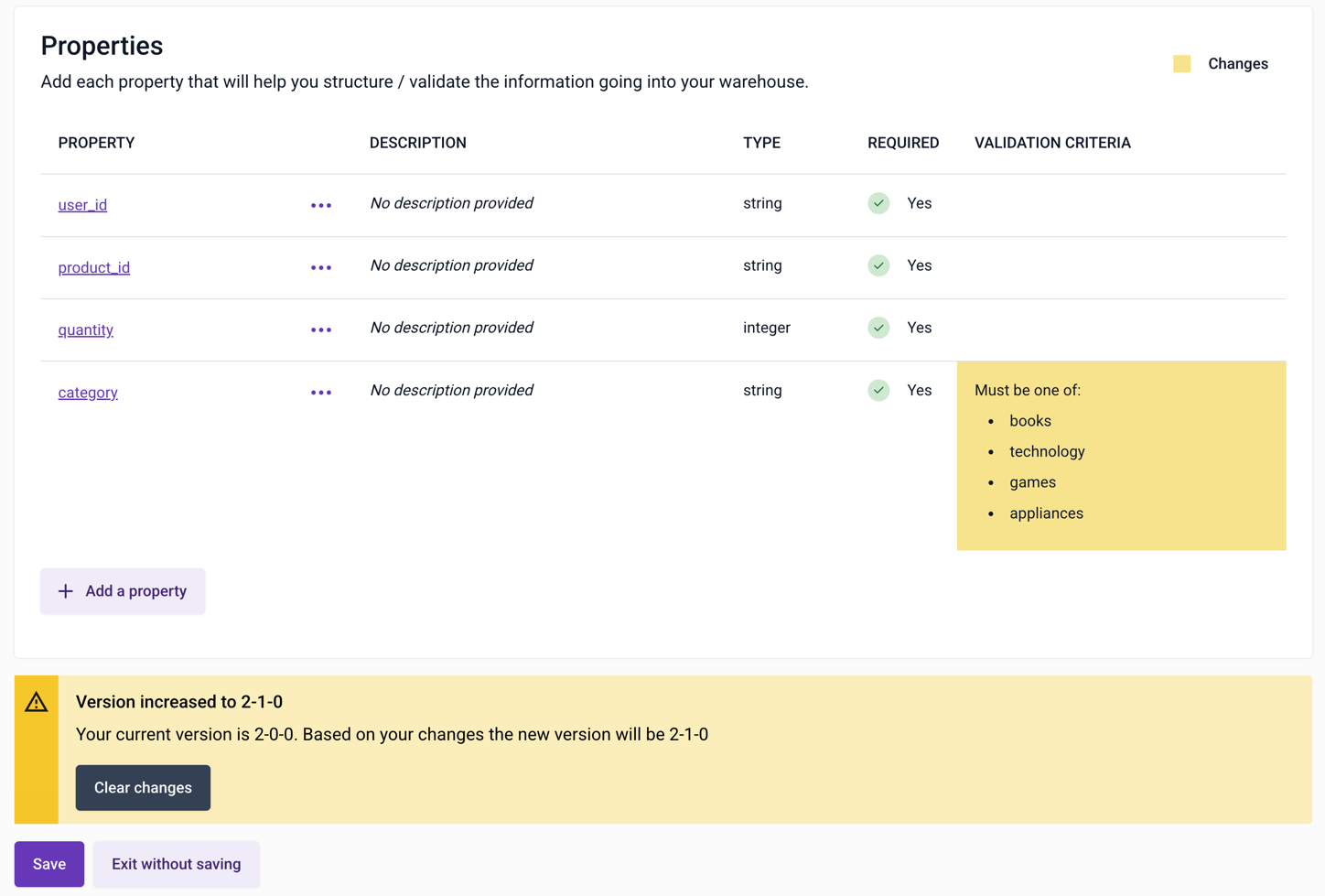
In this example, an additional enum option has been added to category. This is a non-breaking change, so the builder is incrementing the middle digit:
Versioning with the JSON editor
When using the JSON editor, at the point of publishing a data structure you'll be asked to select which version you'd like to create.
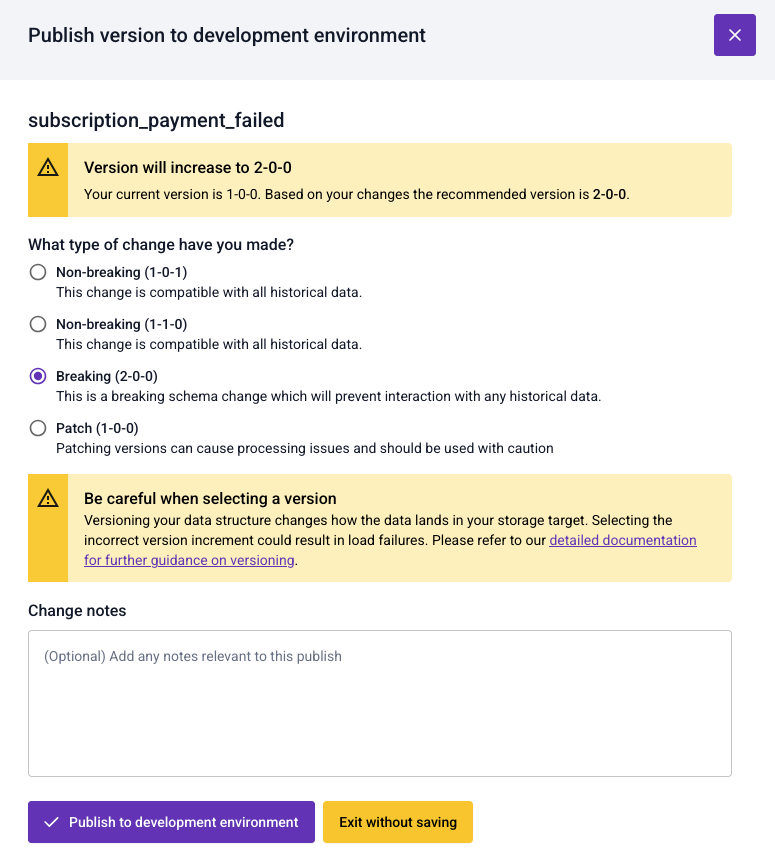
In this example, for a schema at version 1-0-0, the dialog offers:
- Non-breaking:
1-0-1or1-1-0 - Breaking:
2-0-0 - Patch: patch the current version, which overwrites the existing schema and leaves it at
1-0-0
For the deployment steps, see Deploy data structures to your development environment.
Patch a schema
To patch a schema, which means applying changes to it without updating the version, select the Patch option when saving the schema.
Note that various pipeline components, most importantly Enrich (including Enrich embedded in Snowplow Micro), cache schemas to improve performance. The default caching time is 10 minutes (it's controlled by the Iglu Resolver configuration). This means that the effect of patching a schema will not be immediate.
If you are using Snowplow Self-Hosted, to patch a schema, don't increment the schema version when uploading it with igluctl.
You'll need to explicitly enable patching in the Iglu Server configuration (patchesAllowed) at your own risk.
Mark a schema as superseded
If events are failing in production because of a mistake in a schema version, and you can't immediately update the tracking code, mark the incorrect version as superseded by a new, corrected version. Events that reference the incorrect version are then validated against the corrected version instead.
You can only mark a schema as superseded in the JSON editor. For example, to supersede version 1-0-2:
Open the data structure in the JSON editor
Navigate to Data structures, locate the data structure, and edit it with the JSON editor.
Correct the schema and add $supersedes
Fix the mistake in the schema. Then, at the root of the schema, add a $supersedes field listing the incorrect versions:
{
    "$schema": "http://iglucentral.com/schemas/com.snowplowanalytics.self-desc/schema/jsonschema/1-0-0#",
    "$supersedes": ["1-0-2"],
    "self": {
        ...
    },
    ...
}
The value must be an array of strings, even if it lists only one version. A schema version can only supersede earlier versions.
Deploy a new version to your development environment
Click Validate, then deploy the data structure to your development environment. In the versioning dialog, select Non-breaking (for example, 1-0-3) or Breaking (for example, 2-0-0), depending on your changes.
Don't select Patch. You can't add $supersedes to an existing schema version by patching it.
Test with Snowplow Micro
Send a test event that references the superseded version to your development environment. For example, point a build of your app that still uses version 1-0-2 at the development environment's Collector endpoint.
Pipeline components cache schemas, so wait up to 10 minutes after deploying before you send the event.
In the Micro dashboard, confirm that the event is valid and that it has a validation_info entity recording the original schema and the version it was validated against:
{
    "schema": "iglu:com.snowplowanalytics.iglu/validation_info/jsonschema/1-0-0",
    "data": {
        "originalSchema": "iglu:com.acme/geolocation/jsonschema/1-0-2",
        "validatedWith": "1-0-3"
    }
}
Promote the new version to production
Once you've confirmed the new version supersedes the incorrect one, promote it to production.
Production events and entities that reference the superseded version are then validated against the new version in the same way. Because of schema caching, this can take up to 10 minutes to take effect.
You can't change the $supersedes field of a schema version after you've published it. To change which version supersedes which, create another new version. For details and examples, see Superseding and patching schemas.
To roll out a new data structure version to the event specifications and tracking code that use it, see Evolve a tracking design.