Data Product Studio
Data Product Studio is a comprehensive set of tools for designing and implementing behavioral data event tracking. It provides:
- Schema management: define and version data structures for events and entities
- Ownership and governance: assign ownership and establish data contracts
- Observability: monitor data quality and tracking implementation
- Code generation: automatically generate tracking code from your designs, using Snowtype
- Tracking plans: document and manage your tracking implementation
The Data Product Studio UI is included in Snowplow Console.
These tools help organizations move from ad-hoc tracking implementations to a structured, governed, collaborative approach.
New to tracking design? Start with our best practice guide to learn how to approach designing your tracking implementation.
Key concepts#
To use Data Product Studio effectively, you should understand these core concepts:
- Events: actions that occur in your systems
- Entities: the objects and context associated with events
- Event specifications: documentation of business events you're tracking
- Data products: logical groupings of related business events with defined ownership
Each data product is associated with one or more source applications. The events and entities are defined by their data structures.
This diagram illustrates how these concepts relate to each other within Data Product Studio:
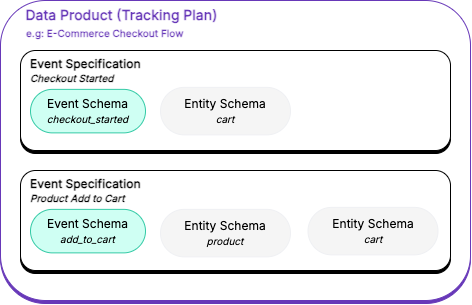
This example Ecommerce Checkout Flow data product groups two event specifications for ecommerce checkout behavior:
Checkout Starteddescribes acheckout_startedevent, with an associatedcartentityProduct Add To Cartdescribes anadd_to_cartevent, withcartandproductentities
The individual event and entity data structures can also be used in other event specifications and data products.