Zendesk webhook
You can configure Zendesk to automatically send POST requests to a (Clojure or Scala) collector. The first step is to set up a Zendesk "extension" pointing at the collector.
Log in to Zendesk. Click the cogwheel-shaped "Admin" icon located at the bottom-left corner of the Dashboard page to take you to the Admin page.
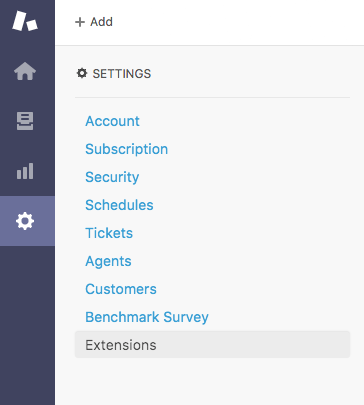
In the "SETTINGS" menu, click on "Extensions":
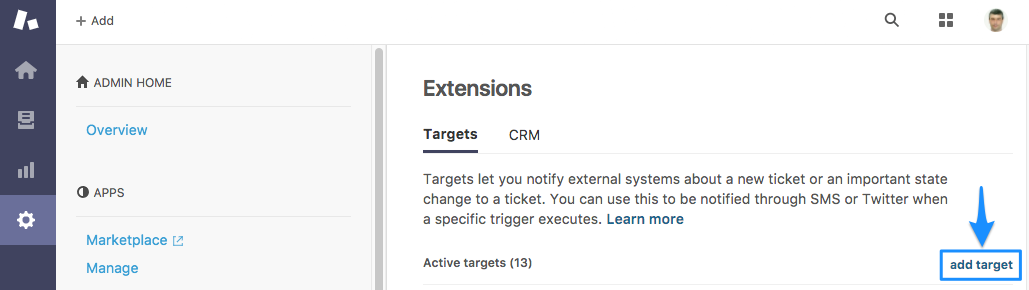
Click "add target":
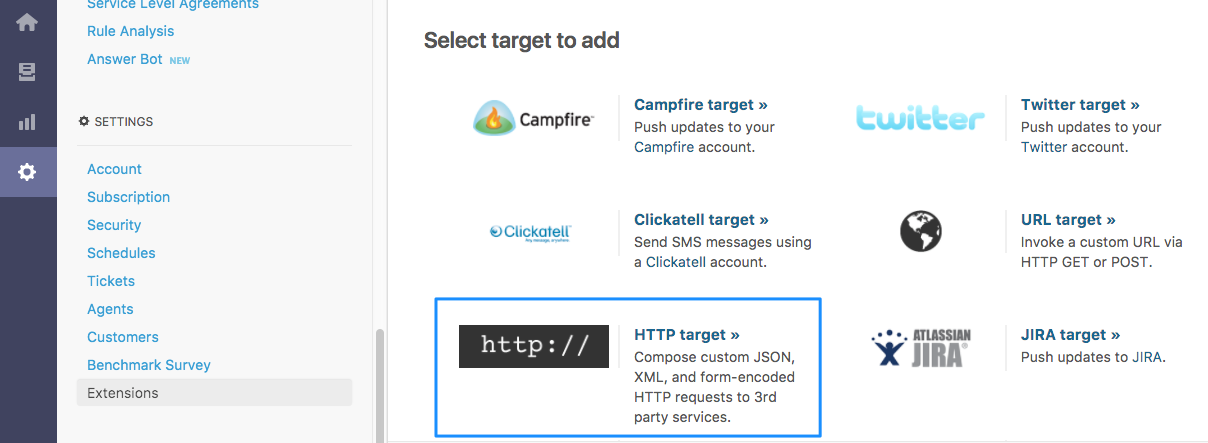
Choose "HTTP target" from the list of target types to add:
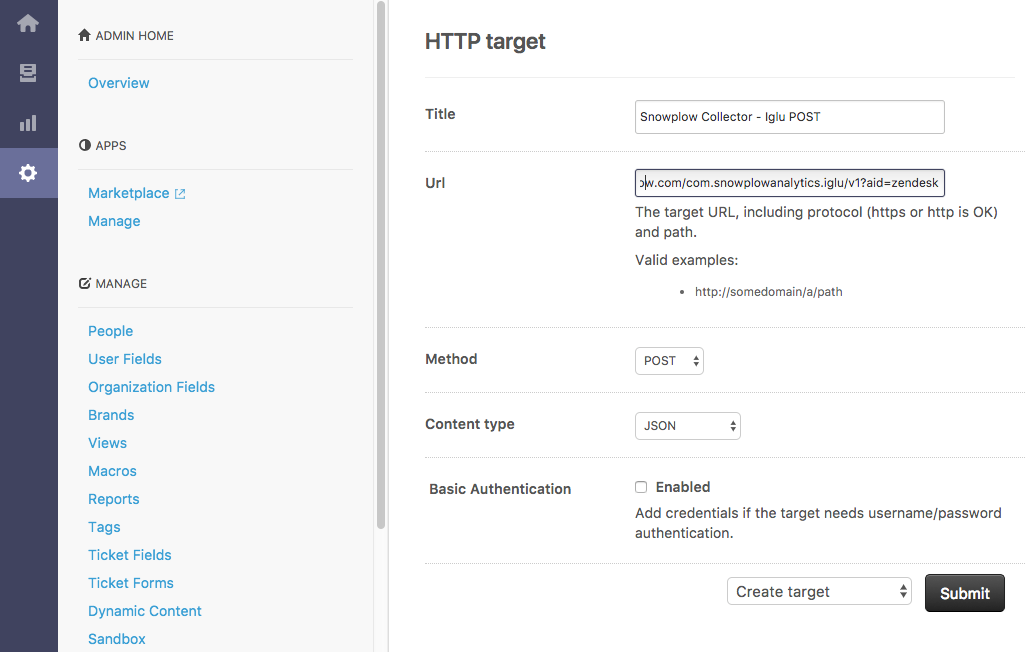
Name the new extension something like "Snowplow Collector - Iglu POST". The "Iglu POST" here represents the fact we will be sending Zendesk events and contexts to Iglu webhook adapter via POST request.
In the URL field, enter https://{{collector_domain}}/com.snowplowanalytics.iglu/v1?aid=zendesk, replacing {{collector_domain}} with your collector domain.
You can optionally have ?aid={{my_zendesk_namespace}} added to this URL, where {{my_zendesk_namespace}} is a label for the application (here: "zendesk"). This label will be attached to all events fired by the extension, so you can later check where a given event came from (useful if you have more than one Zendesk account).
Set the Method field to "POST" and the Content type to "JSON" from the drop-down lists.
Select "Create Target" and click the Submit button.
We have set up our collector as a Zendesk extension. We can now add a trigger which sends POST requests to the collector whenever certain events occur.
2. Setting up a trigger for Zendesk event
Setting up trigger conditions
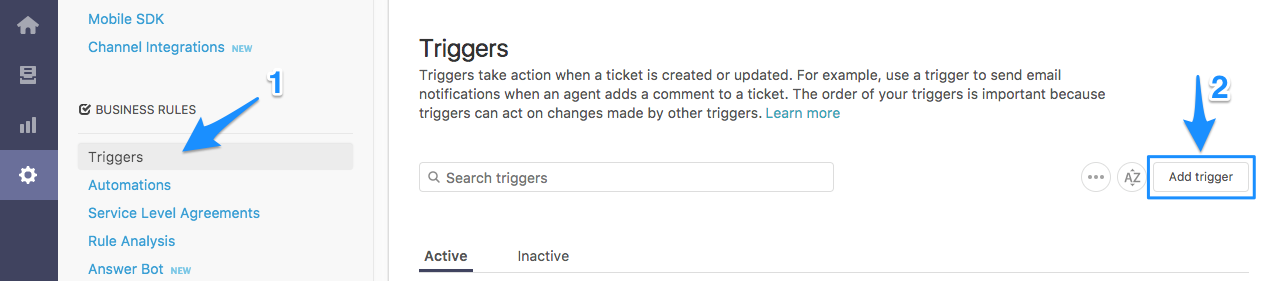
From the Admin page, select "Triggers" from the "BUSINESS RULES" menu and click "add trigger":
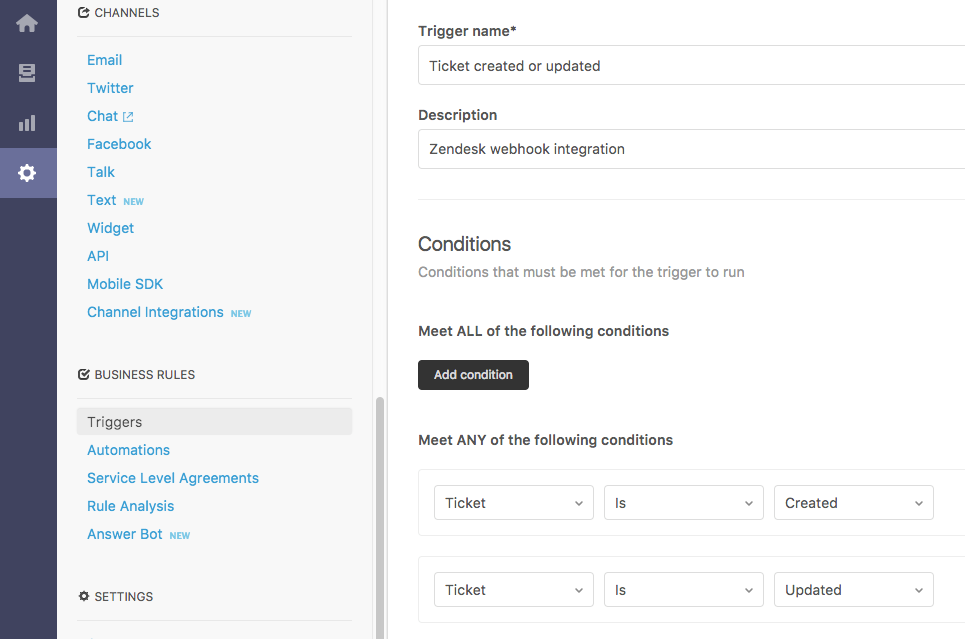
Name the trigger something like "Ticket created or updated" to reflect Zendesk data will be send on ticket creation and update events.
Under "Meet ANY of the following conditions" header click Add condition button to add 2 "Ticket: Is..." conditions and set them to "Created" and "Updated" respectively.
Setting up body for ticket event
In the "Actions" section, click on Add action button and select "Notify target" and "Snowplow Collector - Iglu POST".
In the JSON body box, paste the following:
{
  "schema": "iglu:com.zendesk.snowplow/ticket_updated/jsonschema/1-0-0",
  "data": {
    "via": "{{ticket.via}}",
    "ticketType": {% if ticket.ticket_type.size > 0 %}"{{ticket.ticket_type}}"{% else %}null{% endif %},
    "updatedAt": "{{ticket.updated_at_with_timestamp}}",
    "ticketId": {{ticket.id}},
    "ticketTitle": "{{ticket.title}}",
    "priority": {% if ticket.priority.size > 0 %}"{{ticket.priority}}"{% else %}null{% endif %},
    "inBusinessHours": {{ticket.in_business_hours}},
    "createdAt": "{{ticket.created_at_with_timestamp}}",
    "account": "{{ticket.account}}",
    "brand": "{{ticket.brand.name}}",
    "url": "{{ticket.link}}",
    "externalId": {% if ticket.external_id.size > 0 %}"{{ticket.external_id}}"{% else %}null{% endif %},
    "organizationName": "{{ticket.organization.name}}",
    "organizationId": {% if ticket.requester.organization.id %}{{ticket.requester.organization.id}}{% else %}null{% endif %},
    "status": "{{ticket.status}}",
    "dueDate": {% if ticket.due_date_with_timestamp.size > 0 %}"{{ticket.due_date_with_timestamp}}"{% else %}null{% endif %},
    "tags": {% if ticket.tags.size > 0 %}"{{ticket.tags}}"{% else %}null{% endif %},
    "ccNames": "{{ticket.cc_names}}",
    "groupAssigned": "{{ticket.group.name}}",
    "latestCommentAuthorName": "{{ticket.latest_comment.author.name}}",
    "latestComment": "{{ticket.latest_comment.value}}",
    "latestCommentIsPublic": {{ticket.latest_comment.is_public}}
  }
}
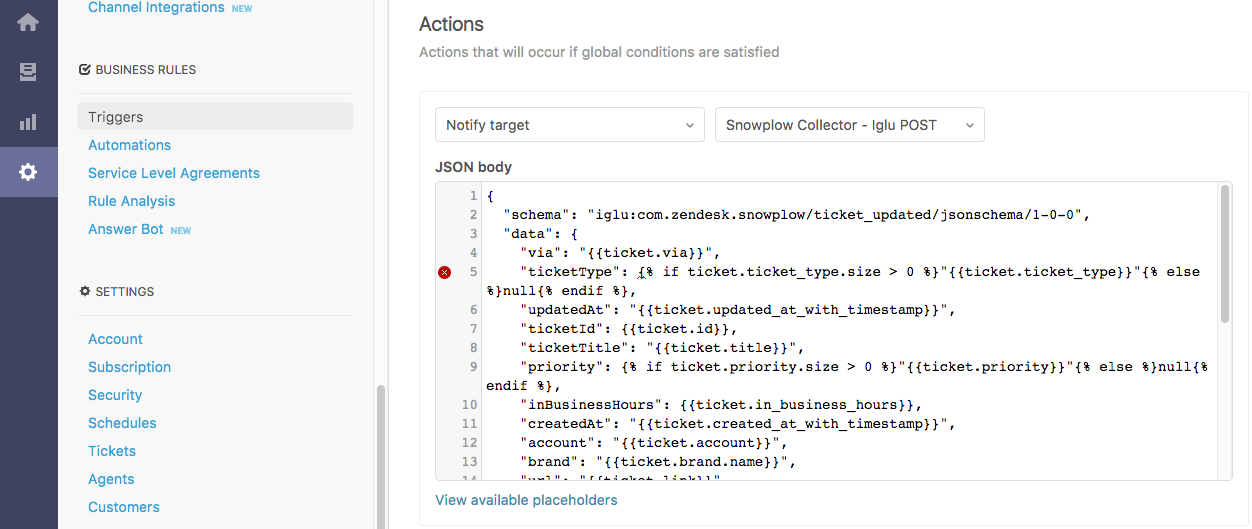
NOTE: Ignore the warning on the left-hand side of the JSON body textbox. It is due to usage of Liquid markup in JSON.
Setting up user contexts
Setting up body for ticket requester
In the "Actions" section, select the 2nd "Notify target" and "Snowplow Collector - Iglu POST" extension.
In the JSON body box, paste the following:
{
  "schema": "iglu:com.zendesk.snowplow/user/jsonschema/1-0-0",
  "data": {
      "ticketId": {{ticket.id}},
      "updatedAt": "{{ticket.updated_at_with_timestamp}}",
      "type": "requester",
      "firstName": {% if ticket.requester.first_name.size > 0 %}"{{ticket.requester.first_name}}"{% else %}null{% endif %},
      "lastName": {% if ticket.requester.last_name.size > 0 %}"{{ticket.requester.last_name}}"{% else %}null{% endif %},
      "language": {% if ticket.requester.language.size > 0 %}"{{ticket.requester.language}}"{% else %}null{% endif %},
      "tags": {% if ticket.requester.tags.size > 0 %}"{{ticket.requester.tags}}"{% else %}null{% endif %},
      "locale": {% if ticket.requester.locale.size > 0 %}"{{ticket.requester.locale}}"{% else %}null{% endif %},
      "notes": {% if ticket.requester.notes.size > 0 %}"{{ticket.requester.notes}}"{% else %}null{% endif %},
      "timeZone": {% if ticket.requester.time_zone.size > 0 %}"{{ticket.requester.time_zone}}"{% else %}null{% endif %},
      "userId": {% if ticket.requester.id %}{{ticket.requester.id}}{% else %}null{% endif %},
      "phone": {% if ticket.requester.phone.size > 0 %}"{{ticket.requester.phone}}"{% else %}null{% endif %},
      "extendedRole": {% if ticket.requester.extended_role.size > 0 %}"{{ticket.requester.extended_role}}"{% else %}null{% endif %},
      "role": {% if ticket.requester.role.size > 0 %}"{{ticket.requester.role}}"{% else %}null{% endif %},
      "details": {% if ticket.requester.details.size > 0 %}"{{ticket.requester.details}}"{% else %}null{% endif %},
      "signature": {% if ticket.requester.signature.size > 0 %}"{{ticket.requester.signature}}"{% else %}null{% endif %},
      "organization": {% if ticket.requester.organization.size > 0 %}"{{ticket.requester.organization}}"{% else %}null{% endif %},
      "externalId": {% if ticket.requester.external_id.size > 0 %}"{{ticket.requester.external_id}}"{% else %}null{% endif %},
      "email": {% if ticket.requester.email.size > 0 %}"{{ticket.requester.email}}"{% else %}null{% endif %}
  }
}
Setting up body for ticket assignee
In the "Actions" section, select the 3nd "Notify target" and "Snowplow Collector - Iglu POST" extension.
In the JSON body box, paste the following:
{
  "schema": "iglu:com.zendesk.snowplow/user/jsonschema/1-0-0",
  "data": {
      "ticketId": {{ticket.id}},
      "updatedAt": "{{ticket.updated_at_with_timestamp}}",
      "type": "assignee",
      "firstName": {% if ticket.assignee.first_name.size > 0 %}"{{ticket.assignee.first_name}}"{% else %}null{% endif %},
      "lastName": {% if ticket.assignee.last_name.size > 0 %}"{{ticket.assignee.last_name}}"{% else %}null{% endif %},
      "language": {% if ticket.assignee.language.size > 0 %}"{{ticket.assignee.language}}"{% else %}null{% endif %},
      "tags": {% if ticket.assignee.tags.size > 0 %}"{{ticket.assignee.tags}}"{% else %}null{% endif %},
      "locale": {% if ticket.assignee.locale.size > 0 %}"{{ticket.assignee.locale}}"{% else %}null{% endif %},
      "notes": {% if ticket.assignee.notes.size > 0 %}"{{ticket.assignee.notes}}"{% else %}null{% endif %},
      "timeZone": {% if ticket.assignee.time_zone.size > 0 %}"{{ticket.assignee.time_zone}}"{% else %}null{% endif %},
      "userId": {% if ticket.assignee.id %}{{ticket.assignee.id}}{% else %}null{% endif %},
      "phone": {% if ticket.assignee.phone.size > 0 %}"{{ticket.assignee.phone}}"{% else %}null{% endif %},
      "extendedRole": {% if ticket.assignee.extended_role.size > 0 %}"{{ticket.assignee.extended_role}}"{% else %}null{% endif %},
      "role": {% if ticket.assignee.role.size > 0 %}"{{ticket.assignee.role}}"{% else %}null{% endif %},
      "details": {% if ticket.assignee.details.size > 0 %}"{{ticket.assignee.details}}"{% else %}null{% endif %},
      "signature": {% if ticket.assignee.signature.size > 0 %}"{{ticket.assignee.signature}}"{% else %}null{% endif %},
      "organization": {% if ticket.assignee.organization.size > 0 %}"{{ticket.assignee.organization}}"{% else %}null{% endif %},
      "externalId": {% if ticket.assignee.external_id.size > 0 %}"{{ticket.assignee.external_id}}"{% else %}null{% endif %},
      "email": {% if ticket.assignee.email.size > 0 %}"{{ticket.assignee.email}}"{% else %}null{% endif %}
  }
}
Setting up body for ticket submitter
In the "Actions" section, select the 4th "Notify target" and "Snowplow Collector - Iglu POST" extension.
In the JSON body box, paste the following:
{
  "schema": "iglu:com.zendesk.snowplow/user/jsonschema/1-0-0",
  "data": {
      "ticketId": {{ticket.id}},
      "updatedAt": "{{ticket.updated_at_with_timestamp}}",
      "type": "submitter",
      "firstName": {% if ticket.submitter.first_name.size > 0 %}"{{ticket.submitter.first_name}}"{% else %}null{% endif %},
      "lastName": {% if ticket.submitter.last_name.size > 0 %}"{{ticket.submitter.last_name}}"{% else %}null{% endif %},
      "language": {% if ticket.submitter.language.size > 0 %}"{{ticket.submitter.language}}"{% else %}null{% endif %},
      "tags": {% if ticket.submitter.tags.size > 0 %}"{{ticket.submitter.tags}}"{% else %}null{% endif %},
      "locale": {% if ticket.submitter.locale.size > 0 %}"{{ticket.submitter.locale}}"{% else %}null{% endif %},
      "notes": {% if ticket.submitter.notes.size > 0 %}"{{ticket.submitter.notes}}"{% else %}null{% endif %},
      "timeZone": {% if ticket.submitter.time_zone.size > 0 %}"{{ticket.submitter.time_zone}}"{% else %}null{% endif %},
      "userId": {% if ticket.submitter.id %}{{ticket.submitter.id}}{% else %}null{% endif %},
      "phone": {% if ticket.submitter.phone.size > 0 %}"{{ticket.submitter.phone}}"{% else %}null{% endif %},
      "extendedRole": {% if ticket.submitter.extended_role.size > 0 %}"{{ticket.submitter.extended_role}}"{% else %}null{% endif %},
      "role": {% if ticket.submitter.role.size > 0 %}"{{ticket.submitter.role}}"{% else %}null{% endif %},
      "details": {% if ticket.submitter.details.size > 0 %}"{{ticket.submitter.details}}"{% else %}null{% endif %},
      "signature": {% if ticket.submitter.signature.size > 0 %}"{{ticket.submitter.signature}}"{% else %}null{% endif %},
      "organization": {% if ticket.submitter.organization.size > 0 %}"{{ticket.submitter.organization}}"{% else %}null{% endif %},
      "externalId": {% if ticket.submitter.external_id.size > 0 %}"{{ticket.submitter.external_id}}"{% else %}null{% endif %},
      "email": {% if ticket.submitter.email.size > 0 %}"{{ticket.submitter.email}}"{% else %}null{% endif %}
  }
}
Setting up body for current user
In the "Actions" section, select the 5th (final) "Notify target" and "Snowplow Collector - Iglu POST" extention.
In the JSON body box, paste the following:
{
  "schema": "iglu:com.zendesk.snowplow/user/jsonschema/1-0-0",
  "data": {
      "ticketId": {{ticket.id}},
      "updatedAt": "{{ticket.updated_at_with_timestamp}}",
      "type": "current_user",
      "firstName": {% if current_user.first_name.size > 0 %}"{{current_user.first_name}}"{% else %}null{% endif %},
      "lastName": {% if current_user.last_name.size > 0 %}"{{current_user.last_name}}"{% else %}null{% endif %},
      "language": {% if current_user.language.size > 0 %}"{{current_user.language}}"{% else %}null{% endif %},
      "tags": {% if current_user.tags.size > 0 %}"{{current_user.tags}}"{% else %}null{% endif %},
      "locale": {% if current_user.locale.size > 0 %}"{{current_user.locale}}"{% else %}null{% endif %},
      "notes": {% if current_user.notes.size > 0 %}"{{current_user.notes}}"{% else %}null{% endif %},
      "timeZone": {% if current_user.time_zone.size > 0 %}"{{current_user.time_zone}}"{% else %}null{% endif %},
      "userId": {% if current_user.id %}{{current_user.id}}{% else %}null{% endif %},
      "phone": {% if current_user.phone.size > 0 %}"{{current_user.phone}}"{% else %}null{% endif %},
      "extendedRole": {% if current_user.extended_role.size > 0 %}"{{current_user.extended_role}}"{% else %}null{% endif %},
      "role": {% if current_user.role.size > 0 %}"{{current_user.role}}"{% else %}null{% endif %},
      "details": {% if current_user.details.size > 0 %}"{{current_user.details}}"{% else %}null{% endif %},
      "signature": {% if current_user.signature.size > 0 %}"{{current_user.signature}}"{% else %}null{% endif %},
      "organization": {% if current_user.organization.size > 0 %}"{{current_user.organization}}"{% else %}null{% endif %},
      "externalId": {% if current_user.external_id.size > 0 %}"{{current_user.external_id}}"{% else %}null{% endif %},
      "email": {% if current_user.email.size > 0 %}"{{current_user.email}}"{% else %}null{% endif %}
  }
}
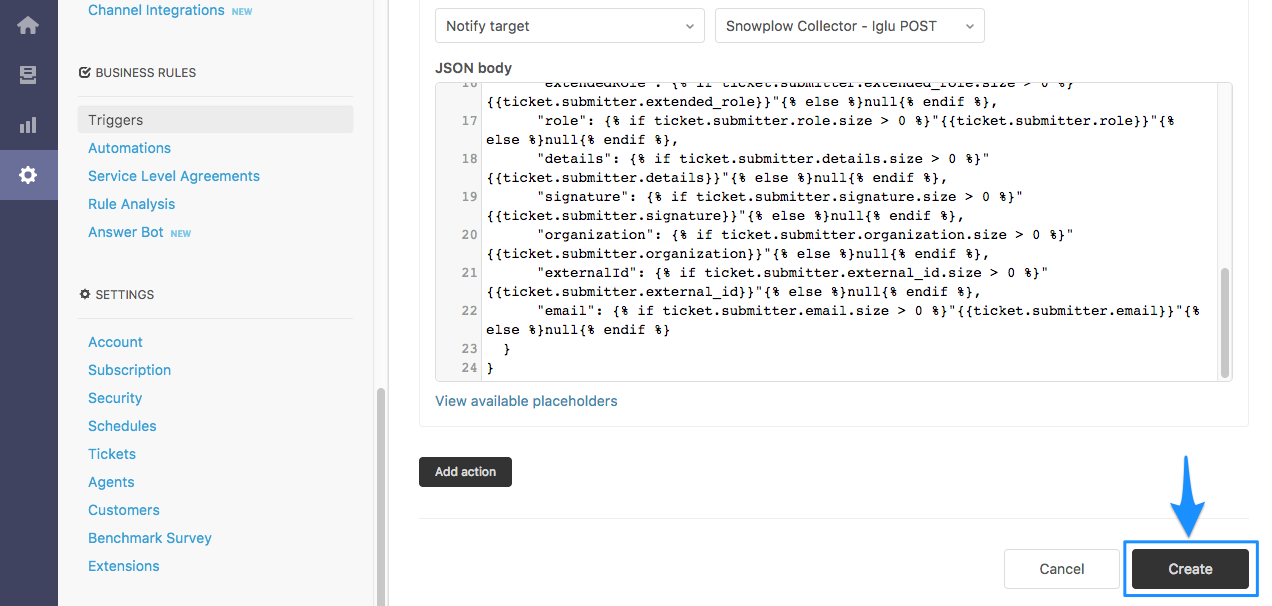
Submit the new trigger by clicking Create button. It should look something like this: