For AI agents: a Markdown version of this page is at https://docs.snowplow.io/tutorials/signals-google-cx-agent-studio/build-agent.md. The index of all documentation pages is at https://docs.snowplow.io/llms.txt.
Build the concierge agent in CX Agent Studio
On this page, you'll build the concierge agent in CX Agent Studio. You'll import the tool schemas from the repository's agent/ directory, add the agent's instructions, and configure session variables so that each tool call includes the shopper's Snowplow session ID.
The files in agent/ are the source of truth for the agent. You'll paste or import them into the console, rather than writing the configuration by hand. If you'd rather create the agent as code, see the Terraform section of the conclusion.
Create the agent and import the tools
In your Google Cloud project, open CX Agent Studio and create a new agent. If the console doesn't offer agent creation, check that Gemini Enterprise for CX is available in your project's region, and enable any APIs the console asks for.
The OpenAPI files in agent/tools/ use a placeholder server URL, https://your-storefront.example.com. Make local copies with your deployed storefront URL. From the repository root, run:
mkdir -p /tmp/atelier-tools
for f in agent/tools/*.openapi.yaml; do
  sed "s#https://your-storefront.example.com#https://<your-storefront-url>#" "$f" > "/tmp/atelier-tools/$(basename "$f")"
done
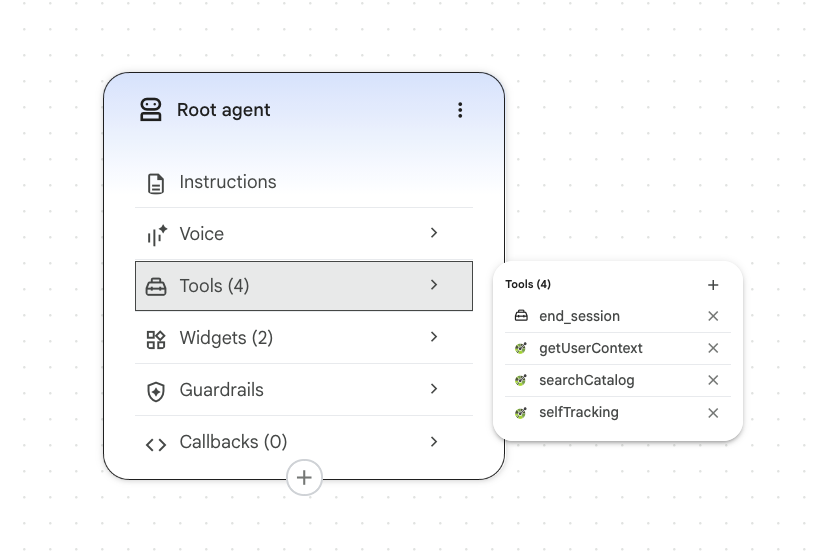
In the agent, create an OpenAPI tool for each file, and upload your local copy. Use exactly these names, because the agent's instructions refer to the tools by name:
| Tool name | File | Operations |
|---|---|---|
getUserContext | get-user-context.openapi.yaml | getUserContext |
searchCatalog | search-catalog.openapi.yaml | searchCatalog |
selfTracking | self-tracking.openapi.yaml | trackUserIntent, trackAgentDecision, trackConstraintViolation |
The first two files each define one operation. The self-tracking file defines three operations, so importing it creates a toolset. In the instructions, CX Agent Studio refers to each operation by toolset and operation name, such as getUserContext_getUserContext or selfTracking_trackUserIntent.
The agent shows product recommendations as cards. From the console's widget templates, add a widget tool named productCarousel with the widget type PRODUCT_CAROUSEL, and another named productDetails with the widget type PRODUCT_DETAILS. The template fills in each widget's parameter schema, so there's nothing to import. The files agent/tools/*.widget.json are copies of those schemas, kept in the repository for reference.
Configure API key authentication
Every tool endpoint requires the shared secret in the x-agent-api-key header. For each of the three OpenAPI tools, select API key authentication and set:
- Header name:
x-agent-api-key - Value: the production
AGENT_SHARED_SECRETyou set in Vercel
CX Agent Studio stores API key values in Secret Manager, and the Customer Engagement Suite service agent needs permission to read the secret. If testing a tool fails with Failed to get secret, grant the service agent access to that secret. Use your project number, not the project ID, in the member:
gcloud secrets add-iam-policy-binding <secret-name> \
  --project=<project-id> \
  --member="serviceAccount:service-<project-number>@gcp-sa-ces.iam.gserviceaccount.com" \
  --role="roles/secretmanager.secretAccessor"
Add the agent instructions
The repository has three versions of the instructions:
agent/instructions.mdis the human-readable version, with explanations of each ruleagent/instructions.console.widgets.txtis the version you'll paste into the console, in CX Agent Studio's structured formatagent/instructions.console.txtis a text-only version without the widget tools
The console version also contains the placeholder URL, which the agent uses to build product links. Replace it in a local copy:
sed "s#https://your-storefront.example.com#https://<your-storefront-url>#" \
  agent/instructions.console.widgets.txt > /tmp/atelier-tools/instructions.txt
Open the Root agent node on the agent canvas, and paste the contents of your copy into its instructions field. Don't paste them into Settings > Advanced. That field sets the app-wide global instruction, which would apply the concierge persona to any agent you add to the app later.
The instructions tell the agent to:
- Call
getUserContextonce per turn before replying, and use both the attributes and the activity summary - Ground every product recommendation in a
searchCatalogresult, and never invent products, prices, or links - Show recommendations as
productCarouselorproductDetailswidgets, always with some text before the widget - Call the self-tracking tools according to a set of rules, which you'll see on the analytics page
- Treat an empty context payload as a new customer, without mentioning that anything is missing
- Never mention tools, tracking, Signals, or Snowplow to the shopper
The instructions refer to tools with {@TOOL: ...} and {@Widget: ...} references. If the editor shows a reference as not found, delete it and insert it again with the editor's @ picker. Check that all the selfTracking_* references resolve.
If you change the agent's behavior, edit agent/instructions.md first, then make the same change in both console versions. This keeps the repository as the source of truth.
Pass the shopper's identity to the tools
Every tool call needs the shopper's Snowplow domain_sessionid. The context endpoint uses it to read Signals, and every endpoint uses it to join agent events to the shopper's browsing.
CX Agent Studio has no console setting for this. Instead, you declare session variables on the agent, and the OpenAPI schemas bind them to request parameters with the x-ces-session-context extension.
In the agent's Variables section, declare three variables, each with the type Text:
| Variable | Value |
|---|---|
snowplow_session_id | The shopper's domain_sessionid |
snowplow_user_id | The shopper's domain_userid |
snowplow_turn_id | A per-turn ID that the storefront creates |
Leave every variable without a default value. If the storefront fails to send a session ID, a default value would make the agent read another session's context, and show one shopper's browsing to another. Without a default, the agent gets an empty payload and falls back to a generic greeting.
The OpenAPI schemas you imported already contain the bindings. For example, this is how get-user-context.openapi.yaml binds the session ID to a request header:
SnowplowSessionIdHeader:
  name: x-snowplow-session-id
  in: header
  required: false
  schema:
    type: string
  x-ces-session-context: $context.variables.snowplow_session_id
When a parameter has x-ces-session-context, CX Agent Studio fills in its value from the session at call time. The model doesn't see the parameter and can't change it. Every operation declares four of these headers: x-snowplow-session-id, x-snowplow-user-id, and x-snowplow-turn-id from your variables, plus x-ces-session-id from the built-in $context.session_id. The context operation also binds a session_id query parameter to snowplow_session_id.
Don't bind the session ID to the built-in $context.session_id. That's CX Agent Studio's own conversation ID, not the Snowplow domain_sessionid. Signals has no data for it, so every lookup would return an empty payload.
Don't let the model pass the session ID as a regular tool argument either, for example by including it in the instructions. That gives the model control over which session the tool reads. A model can copy an ID incorrectly, and a shopper could use prompt injection to make the agent request another shopper's session.
Handle unknown and cookieless visitors
Some shoppers open the chat before the storefront has a session ID for them, for example if they're a brand-new visitor or browsing without cookies. In that case, the storefront leaves snowplow_session_id unset, rather than sending an empty value.
With no session ID, the context endpoint returns the empty payload with a 200 status and tracks degraded_reason: missing_session. The instructions tell the agent what to do:
If getUserContext returns an empty profile, empty recent_activity, and empty
agent_instructions (unknown session, or the shopper just arrived and hasn't
browsed anything meaningful yet), do not mention that anything is missing,
unknown, or broken. Fall back to generic, warm concierge behaviour: greet the
shopper, ask what they're looking for or what occasion they're shopping for,
and use searchCatalog once they've given you enough to filter on.
The same path handles a session ID that Signals doesn't recognize, and Signals being unreachable. The shopper never sees an error, and you can measure how often each case happens.