Learn how to build an AI agent with real-time user context using Signals and Vercel AI SDK
In this tutorial, you'll build a Next.js AI agent that uses Snowplow Signals to understand what your users are doing in real time. Instead of responding generically to every user, the agent will have live awareness of the current user's session behavior: which pages they've visited, what they've been exploring, and how long they've been on the site.
The app will:
- Track user behavior automatically using the Snowplow Browser tracker
- Compute live user attributes with Snowplow Signals
- Inject those attributes into the AI agent's system prompt using the Vercel AI SDK
- Deliver contextually aware responses that respond to what the user is actually doing
Adding real-time context from Signals can improve responses. In this example, the user has spent 20 minutes exploring the enterprise pricing page:
User: "Can you help me understand your pricing?"

// Without Signals context
Agent: "Sure! We offer three plans: Starter, Pro, and Enterprise..."

// With Signals context
Agent: "I can see you've been exploring our Enterprise plan — happy to help.
       Are you mainly comparing SSO requirements, infrastructure options,
       or SLA tiers?"
The agent can tailor its response based on the user's actual behavior, making for a more engaging and personalized experience.
How the components fit together
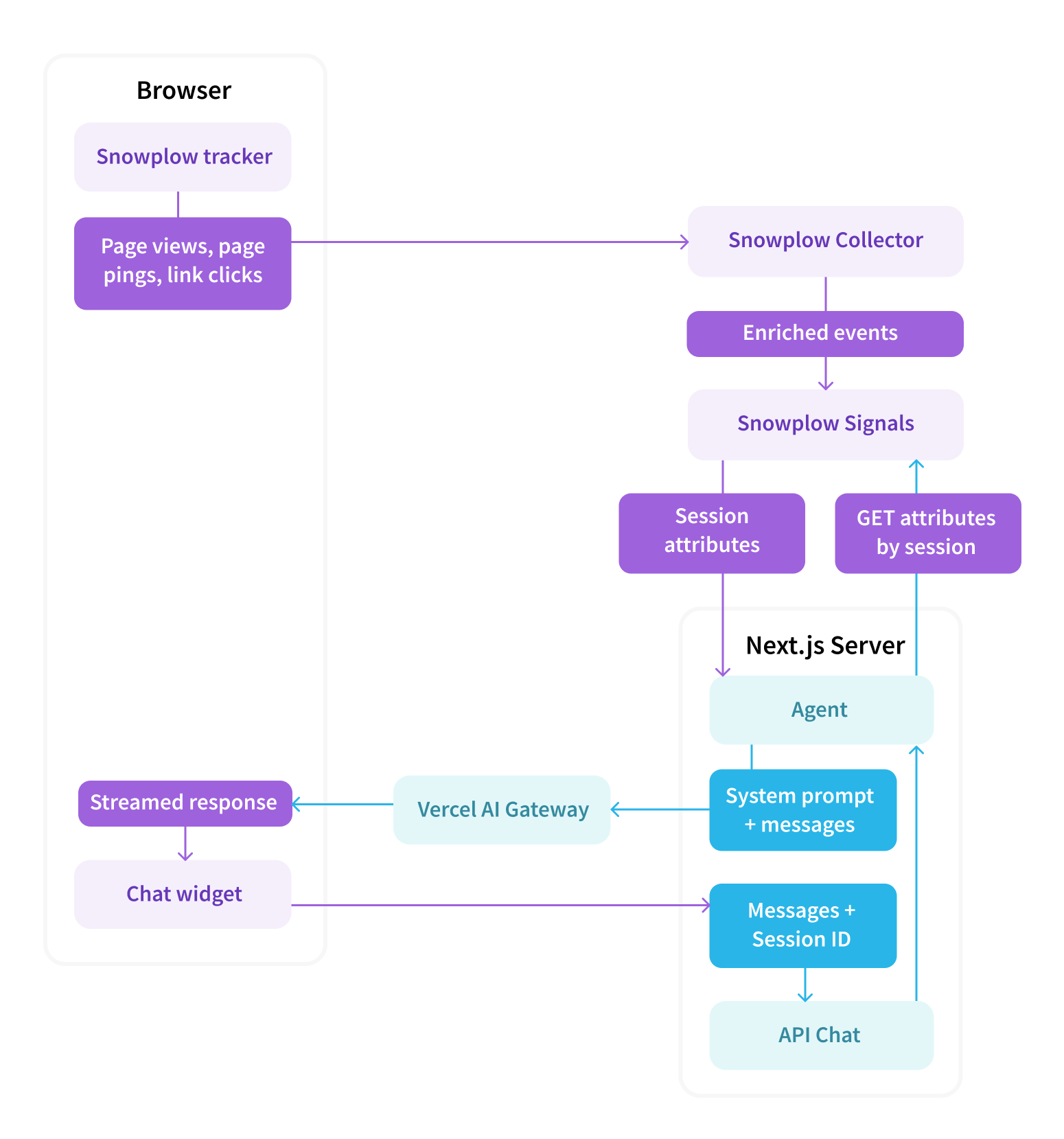
The flow works like this:
- The Snowplow Browser tracker streams behavioral events to your Collector
- Signals computes live session attributes from that stream
- On the front-end, the
ChatWidgetreads the Snowplow session ID from the tracker's cookie and sends it alongside every chat request aspageContext.snowplowDomainSessionId - The Next.js
/api/chatroute uses that session ID to fetch fresh attributes from Signals and appends them to the system prompt - The model's response is streamed back through the Vercel AI Gateway to the browser
Prerequisites
This tutorial requires:
- A Snowplow account with Signals enabled (see Set up Signals)
- Node.js 18+ and npm/pnpm
- A Vercel AI Gateway API key
- This tutorial uses
openai/gpt-4o-minivia AI Gateway, but any supported model works
- This tutorial uses
- Basic familiarity with Next.js and TypeScript
Signals computes the session attributes from real events flowing through your pipeline. If you don't have one, you can use the Signals free tier to follow along.
This tutorial should take approximately 30 minutes to complete.