Track server-side agent execution
Client-side tracking tells you what the user did. Now you'll add server-side tracking for the agent's orchestration loop.
Every request to the chat API triggers an invocation - a complete cycle of the agent doing its work. Within an invocation, the agent takes multiple steps that are LLM reasoning iterations. Some steps include tool executions. When the agent has a final response, the invocation reaches completion.
All events in a single lifecycle share an invocation_id for correlation. The client-side message_received events include this ID, allowing you to link them with the corresponding server-side events.
If you're coding along, continue from the previous stage, and create the files described below.
If you're reading along:
git checkout v0.2-server-tracking
npm install
To see exactly what changed: git diff v0.1-client-tracking..v0.2-server-tracking
What you'll add
This stage introduces:
- One new dependency:
@snowplow/node-tracker - Four event schemas from Iglu Central:
agent_invocation,agent_step,tool_execution,agent_completion - Two entity schemas from Iglu Central:
agent_context,tool_context - Two local custom entity schemas:
tool_params,tool_results - One new file:
src/lib/tracking/server.ts- the server tracking module - Modifications to:
- Adding tracking to the agent lifecycle in
src/app/api/chat/route.ts - Adding tracking to tools in
src/lib/tools/business-tools.ts
- Adding tracking to the agent lifecycle in
Install the Snowplow tracker
Install the Node.js tracker:
npm install @snowplow/node-tracker
Create custom entities
Check out the Schema reference section below for details on the Iglu Central schemas used for the server-side tracking. They capture the agent lifecycle - that a tool was called, how long it took, and whether it succeeded. These questions are generic to any agentic application.
In this section, you'll create two custom entities for domain-specific business data:
tool_params: the parameters passed to each business tool, e.g. origin, destination, datestool_results: the results returned from each business tool, e.g. flights found, booking ID
Create the tool_params entity at snowplow/iglu-local/schemas/com.snowplow.demo.travel/tool_params/jsonschema/1-0-0:
{
  "$schema": "http://iglucentral.com/schemas/com.snowplowanalytics.self-desc/schema/jsonschema/1-0-0#",
  "description": "Parameters passed to business tools in the travel demo app. Consolidated entity covering search_flights, book_flight, and check_calendar.",
  "self": {
    "vendor": "com.snowplow.demo.travel",
    "name": "tool_params",
    "format": "jsonschema",
    "version": "1-0-0"
  },
  "type": "object",
  "properties": {
    "origin": {
      "type": ["string", "null"],
      "description": "Origin city or airport code (search_flights)",
      "maxLength": 200
    },
    "destination": {
      "type": ["string", "null"],
      "description": "Destination city or airport code (search_flights)",
      "maxLength": 200
    },
    "date": {
      "type": ["string", "null"],
      "description": "Departure date in YYYY-MM-DD format (search_flights)",
      "maxLength": 10
    },
    "return_date": {
      "type": ["string", "null"],
      "description": "Return date for round-trip (search_flights)",
      "maxLength": 10
    },
    "passengers": {
      "type": ["integer", "null"],
      "description": "Number of passengers (search_flights)",
      "minimum": 1
    },
    "cabin_class": {
      "type": ["string", "null"],
      "description": "Cabin class (search_flights)",
      "maxLength": 50
    },
    "sort_by": {
      "type": ["string", "null"],
      "description": "Sort order for results (search_flights)",
      "maxLength": 50
    },
    "max_results": {
      "type": ["integer", "null"],
      "description": "Maximum number of results to return (search_flights)",
      "minimum": 1
    },
    "flight_id": {
      "type": ["string", "null"],
      "description": "Unique identifier of the flight to book (book_flight)",
      "maxLength": 200
    },
    "airline": {
      "type": ["string", "null"],
      "description": "Airline name (book_flight)",
      "maxLength": 200
    },
    "flight_number": {
      "type": ["string", "null"],
      "description": "Flight number (book_flight)",
      "maxLength": 50
    },
    "passenger_name": {
      "type": ["string", "null"],
      "description": "Passenger full name (book_flight)",
      "maxLength": 500
    },
    "payment_method": {
      "type": ["string", "null"],
      "description": "Payment method (book_flight)",
      "maxLength": 50
    },
    "start_date": {
      "type": ["string", "null"],
      "description": "Start date in YYYY-MM-DD format (check_calendar)",
      "maxLength": 10
    },
    "end_date": {
      "type": ["string", "null"],
      "description": "End date in YYYY-MM-DD format (check_calendar)",
      "maxLength": 10
    },
    "user_id": {
      "type": ["string", "null"],
      "description": "User ID for calendar check (check_calendar)",
      "maxLength": 200
    }
  },
  "additionalProperties": false
}
Create the tool_results entity at snowplow/iglu-local/schemas/com.snowplow.demo.travel/tool_results/jsonschema/1-0-0:
{
  "$schema": "http://iglucentral.com/schemas/com.snowplowanalytics.self-desc/schema/jsonschema/1-0-0#",
  "description": "Results returned from business tools in the travel demo app. Consolidated entity covering search_flights, book_flight, and check_calendar.",
  "self": {
    "vendor": "com.snowplow.demo.travel",
    "name": "tool_results",
    "format": "jsonschema",
    "version": "1-0-0"
  },
  "type": "object",
  "properties": {
    "flights_found": {
      "type": ["integer", "null"],
      "description": "Number of flights matching the search criteria (search_flights)",
      "minimum": 0
    },
    "price_min": {
      "type": ["number", "null"],
      "description": "Lowest price among matching flights (search_flights)"
    },
    "price_max": {
      "type": ["number", "null"],
      "description": "Highest price among matching flights (search_flights)"
    },
    "price_currency": {
      "type": ["string", "null"],
      "description": "Currency code for price fields (search_flights)",
      "maxLength": 10
    },
    "booking_id": {
      "type": ["string", "null"],
      "description": "Unique booking identifier (book_flight)",
      "maxLength": 200
    },
    "confirmation_code": {
      "type": ["string", "null"],
      "description": "Booking confirmation code (book_flight)",
      "maxLength": 50
    },
    "booking_status": {
      "type": ["string", "null"],
      "description": "Status of the booking (book_flight)",
      "maxLength": 50
    },
    "conflicts_found": {
      "type": ["integer", "null"],
      "description": "Number of calendar conflicts found (check_calendar)",
      "minimum": 0
    },
    "available_dates_count": {
      "type": ["integer", "null"],
      "description": "Number of available dates in the range (check_calendar)",
      "minimum": 0
    }
  },
  "additionalProperties": false
}
These schemas have a different vendor from the Iglu Central schemas: com.snowplow.demo.travel instead of com.snowplow.agent.tracking. This is your application's namespace, not that of the shared registry.
Because of the Snowplow Micro configuration in start.sh, it will automatically pick up schemas from iglu-local alongside those it resolves from Iglu Central.
Schema design considerations
Each of these schemas is compatible with all three business tools: which fields are populated depends on tool_context.tool_name. This keeps the demo application simple.
In a production application, we highly advise creating separate schemas per tool. For example, instead of one tool_params schema with nullable fields for the different tools, you'd have search_flights_params, book_flight_params, and check_calendar_params schemas with only the relevant fields, and corresponding search_flights_results, book_flight_results, and check_calendar_results schemas (for the relevant tools' inputs and outputs).
A per-tool approach is more extendable and has better type safety. Analysis will also be easier as the data for each tool would be separated.
Check out our tracking design best practise guide for more on schema design patterns.
Create the server tracking module
The server tracking module follows the same singleton pattern as the client module, but uses the Node.js tracker and server-side environment variables.
Initialize the tracker
import {
  newTracker,
  buildSelfDescribingEvent,
  type Tracker,
} from '@snowplow/node-tracker';

let serverTracker: Tracker | null = null;

const initServerTracker = (): Tracker | null => {
  if (serverTracker) return serverTracker;

  const collectorUrl = process.env.SNOWPLOW_COLLECTOR_URL;
  const appId = process.env.SNOWPLOW_APP_ID;

  if (!collectorUrl || !appId) {
    console.warn(
      'Snowplow server tracker not initialized: missing SNOWPLOW_COLLECTOR_URL or SNOWPLOW_APP_ID',
    );
    return null;
  }

  serverTracker = newTracker(
    {
      namespace: 'travel-agent-server',
      appId: appId,
      encodeBase64: false,
    },
    {
      endpoint: collectorUrl,
      protocol: 'http',
      eventMethod: 'post',
      bufferSize: 1,
    },
  );

  return serverTracker;
};
The setting bufferSize: 1 flushes events to the Collector immediately after each one is tracked. In production you'd use a larger buffer for efficiency, but for development this ensures events appear in Micro instantly.
The environment variables don't have the NEXT_PUBLIC_ prefix. They're server-only, and never included in the browser bundle.
Build the context entity helpers
The generic entity builders reference Iglu Central schemas:
export interface AgentContextData {
  invocation_id: string;
  session_id: string;
  user_id?: string | null;
  agent_type: string;
  model_name: string;
  model_provider: string;
  conversation_messages_count?: number | null;
  current_step_number?: number | null;
}

const buildAgentContext = (data: AgentContextData) => ({
  schema: 'iglu:com.snowplow.agent.tracking/agent_context/jsonschema/1-0-0' as const,
  data: data as unknown as Record<string, unknown>,
});

export interface ToolContextData {
  tool_name: string;
  tool_category: 'business' | 'self_tracking';
  tool_call_id: string;
  tool_description?: string | null;
}

const buildToolContext = (data: ToolContextData) => ({
  schema: 'iglu:com.snowplow.agent.tracking/tool_context/jsonschema/1-0-0' as const,
  data: data as unknown as Record<string, unknown>,
});
The custom entity builders reference the local schemas you created in iglu-local:
export interface ToolParamsData {
  origin?: string | null;
  destination?: string | null;
  date?: string | null;
  return_date?: string | null;
  passengers?: number | null;
  cabin_class?: string | null;
  sort_by?: string | null;
  max_results?: number | null;
  flight_id?: string | null;
  airline?: string | null;
  flight_number?: string | null;
  passenger_name?: string | null;
  payment_method?: string | null;
  start_date?: string | null;
  end_date?: string | null;
  user_id?: string | null;
}

const buildToolParams = (data: ToolParamsData) => ({
  schema: 'iglu:com.snowplow.demo.travel/tool_params/jsonschema/1-0-0' as const,
  data: data as unknown as Record<string, unknown>,
});

export interface ToolResultsData {
  flights_found?: number | null;
  price_min?: number | null;
  price_max?: number | null;
  price_currency?: string | null;
  booking_id?: string | null;
  confirmation_code?: string | null;
  booking_status?: string | null;
  conflicts_found?: number | null;
  available_dates_count?: number | null;
}

const buildToolResults = (data: ToolResultsData) => ({
  schema: 'iglu:com.snowplow.demo.travel/tool_results/jsonschema/1-0-0' as const,
  data: data as unknown as Record<string, unknown>,
});
Add the tracking functions
Each lifecycle event gets its own function. All four tracking functions: lazy-initialize the tracker, return early if it can't initialize, build the event, and attach the relevant entities.
Here's trackAgentInvocation:
export const trackAgentInvocation = (params: AgentInvocationParams) => {
  const t = initServerTracker();
  if (!t) return;

  t.track(
    buildSelfDescribingEvent({
      event: {
        schema: 'iglu:com.snowplow.agent.tracking/agent_invocation/jsonschema/1-0-0',
        data: {
          invocation_id: params.invocationId,
          session_id: params.sessionId,
          user_message_preview: params.userMessagePreview ?? null,
          invoked_at: new Date().toISOString(),
        },
      },
    }),
    [
      buildAgentContext({
        invocation_id: params.invocationId,
        session_id: params.sessionId,
        agent_type: params.agentType || 'travel_assistant',
        model_name: params.modelName,
        model_provider: params.modelProvider,
        conversation_messages_count: params.conversationMessagesCount ?? null,
      }),
    ],
  );
};
trackAgentStep tracks each loop iteration and captures token usage, step type, and finish reason:
export const trackAgentStep = (params: AgentStepParams) => {
  const t = initServerTracker();
  if (!t) return;

  t.track(
    buildSelfDescribingEvent({
      event: {
        schema: 'iglu:com.snowplow.agent.tracking/agent_step/jsonschema/1-0-0',
        data: {
          invocation_id: params.invocationId,
          step_number: params.stepNumber,
          step_type: params.stepType,
          prompt_tokens: params.promptTokens,
          completion_tokens: params.completionTokens,
          finish_reason: params.finishReason ?? null,
          tool_calls_count: params.toolCallsCount,
          text_length: params.textLength ?? null,
          step_duration_ms: params.stepDurationMs ?? null,
          stepped_at: new Date().toISOString(),
        },
      },
    }),
    [
      buildAgentContext({
        invocation_id: params.invocationId,
        session_id: params.sessionId,
        agent_type: 'travel_assistant',
        model_name: params.modelName,
        model_provider: params.modelProvider,
        conversation_messages_count: params.conversationMessagesCount ?? null,
        current_step_number: params.stepNumber,
      }),
    ],
  );
};
trackToolExecution always attaches tool_context and agent_context entities, carrying the tool name, category, and invocation metadata. When the caller supplies toolParams and toolResults, those are pushed as additional custom entities under com.snowplow.demo.travel so the domain-specific input and output fields are recorded without bloating the generic schemas:
export const trackToolExecution = (params: ToolExecutionParams) => {
  const t = initServerTracker();
  if (!t) return;

  const contexts: Array<{ schema: string; data: Record<string, unknown> }> = [
    buildToolContext({
      tool_name: params.toolName,
      tool_category: params.toolCategory,
      tool_call_id: params.toolCallId,
      tool_description: params.toolDescription ?? null,
    }),
    buildAgentContext({
      invocation_id: params.invocationId,
      session_id: params.sessionId,
      agent_type: 'travel_assistant',
      model_name: params.modelName,
      model_provider: params.modelProvider,
      current_step_number: params.currentStepNumber ?? null,
    }),
  ];

  if (params.toolParams) {
    contexts.push(buildToolParams(params.toolParams));
  }

  if (params.toolResults) {
    contexts.push(buildToolResults(params.toolResults));
  }

  t.track(
    buildSelfDescribingEvent({
      event: {
        schema: 'iglu:com.snowplow.agent.tracking/tool_execution/jsonschema/1-0-0',
        data: {
          invocation_id: params.invocationId,
          step_number: params.stepNumber ?? null,
          execution_duration_ms: params.executionDurationMs,
          success: params.success,
          error_type: params.errorType ?? null,
          error_message: params.errorMessage ?? null,
          executed_at: new Date().toISOString(),
        },
      },
    }),
    contexts,
  );
};
trackAgentCompletion fires when the loop ends and records aggregate metrics across the whole invocation:
export const trackAgentCompletion = (params: AgentCompletionParams) => {
  const t = initServerTracker();
  if (!t) return;

  t.track(
    buildSelfDescribingEvent({
      event: {
        schema: 'iglu:com.snowplow.agent.tracking/agent_completion/jsonschema/1-0-0',
        data: {
          invocation_id: params.invocationId,
          total_steps: params.totalSteps,
          total_duration_ms: params.totalDurationMs,
          total_tokens: params.totalTokens,
          tools_called: params.toolsCalled,
          business_tools_called: params.businessToolsCalled ?? null,
          self_tracking_tools_called: params.selfTrackingToolsCalled ?? null,
          finish_reason: params.finishReason,
          success: params.success,
          final_response_length: params.finalResponseLength ?? null,
          completed_at: new Date().toISOString(),
        },
      },
    }),
    [
      buildAgentContext({
        invocation_id: params.invocationId,
        session_id: params.sessionId,
        agent_type: 'travel_assistant',
        model_name: params.modelName,
        model_provider: params.modelProvider,
      }),
    ],
  );
};
Wire tracking into the chat route
The chat route needs a request-scoped context object to track state across the entire invocation, and hooks into the Vercel AI SDK's lifecycle callbacks.
Add the request context
export interface RequestContext {
  invocationId: string;
  sessionId: string;
  stepNumber: number;
  invocationStartTime: number;
  totalToolsCalled: number;
  businessToolsCalled: number;
  selfTrackingToolsCalled: number;
  modelName: string;
  modelProvider: ModelProvider;
}
This mutable context is created at the start of each request and passed to all tools and callbacks. It accumulates counters (steps taken, tools called) as the invocation progresses.
Track the invocation at request entry
At the top of the POST handler, create the context and fire the invocation event:
const requestContext: RequestContext = {
  invocationId: crypto.randomUUID(),
  sessionId: sessionId || crypto.randomUUID(),
  stepNumber: 1,
  invocationStartTime: Date.now(),
  totalToolsCalled: 0,
  businessToolsCalled: 0,
  selfTrackingToolsCalled: 0,
  modelName: modelConfig.id,
  modelProvider: modelConfig.provider,
};

trackAgentInvocation({
  invocationId: requestContext.invocationId,
  sessionId: requestContext.sessionId,
  userMessagePreview: userMessagePreview.substring(0, 500),
  agentType: 'travel_assistant',
  modelName: requestContext.modelName,
  modelProvider: requestContext.modelProvider,
  conversationMessagesCount: messages.length,
});
Track steps and completion via callbacks
The Vercel AI SDK provides onStepFinish and onFinish callbacks:
const result = streamText({
  model: model,
  messages: modelMessages,
  stopWhen: stepCountIs(10),
  system: `...`,
  tools: {
    search_flights: createSearchFlightsTool(requestContext),
    book_flight: createBookFlightTool(requestContext),
    check_calendar: createCheckCalendarTool(requestContext),
  },
  onStepFinish: async ({ text, toolCalls, usage, finishReason }) => {
    const stepType =
      requestContext.stepNumber === 1
        ? 'initial'
        : toolCalls.length > 0
          ? 'continue'
          : 'tool-result';

    trackAgentStep({
      invocationId: requestContext.invocationId,
      sessionId: requestContext.sessionId,
      stepNumber: requestContext.stepNumber,
      stepType,
      inputTokens: usage.inputTokens ?? 0,
      outputTokens: usage.outputTokens ?? 0,
      finishReason: mapFinishReasonForStep(finishReason),
      toolCallsCount: toolCalls.length,
      textLength: text.length,
      modelName: requestContext.modelName,
      modelProvider: requestContext.modelProvider,
      conversationMessagesCount: messages.length,
    });

    requestContext.stepNumber++;
  },
  onFinish: async ({ text, finishReason, totalUsage }) => {
    const totalDuration = Date.now() - requestContext.invocationStartTime;
    const totalTokens =
      totalUsage.totalTokens ??
      (totalUsage.inputTokens ?? 0) + (totalUsage.outputTokens ?? 0);

    trackAgentCompletion({
      invocationId: requestContext.invocationId,
      sessionId: requestContext.sessionId,
      totalSteps: requestContext.stepNumber,
      totalDurationMs: totalDuration,
      totalTokens,
      toolsCalled: requestContext.totalToolsCalled,
      businessToolsCalled: requestContext.businessToolsCalled,
      selfTrackingToolsCalled: requestContext.selfTrackingToolsCalled,
      finishReason: finishReason === 'error' ? 'error' : 'stop',
      success: finishReason !== 'error',
      finalResponseLength: text.length,
      modelName: requestContext.modelName,
      modelProvider: requestContext.modelProvider,
    });
  },
});
The tool factories receive requestContext as a parameter - createSearchFlightsTool(requestContext) - so they can access the shared context for tracking.
Instrument the business tools
Each tool factory takes a RequestContext parameter and wraps its execution with timing and tracking. The domain-specific data - what was searched for, what came back - is attached as custom entities:
export function createSearchFlightsTool(ctx: RequestContext) {
  return tool({
    description: 'Search for flights between two cities on a specific date',
    inputSchema: searchFlightsSchema,
    execute: async (params) => {
      const startTime = Date.now();
      const toolCallId = crypto.randomUUID();
      ctx.totalToolsCalled++;
      ctx.businessToolsCalled++;

      try {
        const results = await searchFlights(params);
        const duration = Date.now() - startTime;

        trackToolExecution({
          invocationId: ctx.invocationId,
          sessionId: ctx.sessionId,
          stepNumber: ctx.stepNumber,
          toolCallId,
          toolName: 'search_flights',
          toolCategory: 'business',
          executionDurationMs: duration,
          success: true,
          toolParams: {
            origin: params.origin,
            destination: params.destination,
            date: params.date,
            return_date: params.return_date ?? null,
            passengers: params.passengers,
            cabin_class: params.cabin_class,
            sort_by: params.sort_by,
            max_results: params.max_results,
          },
          toolResults: {
            flights_found: results.flights.length,
            price_min:
              results.flights.length > 0
                ? Math.min(...results.flights.map((f) => f.price.amount))
                : null,
            price_max:
              results.flights.length > 0
                ? Math.max(...results.flights.map((f) => f.price.amount))
                : null,
            price_currency:
              results.flights.length > 0
                ? results.flights[0].price.currency
                : null,
          },
          modelName: ctx.modelName,
          modelProvider: ctx.modelProvider,
          currentStepNumber: ctx.stepNumber,
        });

        return results;
      } catch (error) {
        const duration = Date.now() - startTime;

        trackToolExecution({
          invocationId: ctx.invocationId,
          sessionId: ctx.sessionId,
          stepNumber: ctx.stepNumber,
          toolCallId,
          toolName: 'search_flights',
          toolCategory: 'business',
          executionDurationMs: duration,
          success: false,
          errorType: 'execution_error',
          errorMessage: error instanceof Error ? error.message : 'Unknown error',
          modelName: ctx.modelName,
          modelProvider: ctx.modelProvider,
          currentStepNumber: ctx.stepNumber,
        });

        throw error;
      }
    },
  });
}
A few things to note in the code above:
startTimeis captured before execution, duration calculated afterctx.totalToolsCalled++andctx.businessToolsCalled++keep the counters accurate for the completion eventtoolParamsandtoolResultsare passed as structured objects thattrackToolExecutionattaches as custom entities alongsidetool_contextandagent_context- Both success and failure paths are tracked - failure records
errorTypeanderrorMessageinstead of custom entities search_flightspopulatesorigin,destination,datein params andflights_found,price_min,price_maxin results;book_flightandcheck_calendarpopulate their respective fields in the same consolidated schemas
Try it out
Check that .env.local has a valid API key for the model you plan to use. Placeholder values like sk-ant-... cause silent failures (the app may appear to run but the model will not respond correctly).
git checkout v0.2-server-tracking  # (or verify your code-along)
npm run start:dev
- Send "Find flights from London to Paris tomorrow"
- Open Snowplow Micro UI at http://localhost:9090/micro/ui - press Refresh to see both client and server events arriving
- Find the
agent_invocationevent - note theinvocation_idthat links all events in this lifecycle - Find the
agent_stepevents - observestep_numberincrementing, token counts, andfinish_reason("tool_calls" when the agent wants to call a tool, "stop" when it has a final response) - Find the
tool_executionforsearch_flights- noteexecution_duration_msand thesuccess: trueflag. Drill into the event's entities and find thetool_paramsentity (withorigin,destination,date) andtool_resultsentity (withflights_found,price_min,price_max) alongside the generictool_contextandagent_context - Find the
agent_completion- notetotal_steps,total_tokens,total_duration_ms, and the aggregate tool counts - Trace the
invocation_idacross all events - use the Micro UI to drill into each event's entities and see how they form a complete lifecycle linked by this ID
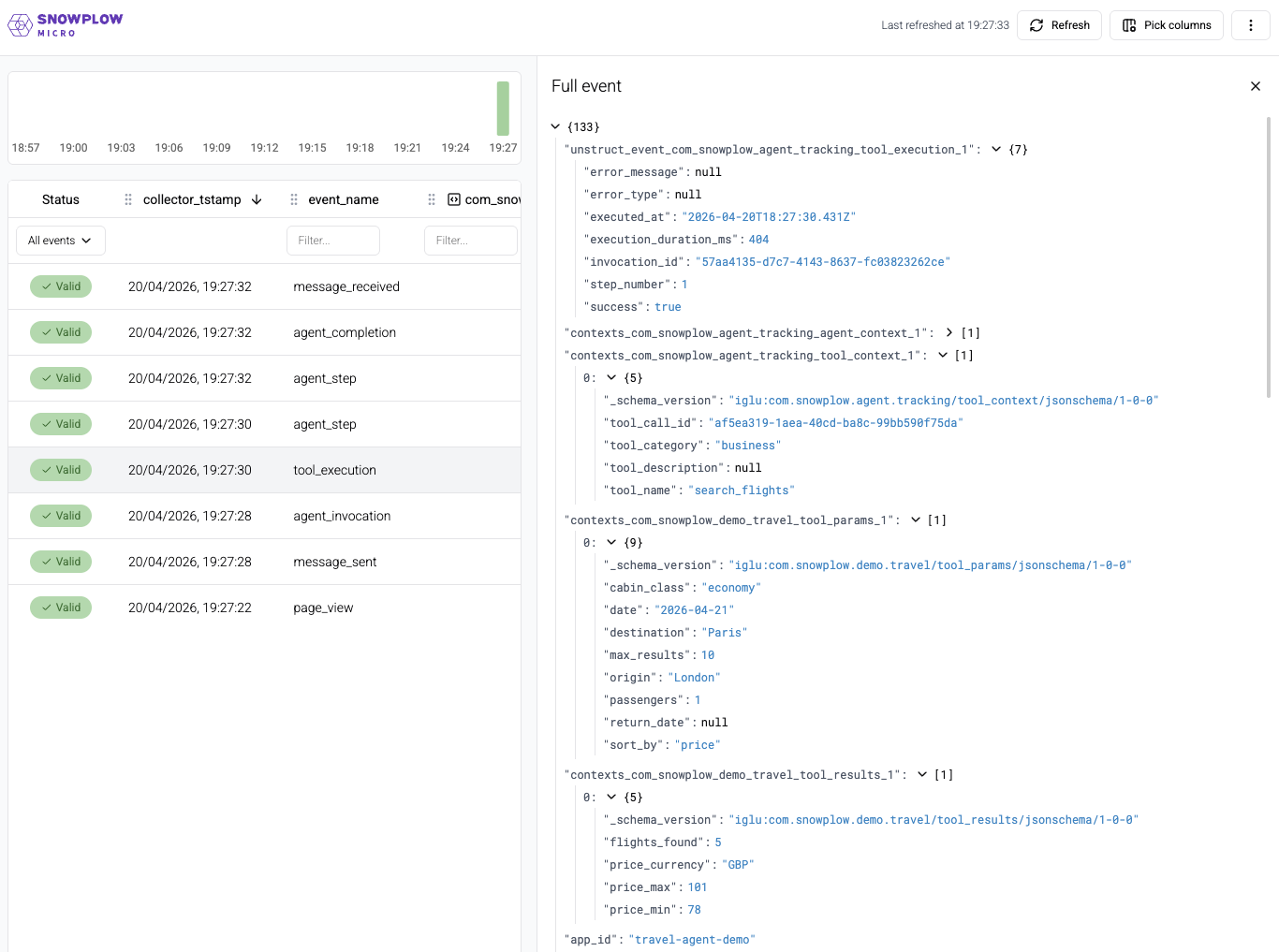
You now have visibility into both the user's actions and the agent's execution.
Schema reference
The six schemas used in this stage are published on Iglu Central under vendor com.snowplow.agent.tracking, just like the client-side schemas from the previous stage.
All the events have the invocation_id.
agent_context entity
The agent_context entity is attached to every server-side event. It identifies the invocation, session, model, and current state.
agent_context
Entityiglu:com.snowplow.agent.tracking/agent_context/jsonschema/1-0-0Example data
{
  "invocation_id": "7c9e6679-7425-40de-944b-e07fc1f90ae7",
  "session_id": "550e8400-e29b-41d4-a716-446655440000",
  "user_id": null,
  "agent_type": "travel_assistant",
  "model_name": "claude-sonnet-5",
  "model_provider": "anthropic",
  "application_version": "1.0.0",
  "conversation_messages_count": 3,
  "current_step_number": 2
}
Properties and schema
- Table
- Complete JSON schema
| Property | Description |
|---|---|
invocation_idstring | Required. Unique identifier for current agent invocation |
session_idstring | Required. User session identifier |
user_idstring | Optional. User identifier if authenticated |
agent_typestring | Required. Type/name of agent |
model_namestring | Required. LLM model identifier (e.g., claude-sonnet-5) |
model_providerstring | Required. LLM provider (e.g., anthropic, openai) |
application_versionstring | Optional. Application version |
conversation_messages_countinteger | Optional. Number of messages in conversation history at this point |
current_step_numberinteger | Optional. Current step number within the invocation |
{
  "$schema": "http://iglucentral.com/schemas/com.snowplowanalytics.self-desc/schema/jsonschema/1-0-0#",
  "description": "Context entity describing the agent, its configuration, and current state when performing actions.",
  "self": {
    "vendor": "com.snowplow.agent.tracking",
    "name": "agent_context",
    "format": "jsonschema",
    "version": "1-0-0"
  },
  "type": "object",
  "properties": {
    "invocation_id": {
      "type": "string",
      "description": "Unique identifier for current agent invocation",
      "format": "uuid"
    },
    "session_id": {
      "type": "string",
      "description": "User session identifier",
      "format": "uuid"
    },
    "user_id": {
      "type": [
        "string",
        "null"
      ],
      "description": "User identifier if authenticated",
      "maxLength": 255
    },
    "agent_type": {
      "type": "string",
      "description": "Type/name of agent",
      "maxLength": 100
    },
    "model_name": {
      "type": "string",
      "description": "LLM model identifier (e.g., claude-sonnet-5)",
      "maxLength": 100
    },
    "model_provider": {
      "type": "string",
      "description": "LLM provider (e.g., anthropic, openai)",
      "maxLength": 50
    },
    "application_version": {
      "type": [
        "string",
        "null"
      ],
      "description": "Application version",
      "maxLength": 20
    },
    "conversation_messages_count": {
      "type": [
        "integer",
        "null"
      ],
      "description": "Number of messages in conversation history at this point",
      "minimum": 0,
      "maximum": 10000
    },
    "current_step_number": {
      "type": [
        "integer",
        "null"
      ],
      "description": "Current step number within the invocation",
      "minimum": 1,
      "maximum": 10000
    }
  },
  "required": [
    "invocation_id",
    "session_id",
    "agent_type",
    "model_name",
    "model_provider"
  ],
  "additionalProperties": false
}
tool_context entity
The tool_context entity is attached to tool-related events. It identifies the tool and its category.
tool_context
Entityiglu:com.snowplow.agent.tracking/tool_context/jsonschema/1-0-0Example data
{
  "tool_name": "search_flights",
  "tool_category": "business",
  "tool_call_id": "3f2504e0-4f89-11d3-9a0c-0305e82c3301",
  "tool_description": "Search for flights between two cities on a specific date"
}
Properties and schema
- Table
- Complete JSON schema
| Property | Description |
|---|---|
tool_namestring | Required. Name of the tool being executed |
tool_categorystring | Required. Category of tool (application-defined) |
tool_call_idstring | Required. Unique identifier for this specific tool invocation |
tool_descriptionstring | Optional. Brief description of what this tool does |
{
  "$schema": "http://iglucentral.com/schemas/com.snowplowanalytics.self-desc/schema/jsonschema/1-0-0#",
  "description": "Context entity describing a tool (function) being invoked by the agent, including its purpose, category, and parameters.",
  "self": {
    "vendor": "com.snowplow.agent.tracking",
    "name": "tool_context",
    "format": "jsonschema",
    "version": "1-0-0"
  },
  "type": "object",
  "properties": {
    "tool_name": {
      "type": "string",
      "description": "Name of the tool being executed",
      "maxLength": 100
    },
    "tool_category": {
      "type": "string",
      "examples": [
        "business",
        "self_tracking",
        "retrieval",
        "orchestration"
      ],
      "description": "Category of tool (application-defined)",
      "maxLength": 100
    },
    "tool_call_id": {
      "type": "string",
      "description": "Unique identifier for this specific tool invocation",
      "format": "uuid"
    },
    "tool_description": {
      "type": [
        "string",
        "null"
      ],
      "description": "Brief description of what this tool does",
      "maxLength": 500
    }
  },
  "required": [
    "tool_name",
    "tool_category",
    "tool_call_id"
  ],
  "additionalProperties": false
}
agent_invocation event
The agent_invocation event fires when the chat API receives a request. It starts the lifecycle — every subsequent event in this invocation shares the same invocation_id. The user_message_preview field captures the first 500 characters of the user's message for context; full message content is never stored.
agent_invocation
Eventiglu:com.snowplow.agent.tracking/agent_invocation/jsonschema/1-0-0Example data
{
  "invocation_id": "7c9e6679-7425-40de-944b-e07fc1f90ae7",
  "session_id": "550e8400-e29b-41d4-a716-446655440000",
  "user_message_preview": "Find flights from London to Paris tomorrow",
  "invoked_at": "2024-01-15T10:30:00.000Z"
}
Properties and schema
- Table
- Complete JSON schema
| Property | Description |
|---|---|
invocation_idstring | Required. Unique identifier for this agent invocation |
session_idstring | Required. User session identifier |
user_message_previewstring | Optional. Truncated/sanitized user message that triggered invocation |
invoked_atstring | Required. Timestamp when invocation started |
{
  "$schema": "http://iglucentral.com/schemas/com.snowplowanalytics.self-desc/schema/jsonschema/1-0-0#",
  "description": "Marks the start of an agent invocation. Agent details and state are in the attached agent_context entity.",
  "self": {
    "vendor": "com.snowplow.agent.tracking",
    "name": "agent_invocation",
    "format": "jsonschema",
    "version": "1-0-0"
  },
  "type": "object",
  "properties": {
    "invocation_id": {
      "type": "string",
      "description": "Unique identifier for this agent invocation",
      "format": "uuid"
    },
    "session_id": {
      "type": "string",
      "description": "User session identifier",
      "format": "uuid"
    },
    "user_message_preview": {
      "type": [
        "string",
        "null"
      ],
      "description": "Truncated/sanitized user message that triggered invocation",
      "maxLength": 500
    },
    "invoked_at": {
      "type": "string",
      "format": "date-time",
      "description": "Timestamp when invocation started"
    }
  },
  "required": [
    "invocation_id",
    "session_id",
    "invoked_at"
  ],
  "additionalProperties": false
}
Warehouse query
- Snowflake
- BigQuery
- Databricks
- Redshift & Postgres
select
unstruct_event_com_snowplow_agent_tracking_agent_invocation_1 agent_invocation_1
from
atomic.events
where
events.collector_tstamp > getdate() - interval '1 hour'
and events.event = 'unstruct'
and events.event_name = 'agent_invocation'
and events.event_vendor = 'com.snowplow.agent.tracking'
select
unstruct_event_com_snowplow_agent_tracking_agent_invocation_1_0_0
from
PIPELINE_NAME.events events
where
events.collector_tstamp > timestamp_sub(current_timestamp(), interval 1 hour)
and events.event = 'unstruct'
and events.event_name = 'agent_invocation'
and events.event_vendor = 'com.snowplow.agent.tracking'
select
unstruct_event_com_snowplow_agent_tracking_agent_invocation_1
from
atomic.events events
where
events.collector_tstamp > timestampadd(HOUR, -1, current_timestamp())
and events.event = 'unstruct'
and events.event_name = 'agent_invocation'
and events.event_vendor = 'com.snowplow.agent.tracking'
and unstruct_event_com_snowplow_agent_tracking_agent_invocation_1 is not null
select
"agent_invocation_1".*
from
atomic.events events
join atomic.com_snowplow_agent_tracking_agent_invocation_1 "agent_invocation_1"
  on "agent_invocation_1".root_id = events.event_id and "agent_invocation_1".root_tstamp = events.collector_tstamp
where
events.collector_tstamp > getdate() - interval '1 hour'
and "agent_invocation_1".root_tstamp > getdate() - interval '1 hour'
and events.event = 'unstruct'
and events.event_name = 'agent_invocation'
and events.event_vendor = 'com.snowplow.agent.tracking'
agent_step event
The agent_step event fires at the end of each LLM iteration. step_type indicates where in the reasoning loop this step falls: initial for the first LLM call, tool-result when the model is processing tool output, and continue for intermediate steps. finish_reason tells you why the model stopped: tool_calls means it wants to invoke a tool next, stop means it has a final answer.
agent_step
Eventiglu:com.snowplow.agent.tracking/agent_step/jsonschema/1-0-0Example data
{
  "invocation_id": "7c9e6679-7425-40de-944b-e07fc1f90ae7",
  "step_number": 2,
  "step_type": "tool-result",
  "input_tokens": 1250,
  "output_tokens": 87,
  "finish_reason": "tool_calls",
  "tool_calls_count": 1,
  "text_length": null,
  "step_duration_ms": 820,
  "stepped_at": "2024-01-15T10:30:01.820Z"
}
Properties and schema
- Table
- Complete JSON schema
| Property | Description |
|---|---|
invocation_idstring | Required. Parent invocation identifier |
step_numberinteger | Required. Sequential step number in this invocation |
step_typestring | Required. Type of step in the agent loop Must be one of: initial, continue, tool-result |
input_tokensinteger | Required. Input tokens for this step |
output_tokensinteger | Required. Output tokens for this step |
finish_reasonstring | Optional. Why the model stopped generating Must be one of: stop, length, tool_calls, content_filter, |
tool_calls_countinteger | Required. Number of tool calls made in this step |
text_lengthinteger | Optional. Length of text generated in this step |
step_duration_msinteger | Optional. Duration of this step |
stepped_atstring | Required. Timestamp when step completed |
{
  "$schema": "http://iglucentral.com/schemas/com.snowplowanalytics.self-desc/schema/jsonschema/1-0-0#",
  "description": "Records a single iteration step in the agent reasoning loop. Agent context provides invocation details.",
  "self": {
    "vendor": "com.snowplow.agent.tracking",
    "name": "agent_step",
    "format": "jsonschema",
    "version": "1-0-0"
  },
  "type": "object",
  "properties": {
    "invocation_id": {
      "type": "string",
      "description": "Parent invocation identifier",
      "format": "uuid"
    },
    "step_number": {
      "type": "integer",
      "description": "Sequential step number in this invocation",
      "minimum": 1,
      "maximum": 10000
    },
    "step_type": {
      "type": "string",
      "enum": [
        "initial",
        "continue",
        "tool-result"
      ],
      "description": "Type of step in the agent loop"
    },
    "input_tokens": {
      "type": "integer",
      "description": "Input tokens for this step",
      "minimum": 0,
      "maximum": 2147483647
    },
    "output_tokens": {
      "type": "integer",
      "description": "Output tokens for this step",
      "minimum": 0,
      "maximum": 2147483647
    },
    "finish_reason": {
      "type": [
        "string",
        "null"
      ],
      "enum": [
        "stop",
        "length",
        "tool_calls",
        "content_filter",
        null
      ],
      "description": "Why the model stopped generating"
    },
    "tool_calls_count": {
      "type": "integer",
      "description": "Number of tool calls made in this step",
      "minimum": 0,
      "maximum": 100
    },
    "text_length": {
      "type": [
        "integer",
        "null"
      ],
      "description": "Length of text generated in this step",
      "minimum": 0,
      "maximum": 100000
    },
    "step_duration_ms": {
      "type": [
        "integer",
        "null"
      ],
      "description": "Duration of this step",
      "minimum": 0,
      "maximum": 300000
    },
    "stepped_at": {
      "type": "string",
      "format": "date-time",
      "description": "Timestamp when step completed"
    }
  },
  "required": [
    "invocation_id",
    "step_number",
    "step_type",
    "input_tokens",
    "output_tokens",
    "tool_calls_count",
    "stepped_at"
  ],
  "additionalProperties": false
}
Warehouse query
- Snowflake
- BigQuery
- Databricks
- Redshift & Postgres
select
unstruct_event_com_snowplow_agent_tracking_agent_step_1 agent_step_1
from
atomic.events
where
events.collector_tstamp > getdate() - interval '1 hour'
and events.event = 'unstruct'
and events.event_name = 'agent_step'
and events.event_vendor = 'com.snowplow.agent.tracking'
select
unstruct_event_com_snowplow_agent_tracking_agent_step_1_0_0
from
PIPELINE_NAME.events events
where
events.collector_tstamp > timestamp_sub(current_timestamp(), interval 1 hour)
and events.event = 'unstruct'
and events.event_name = 'agent_step'
and events.event_vendor = 'com.snowplow.agent.tracking'
select
unstruct_event_com_snowplow_agent_tracking_agent_step_1
from
atomic.events events
where
events.collector_tstamp > timestampadd(HOUR, -1, current_timestamp())
and events.event = 'unstruct'
and events.event_name = 'agent_step'
and events.event_vendor = 'com.snowplow.agent.tracking'
and unstruct_event_com_snowplow_agent_tracking_agent_step_1 is not null
select
"agent_step_1".*
from
atomic.events events
join atomic.com_snowplow_agent_tracking_agent_step_1 "agent_step_1"
  on "agent_step_1".root_id = events.event_id and "agent_step_1".root_tstamp = events.collector_tstamp
where
events.collector_tstamp > getdate() - interval '1 hour'
and "agent_step_1".root_tstamp > getdate() - interval '1 hour'
and events.event = 'unstruct'
and events.event_name = 'agent_step'
and events.event_vendor = 'com.snowplow.agent.tracking'
tool_execution event
The tool_execution event fires when a tool call completes. The event captures lifecycle data — timing and success or failure — while the domain-specific data lives in the custom tool_params and tool_results entities attached alongside tool_context and agent_context. On a failed call, error_type and error_message are populated instead.
tool_execution
Eventiglu:com.snowplow.agent.tracking/tool_execution/jsonschema/1-0-0Example data
{
  "invocation_id": "7c9e6679-7425-40de-944b-e07fc1f90ae7",
  "step_number": 2,
  "execution_duration_ms": 340,
  "success": true,
  "error_type": null,
  "error_message": null,
  "executed_at": "2024-01-15T10:30:01.480Z"
}
Properties and schema
- Table
- Complete JSON schema
| Property | Description |
|---|---|
invocation_idstring | Required. Parent invocation identifier |
step_numberinteger | Optional. Step number within invocation |
execution_duration_msinteger | Required. Time taken to execute the tool |
successboolean | Required. Whether tool execution succeeded |
error_typestring | Optional. Type of error if execution failed |
error_messagestring | Optional. Error message if execution failed |
executed_atstring | Required. Timestamp when tool execution completed |
{
  "$schema": "http://iglucentral.com/schemas/com.snowplowanalytics.self-desc/schema/jsonschema/1-0-0#",
  "description": "Records execution of an agent tool. Tool details are in the attached tool_context entity. Agent state is in agent_context entity.",
  "self": {
    "vendor": "com.snowplow.agent.tracking",
    "name": "tool_execution",
    "format": "jsonschema",
    "version": "1-0-0"
  },
  "type": "object",
  "properties": {
    "invocation_id": {
      "type": "string",
      "description": "Parent invocation identifier",
      "format": "uuid"
    },
    "step_number": {
      "type": [
        "integer",
        "null"
      ],
      "description": "Step number within invocation",
      "minimum": 1,
      "maximum": 10000
    },
    "execution_duration_ms": {
      "type": "integer",
      "description": "Time taken to execute the tool",
      "minimum": 0,
      "maximum": 300000
    },
    "success": {
      "type": "boolean",
      "description": "Whether tool execution succeeded"
    },
    "error_type": {
      "type": [
        "string",
        "null"
      ],
      "description": "Type of error if execution failed",
      "maxLength": 100
    },
    "error_message": {
      "type": [
        "string",
        "null"
      ],
      "description": "Error message if execution failed",
      "maxLength": 500
    },
    "executed_at": {
      "type": "string",
      "format": "date-time",
      "description": "Timestamp when tool execution completed"
    }
  },
  "required": [
    "invocation_id",
    "execution_duration_ms",
    "success",
    "executed_at"
  ],
  "additionalProperties": false
}
Warehouse query
- Snowflake
- BigQuery
- Databricks
- Redshift & Postgres
select
unstruct_event_com_snowplow_agent_tracking_tool_execution_1 tool_execution_1
from
atomic.events
where
events.collector_tstamp > getdate() - interval '1 hour'
and events.event = 'unstruct'
and events.event_name = 'tool_execution'
and events.event_vendor = 'com.snowplow.agent.tracking'
select
unstruct_event_com_snowplow_agent_tracking_tool_execution_1_0_0
from
PIPELINE_NAME.events events
where
events.collector_tstamp > timestamp_sub(current_timestamp(), interval 1 hour)
and events.event = 'unstruct'
and events.event_name = 'tool_execution'
and events.event_vendor = 'com.snowplow.agent.tracking'
select
unstruct_event_com_snowplow_agent_tracking_tool_execution_1
from
atomic.events events
where
events.collector_tstamp > timestampadd(HOUR, -1, current_timestamp())
and events.event = 'unstruct'
and events.event_name = 'tool_execution'
and events.event_vendor = 'com.snowplow.agent.tracking'
and unstruct_event_com_snowplow_agent_tracking_tool_execution_1 is not null
select
"tool_execution_1".*
from
atomic.events events
join atomic.com_snowplow_agent_tracking_tool_execution_1 "tool_execution_1"
  on "tool_execution_1".root_id = events.event_id and "tool_execution_1".root_tstamp = events.collector_tstamp
where
events.collector_tstamp > getdate() - interval '1 hour'
and "tool_execution_1".root_tstamp > getdate() - interval '1 hour'
and events.event = 'unstruct'
and events.event_name = 'tool_execution'
and events.event_vendor = 'com.snowplow.agent.tracking'
agent_completion event
The agent_completion event fires when the invocation ends and provides aggregate metrics across the entire lifecycle. finish_reason: max_steps means the agent hit the stopWhen: stepCountIs(10) limit without reaching a final answer — a useful signal for identifying queries that are hitting complexity limits.
agent_completion
Eventiglu:com.snowplow.agent.tracking/agent_completion/jsonschema/1-0-0Example data
{
  "invocation_id": "7c9e6679-7425-40de-944b-e07fc1f90ae7",
  "total_steps": 3,
  "total_duration_ms": 2850,
  "total_tokens": 3420,
  "tools_called": 1,
  "business_tools_called": 1,
  "self_tracking_tools_called": 0,
  "finish_reason": "stop",
  "success": true,
  "final_response_length": 312,
  "completed_at": "2024-01-15T10:30:02.850Z"
}
Properties and schema
- Table
- Complete JSON schema
| Property | Description |
|---|---|
invocation_idstring | Required. Invocation identifier |
total_stepsinteger | Required. Total number of reasoning steps |
total_duration_msinteger | Required. Total time from invocation to completion |
total_tokensinteger | Required. Total tokens used (prompt + completion) |
tools_calledinteger | Required. Total number of tool calls made |
business_tools_calledinteger | Optional. Number of business tools called |
self_tracking_tools_calledinteger | Optional. Number of self-tracking tools called |
finish_reasonstring | Required. Why the agent stopped Must be one of: stop, length, error, max_steps |
successboolean | Required. Whether invocation completed successfully |
final_response_lengthinteger | Optional. Length of final response to user |
completed_atstring | Required. Timestamp when invocation completed |
{
  "$schema": "http://iglucentral.com/schemas/com.snowplowanalytics.self-desc/schema/jsonschema/1-0-0#",
  "description": "Records completion of an agent invocation with summary metrics. Agent context provides invocation details.",
  "self": {
    "vendor": "com.snowplow.agent.tracking",
    "name": "agent_completion",
    "format": "jsonschema",
    "version": "1-0-0"
  },
  "type": "object",
  "properties": {
    "invocation_id": {
      "type": "string",
      "description": "Invocation identifier",
      "format": "uuid"
    },
    "total_steps": {
      "type": "integer",
      "description": "Total number of reasoning steps",
      "minimum": 1,
      "maximum": 10000
    },
    "total_duration_ms": {
      "type": "integer",
      "description": "Total time from invocation to completion",
      "minimum": 0,
      "maximum": 600000
    },
    "total_tokens": {
      "type": "integer",
      "description": "Total tokens used (prompt + completion)",
      "minimum": 0,
      "maximum": 2147483647
    },
    "tools_called": {
      "type": "integer",
      "description": "Total number of tool calls made",
      "minimum": 0,
      "maximum": 1000
    },
    "business_tools_called": {
      "type": [
        "integer",
        "null"
      ],
      "description": "Number of business tools called",
      "minimum": 0,
      "maximum": 1000
    },
    "self_tracking_tools_called": {
      "type": [
        "integer",
        "null"
      ],
      "description": "Number of self-tracking tools called",
      "minimum": 0,
      "maximum": 1000
    },
    "finish_reason": {
      "type": "string",
      "enum": [
        "stop",
        "length",
        "error",
        "max_steps"
      ],
      "description": "Why the agent stopped"
    },
    "success": {
      "type": "boolean",
      "description": "Whether invocation completed successfully"
    },
    "final_response_length": {
      "type": [
        "integer",
        "null"
      ],
      "description": "Length of final response to user",
      "minimum": 0,
      "maximum": 100000
    },
    "completed_at": {
      "type": "string",
      "format": "date-time",
      "description": "Timestamp when invocation completed"
    }
  },
  "required": [
    "invocation_id",
    "total_steps",
    "total_duration_ms",
    "total_tokens",
    "tools_called",
    "finish_reason",
    "success",
    "completed_at"
  ],
  "additionalProperties": false
}
Warehouse query
- Snowflake
- BigQuery
- Databricks
- Redshift & Postgres
select
unstruct_event_com_snowplow_agent_tracking_agent_completion_1 agent_completion_1
from
atomic.events
where
events.collector_tstamp > getdate() - interval '1 hour'
and events.event = 'unstruct'
and events.event_name = 'agent_completion'
and events.event_vendor = 'com.snowplow.agent.tracking'
select
unstruct_event_com_snowplow_agent_tracking_agent_completion_1_0_0
from
PIPELINE_NAME.events events
where
events.collector_tstamp > timestamp_sub(current_timestamp(), interval 1 hour)
and events.event = 'unstruct'
and events.event_name = 'agent_completion'
and events.event_vendor = 'com.snowplow.agent.tracking'
select
unstruct_event_com_snowplow_agent_tracking_agent_completion_1
from
atomic.events events
where
events.collector_tstamp > timestampadd(HOUR, -1, current_timestamp())
and events.event = 'unstruct'
and events.event_name = 'agent_completion'
and events.event_vendor = 'com.snowplow.agent.tracking'
and unstruct_event_com_snowplow_agent_tracking_agent_completion_1 is not null
select
"agent_completion_1".*
from
atomic.events events
join atomic.com_snowplow_agent_tracking_agent_completion_1 "agent_completion_1"
  on "agent_completion_1".root_id = events.event_id and "agent_completion_1".root_tstamp = events.collector_tstamp
where
events.collector_tstamp > getdate() - interval '1 hour'
and "agent_completion_1".root_tstamp > getdate() - interval '1 hour'
and events.event = 'unstruct'
and events.event_name = 'agent_completion'
and events.event_vendor = 'com.snowplow.agent.tracking'