Track client-side interactions for your agentic application
In this stage, you'll add the first layer of tracking: client-side events that capture what the user does in the browser.
If you're coding along, create the files described below on the starter branch.
If you're reading along, check out this tag and review the changes:
git checkout v0.1-client-tracking
npm install
To see exactly what changed: git diff v0.0-starter..v0.1-client-tracking
What you'll add
This stage introduces:
- One new dependency:
@snowplow/browser-tracker - Two event schemas from Iglu Central:
message_sentandmessage_received - One entity schema from Iglu Central:
message_context - One new file:
src/lib/tracking/client.ts- the client tracking module - A nanoid-to-UUID helper for the message IDs that come from the AI SDK
- One new file:
start.sh- dev startup script that runs Snowplow Micro alongside Next.js - Modifications to:
src/app/page.tsxto add tracking
Install the Snowplow tracker
Install the Browser tracker:
npm install @snowplow/browser-tracker
Create the client tracking module
This module initializes the Snowplow browser tracker and provides two functions for tracking messages.
'use client';

import {
  newTracker,
  trackPageView,
  trackSelfDescribingEvent,
} from '@snowplow/browser-tracker';

// ---------------------------------------------------------------------------
// Tracker initialisation
// ---------------------------------------------------------------------------

let trackerInitialized = false;

/**
 * Initialise the Snowplow browser tracker.
 * Call once on app mount (e.g. in a useEffect).
 */
export const initClientTracker = () => {
  if (trackerInitialized) return;

  const collectorUrl = process.env.NEXT_PUBLIC_SNOWPLOW_COLLECTOR_URL;
  const appId = process.env.NEXT_PUBLIC_SNOWPLOW_APP_ID;

  if (!collectorUrl || !appId) {
    console.warn(
      'Snowplow browser tracker not initialized: missing NEXT_PUBLIC_SNOWPLOW_COLLECTOR_URL or NEXT_PUBLIC_SNOWPLOW_APP_ID',
    );
    return;
  }

  newTracker('sp', collectorUrl, {
    appId,
    contexts: {
      webPage: true,
      session: true,
    },
    anonymousTracking: false,
    stateStorageStrategy: 'localStorage',
  });

  trackerInitialized = true;
  trackPageView();
};
The initClientTracker() function initalizes the tracker as a singleton. The function reads the Collector URL and app ID from environment variables, enables the built-in web page and session entities, and fires an initial page view.
For production Snowplow implementations, we recommend enabling activity tracking. We've left it out of this accelerator to keep the focus on agentic tracking.
The Snowplow schemas on Iglu Central use format: uuid on identifier fields. Everywhere else in this tutorial you will generate IDs with crypto.randomUUID(), which satisfies that constraint directly. The one exception is message.id from the AI SDK's useChat hook, which is a nanoid, so you need to convert it before using it as invocation_id or message_id on a Snowplow event.
Add a deterministic nanoid-to-UUIDv5 mapping in client.ts. The same message.id always produces the same UUID, preserving correlation without a lookup table.
// ---------------------------------------------------------------------------
// Deterministic nanoid to UUID mapping (UUIDv5)
// ---------------------------------------------------------------------------

const TRACKING_UUID_NAMESPACE = 'b7f3e4d2-8c1a-4f5e-9a2b-6d7c8e9f0a1b';

const hexToBytes = (hex: string): Uint8Array => {
  const clean = hex.replace(/-/g, '');
  const bytes = new Uint8Array(clean.length / 2);
  for (let i = 0; i < bytes.length; i++) {
    bytes[i] = parseInt(clean.substr(i * 2, 2), 16);
  }
  return bytes;
};

const bytesToUuid = (bytes: Uint8Array): string => {
  const hex = Array.from(bytes.slice(0, 16))
    .map((b) => b.toString(16).padStart(2, '0'))
    .join('');
  return `${hex.slice(0, 8)}-${hex.slice(8, 12)}-${hex.slice(12, 16)}-${hex.slice(16, 20)}-${hex.slice(20, 32)}`;
};

export const nanoidToUuid = async (input: string): Promise<string> => {
  const namespace = hexToBytes(TRACKING_UUID_NAMESPACE);
  const name = new TextEncoder().encode(input);
  const combined = new Uint8Array(namespace.length + name.length);
  combined.set(namespace, 0);
  combined.set(name, namespace.length);

  const hashBuffer = await crypto.subtle.digest('SHA-1', combined);
  const uuid = new Uint8Array(hashBuffer).slice(0, 16);
  uuid[6] = (uuid[6] & 0x0f) | 0x50; // version 5
  uuid[8] = (uuid[8] & 0x3f) | 0x80; // RFC 4122 variant
  return bytesToUuid(uuid);
};
Generate your own namespace UUID when adopting this pattern in a production app. It needs to be stable across sessions so IDs stay correlatable.
Next, add the two tracking functions within the same file.
The tracking uses the Iglu Central schemas message_sent, message_received, and message_context. See the Schema reference section below for details on these schemas.
The invocation_id in the message_received event links it to the server-side events you'll add in the next section.
// ---------------------------------------------------------------------------
// Context entity builder
// ---------------------------------------------------------------------------

export interface MessageContextData {
  message_id: string;
  message_role: 'user' | 'assistant';
  message_length: number;
  message_preview: string | null;
  message_index: number;
  conversation_turn: number | null;
}

const buildMessageContext = (data: MessageContextData) => ({
  schema: 'iglu:com.snowplow.agent.tracking/message_context/jsonschema/1-0-0' as const,
  data: data as unknown as Record<string, unknown>,
});

// ---------------------------------------------------------------------------
// Event: message sent
// ---------------------------------------------------------------------------

export interface MessageSentParams {
  sessionId: string;
  messageId: string;
  message: string;
  messageIndex: number;
  conversationTurn?: number;
}

export const trackMessageSent = (params: MessageSentParams) => {
  trackSelfDescribingEvent({
    event: {
      schema: 'iglu:com.snowplow.agent.tracking/message_sent/jsonschema/1-0-0',
      data: {
        session_id: params.sessionId,
        sent_at: new Date().toISOString(),
      },
    },
    context: [
      buildMessageContext({
        message_id: params.messageId,
        message_role: 'user',
        message_length: params.message.length,
        message_preview: params.message.substring(0, 100),
        message_index: params.messageIndex,
        conversation_turn: params.conversationTurn ?? null,
      }),
    ],
  });
};

// ---------------------------------------------------------------------------
// Event: message received
// ---------------------------------------------------------------------------

export interface MessageReceivedParams {
  sessionId: string;
  invocationId: string;
  messageId: string;
  responseText: string;
  tokensUsed?: number | null;
  toolCallsCount: number;
  responseTimeMs: number;
  messageIndex: number;
  conversationTurn?: number;
  modelName: string;
  modelProvider: 'anthropic' | 'openai' | 'google';
}

export const trackMessageReceived = (params: MessageReceivedParams) => {
  trackSelfDescribingEvent({
    event: {
      schema: 'iglu:com.snowplow.agent.tracking/message_received/jsonschema/1-0-0',
      data: {
        session_id: params.sessionId,
        invocation_id: params.invocationId,
        tokens_used: params.tokensUsed ?? null,
        response_time_ms: params.responseTimeMs,
        tool_calls_count: params.toolCallsCount,
        received_at: new Date().toISOString(),
      },
    },
    context: [
      buildMessageContext({
        message_id: params.messageId,
        message_role: 'assistant',
        message_length: params.responseText.length,
        message_preview: params.responseText.substring(0, 100),
        message_index: params.messageIndex,
        conversation_turn: params.conversationTurn ?? null,
      }),
    ],
  });
};
Both functions, trackMessageSent() and trackMessageReceived(), track the message data as a self-describing event with an attached message_context entity.
The message_preview field is capped at 100 characters. Full message content is never sent to the Collector. This is a good practice for any user-generated content - capture enough for debugging and analysis, but respect user privacy.
Add tracking to the UI
Connect the tracking module to four places in src/app/page.tsx.
Initialize the tracker on mount
Import the tracking functions and initialize the tracker in a useEffect:
import {
  initClientTracker,
  trackMessageSent,
  trackMessageReceived,
  nanoidToUuid,
} from '@/lib/tracking/client';

// Inside the Home component:
useEffect(() => {
  initClientTracker();
}, []);
Track message sent on submit
In the onSubmit handler, call trackMessageSent() before sending the message to the API:
const onSubmit = (e: React.FormEvent) => {
  e.preventDefault();
  if (!input.trim()) return;

  startTimeRef.current = Date.now();
  const activeSessionId = ensureActiveSessionId();

  trackMessageSent({
    sessionId: activeSessionId,
    messageId: crypto.randomUUID(),
    message: input,
    messageIndex: messageIndex,
  });

  sendMessage(
    { role: 'user', parts: [{ type: 'text', text: input }] },
    { body: { sessionId: activeSessionId, modelId: selectedModelId } },
  );
  setInput('');
};
Track message sent from demo scenarios
The scenario handler follows the same pattern:
const handleScenarioSelect = (message: string) => {
  startTimeRef.current = Date.now();
  const activeSessionId = ensureActiveSessionId();

  trackMessageSent({
    sessionId: activeSessionId,
    messageId: crypto.randomUUID(),
    message: message,
    messageIndex: messageIndex,
  });

  sendMessage(
    { role: 'user', parts: [{ type: 'text', text: message }] },
    { body: { sessionId: activeSessionId, modelId: selectedModelId } },
  );
};
Track message received on completion
In the useChat hook's onFinish callback, call trackMessageReceived() with the response metadata:
const { messages, sendMessage, status } = useChat<UIMessage>({
  transport: chatTransport,
  onFinish: async ({ message }) => {
    const responseTime = Date.now() - startTimeRef.current;
    const textContent = extractTextContent(message.parts);
    const toolCallsCount = extractToolCalls(message.parts).length;
    const activeSessionId = ensureActiveSessionId();
    const messageUuid = await nanoidToUuid(message.id);

    trackMessageReceived({
      sessionId: activeSessionId,
      invocationId: messageUuid,
      messageId: messageUuid,
      responseText: textContent,
      tokensUsed: null,
      toolCallsCount: toolCallsCount,
      responseTimeMs: responseTime,
      messageIndex: messageIndex + 1,
      modelName: selectedModelId,
      modelProvider: selectedModelProvider,
    });

    setMessageIndex((prev) => prev + 2);
  },
});
The onFinish callback fires once the full response has been streamed. The callback is async because nanoidToUuid uses crypto.subtle.digest.
Enable the LiveTrackingPanel component
The LiveTrackingPanel component is already in the codebase. Render it in the JSX:
<LiveTrackingPanel sessionId={sessionId} />
This component polls Snowplow Micro's API every two seconds and displays events in a real-time sidebar. It requires Micro to be running.
Run the application
Start Snowplow Micro on port 9090 and Next.js on port 3000 by running:
npm run start:dev
This runs the start.sh script, which starts Snowplow Micro in a Docker container and then starts the Next.js development server:
#!/bin/bash
# Start Snowplow Micro and Next.js server

# Load environment variables from .env.local
if [ -f .env.local ]; then
  export $(grep -v '^#' .env.local | grep -v '^$' | xargs)
fi

# Generic schemas (com.snowplow.agent.tracking) resolve from Iglu Central automatically.
# The local mount provides app-specific custom entities added in later stages.
docker run -d --name snowplow-micro \
  -p 9090:9090 \
  -v "$(pwd)/snowplow/iglu-local:/config/iglu-client-embedded" \
  snowplow/snowplow-micro:4.4.1

sleep 2

# Start Next.js dev server
npm run dev
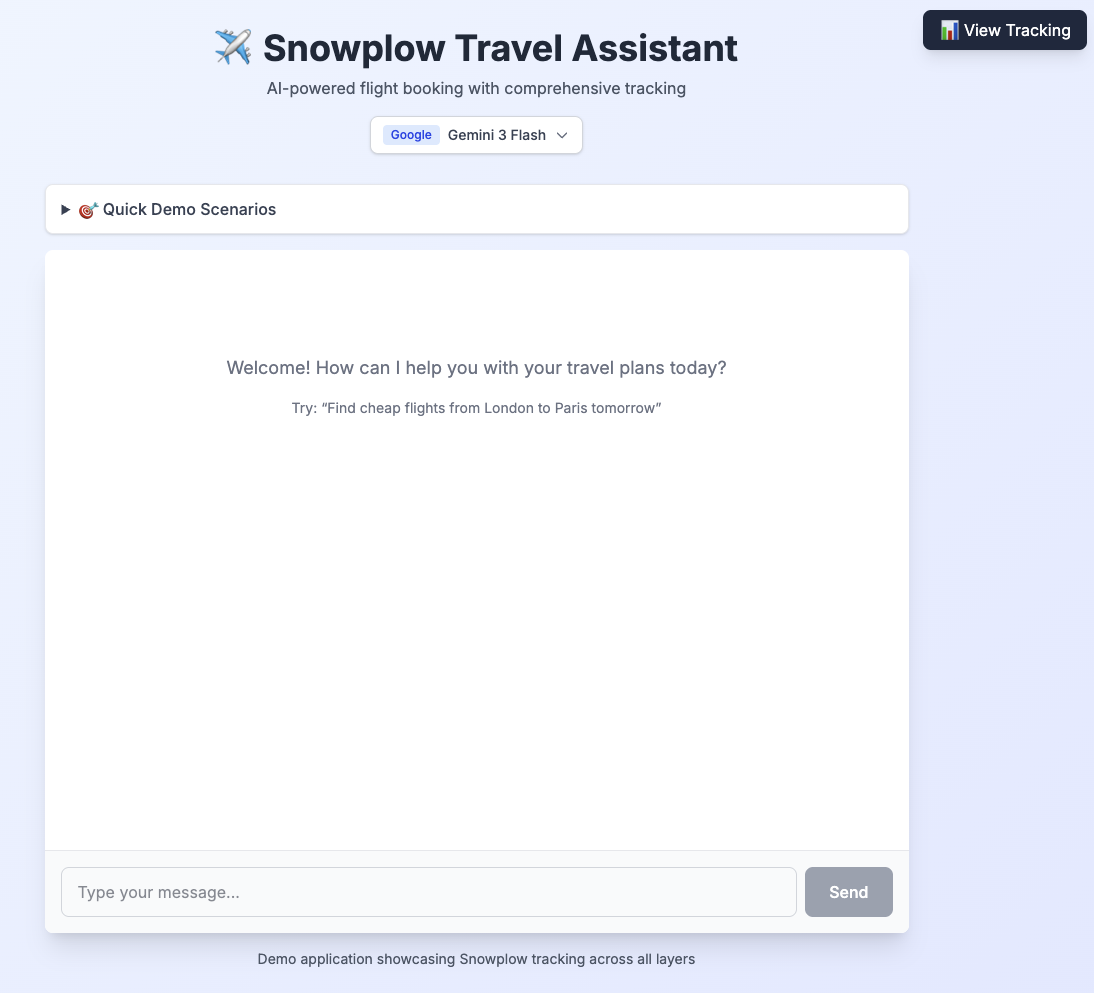
Snowplow Micro validates every incoming event against its schema. Micro resolves Iglu Central schemas automatically, so you don't need local copies.
The -v mount maps the local snowplow/iglu-local directory into the container. This directory is where you'll add your own custom entity schemas later on.
Explore the tracking
With both services running:
- Open http://localhost:3000 and send a message: "Find flights from London to Paris tomorrow".
- Open the LiveTrackingPanel sidebar on the right - you'll see events appearing in real-time.
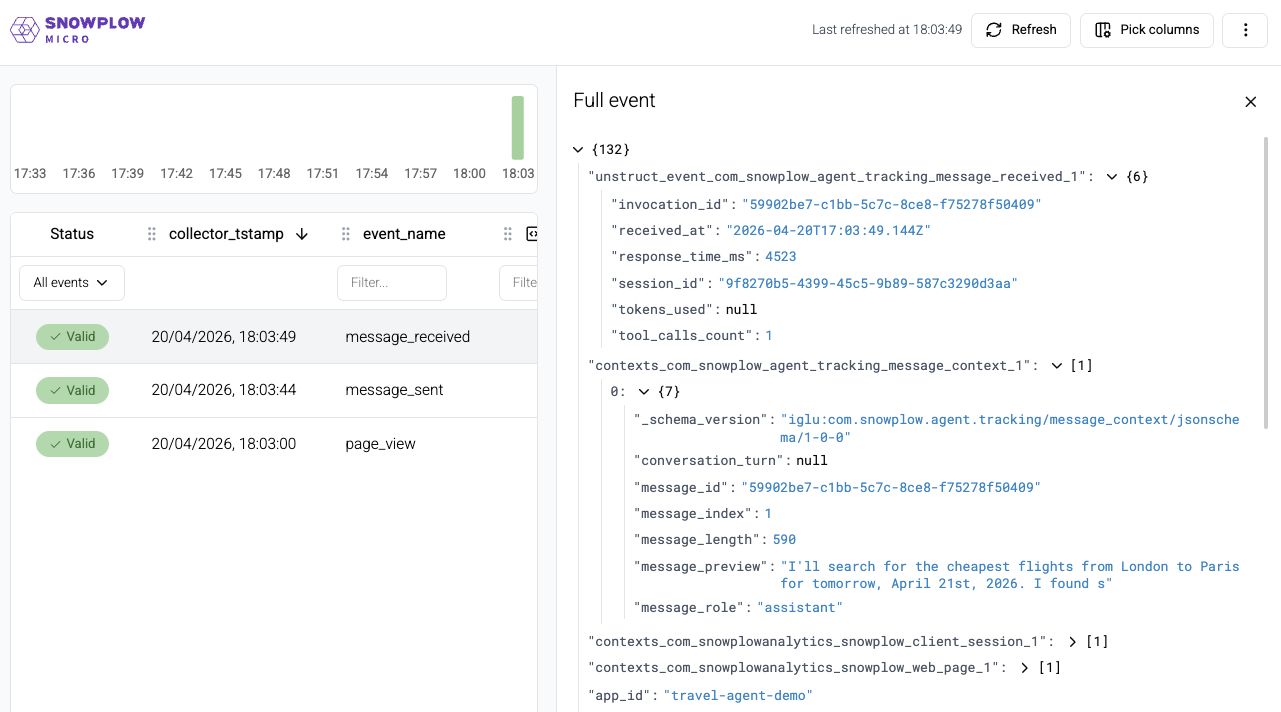
- Open Snowplow Micro UI at http://localhost:9090/micro/ui. Press Refresh to see events arriving. You can click on individual events to explore their properties and attached entities. The UI also shows any events that failed schema validation.
- Examine a
message_sentevent in the Micro UI. Notice the self-describing event structure and the attachedmessage_contextentity showing"role": "user", the message length, and the truncated preview. - Examine a
message_receivedevent. Notice theresponse_time_msshowing how long the agent took, andtool_calls_countshowing how many tools it used.
If the chatbot accepts your message but never responds, check that .env.local has a real API key for the provider and model you selected. Placeholder or invalid keys often fail silently (see Configure environment variables).
Micro also exposes raw JSON endpoints at /micro/good and /micro/bad if you prefer programmatic access, but the UI is the recommended way to explore events throughout this accelerator.
Schema reference
You used these schemas in the client tracking module. Find their definitions and properties below.
message_sent
The message_sent event is deliberately minimal. It captures only the session and timestamp. Most of the message data will be tracked in the attached message_context entity.
message_sent
Eventiglu:com.snowplow.agent.tracking/message_sent/jsonschema/1-0-0Example data
{
  "session_id": "550e8400-e29b-41d4-a716-446655440000",
  "sent_at": "2024-01-15T10:30:00.000Z"
}
Properties and schema
- Table
- Complete JSON schema
| Property | Description |
|---|---|
session_idstring | Required. Chat session identifier |
sent_atstring | Required. Timestamp when message was sent |
{
  "$schema": "http://iglucentral.com/schemas/com.snowplowanalytics.self-desc/schema/jsonschema/1-0-0#",
  "description": "User sends a message in the chat interface. Message details are in the attached message_context entity.",
  "self": {
    "vendor": "com.snowplow.agent.tracking",
    "name": "message_sent",
    "format": "jsonschema",
    "version": "1-0-0"
  },
  "type": "object",
  "properties": {
    "session_id": {
      "type": "string",
      "description": "Chat session identifier",
      "format": "uuid"
    },
    "sent_at": {
      "type": "string",
      "format": "date-time",
      "description": "Timestamp when message was sent"
    }
  },
  "required": [
    "session_id",
    "sent_at"
  ],
  "additionalProperties": false
}
Warehouse query
- Snowflake
- BigQuery
- Databricks
- Redshift & Postgres
select
unstruct_event_com_snowplow_agent_tracking_message_sent_1 message_sent_1
from
atomic.events
where
events.collector_tstamp > getdate() - interval '1 hour'
and events.event = 'unstruct'
and events.event_name = 'message_sent'
and events.event_vendor = 'com.snowplow.agent.tracking'
select
unstruct_event_com_snowplow_agent_tracking_message_sent_1_0_0
from
PIPELINE_NAME.events events
where
events.collector_tstamp > timestamp_sub(current_timestamp(), interval 1 hour)
and events.event = 'unstruct'
and events.event_name = 'message_sent'
and events.event_vendor = 'com.snowplow.agent.tracking'
select
unstruct_event_com_snowplow_agent_tracking_message_sent_1
from
atomic.events events
where
events.collector_tstamp > timestampadd(HOUR, -1, current_timestamp())
and events.event = 'unstruct'
and events.event_name = 'message_sent'
and events.event_vendor = 'com.snowplow.agent.tracking'
and unstruct_event_com_snowplow_agent_tracking_message_sent_1 is not null
select
"message_sent_1".*
from
atomic.events events
join atomic.com_snowplow_agent_tracking_message_sent_1 "message_sent_1"
  on "message_sent_1".root_id = events.event_id and "message_sent_1".root_tstamp = events.collector_tstamp
where
events.collector_tstamp > getdate() - interval '1 hour'
and "message_sent_1".root_tstamp > getdate() - interval '1 hour'
and events.event = 'unstruct'
and events.event_name = 'message_sent'
and events.event_vendor = 'com.snowplow.agent.tracking'
message_received
The message_received event captures performance and usage metrics about the agent's response that are only available once the response completes.
The invocation_id links this event to the server-side events you'll add in the next section.
message_received
Eventiglu:com.snowplow.agent.tracking/message_received/jsonschema/1-0-0Example data
{
  "session_id": "550e8400-e29b-41d4-a716-446655440000",
  "invocation_id": "7c9e6679-7425-40de-944b-e07fc1f90ae7",
  "tokens_used": 342,
  "response_time_ms": 1850,
  "tool_calls_count": 2,
  "received_at": "2024-01-15T10:30:02.500Z"
}
Properties and schema
- Table
- Complete JSON schema
| Property | Description |
|---|---|
session_idstring | Required. Chat session identifier |
invocation_idstring | Required. Agent invocation that generated this response |
tokens_usedinteger | Optional. Total tokens used in generation |
response_time_msinteger | Required. Time taken to generate response |
tool_calls_countinteger | Required. Number of tool calls made during this response |
received_atstring | Required. Timestamp when response was received |
{
  "$schema": "http://iglucentral.com/schemas/com.snowplowanalytics.self-desc/schema/jsonschema/1-0-0#",
  "description": "User receives a response from the agent. Message details are in the attached message_context entity. Agent details are in the attached agent_context entity.",
  "self": {
    "vendor": "com.snowplow.agent.tracking",
    "name": "message_received",
    "format": "jsonschema",
    "version": "1-0-0"
  },
  "type": "object",
  "properties": {
    "session_id": {
      "type": "string",
      "description": "Chat session identifier",
      "format": "uuid"
    },
    "invocation_id": {
      "type": "string",
      "description": "Agent invocation that generated this response",
      "format": "uuid"
    },
    "tokens_used": {
      "type": [
        "integer",
        "null"
      ],
      "description": "Total tokens used in generation",
      "minimum": 0,
      "maximum": 2147483647
    },
    "response_time_ms": {
      "type": "integer",
      "description": "Time taken to generate response",
      "minimum": 0,
      "maximum": 300000
    },
    "tool_calls_count": {
      "type": "integer",
      "description": "Number of tool calls made during this response",
      "minimum": 0,
      "maximum": 100
    },
    "received_at": {
      "type": "string",
      "format": "date-time",
      "description": "Timestamp when response was received"
    }
  },
  "required": [
    "session_id",
    "invocation_id",
    "response_time_ms",
    "tool_calls_count",
    "received_at"
  ],
  "additionalProperties": false
}
Warehouse query
- Snowflake
- BigQuery
- Databricks
- Redshift & Postgres
select
unstruct_event_com_snowplow_agent_tracking_message_received_1 message_received_1
from
atomic.events
where
events.collector_tstamp > getdate() - interval '1 hour'
and events.event = 'unstruct'
and events.event_name = 'message_received'
and events.event_vendor = 'com.snowplow.agent.tracking'
select
unstruct_event_com_snowplow_agent_tracking_message_received_1_0_0
from
PIPELINE_NAME.events events
where
events.collector_tstamp > timestamp_sub(current_timestamp(), interval 1 hour)
and events.event = 'unstruct'
and events.event_name = 'message_received'
and events.event_vendor = 'com.snowplow.agent.tracking'
select
unstruct_event_com_snowplow_agent_tracking_message_received_1
from
atomic.events events
where
events.collector_tstamp > timestampadd(HOUR, -1, current_timestamp())
and events.event = 'unstruct'
and events.event_name = 'message_received'
and events.event_vendor = 'com.snowplow.agent.tracking'
and unstruct_event_com_snowplow_agent_tracking_message_received_1 is not null
select
"message_received_1".*
from
atomic.events events
join atomic.com_snowplow_agent_tracking_message_received_1 "message_received_1"
  on "message_received_1".root_id = events.event_id and "message_received_1".root_tstamp = events.collector_tstamp
where
events.collector_tstamp > getdate() - interval '1 hour'
and "message_received_1".root_tstamp > getdate() - interval '1 hour'
and events.event = 'unstruct'
and events.event_name = 'message_received'
and events.event_vendor = 'com.snowplow.agent.tracking'
message_context
The message_context entity will be attached to both events. It describes the message itself: who sent it, how long it is, and its position in the conversation.
message_context
Entityiglu:com.snowplow.agent.tracking/message_context/jsonschema/1-0-0Example data
{
  "message_id": "3f2504e0-4f89-11d3-9a0c-0305e82c3301",
  "message_role": "user",
  "message_length": 47,
  "message_preview": "Find flights from London to Paris tomorrow",
  "message_index": 0,
  "conversation_turn": 1
}
Properties and schema
- Table
- Complete JSON schema
| Property | Description |
|---|---|
message_idstring | Required. Unique identifier for this message |
message_rolestring | Required. Who sent the message (user or AI assistant) Must be one of: user, assistant |
message_lengthinteger | Required. Length of message in characters |
message_previewstring | Optional. Truncated message content for privacy (first 100 chars) |
message_indexinteger | Required. Position of this message in the conversation |
conversation_turninteger | Optional. Turn number in the conversation (pair of user + assistant messages) |
{
  "$schema": "http://iglucentral.com/schemas/com.snowplowanalytics.self-desc/schema/jsonschema/1-0-0#",
  "description": "Context entity describing a chat message, its content, and metadata. Attached to message_sent and message_received events.",
  "self": {
    "vendor": "com.snowplow.agent.tracking",
    "name": "message_context",
    "format": "jsonschema",
    "version": "1-0-0"
  },
  "type": "object",
  "properties": {
    "message_id": {
      "type": "string",
      "description": "Unique identifier for this message",
      "format": "uuid"
    },
    "message_role": {
      "type": "string",
      "enum": [
        "user",
        "assistant"
      ],
      "description": "Who sent the message (user or AI assistant)"
    },
    "message_length": {
      "type": "integer",
      "description": "Length of message in characters",
      "minimum": 0,
      "maximum": 100000
    },
    "message_preview": {
      "type": [
        "string",
        "null"
      ],
      "description": "Truncated message content for privacy (first 100 chars)",
      "maxLength": 100
    },
    "message_index": {
      "type": "integer",
      "description": "Position of this message in the conversation",
      "minimum": 0,
      "maximum": 10000
    },
    "conversation_turn": {
      "type": [
        "integer",
        "null"
      ],
      "description": "Turn number in the conversation (pair of user + assistant messages)",
      "minimum": 0,
      "maximum": 5000
    }
  },
  "required": [
    "message_id",
    "message_role",
    "message_length",
    "message_index"
  ],
  "additionalProperties": false
}