Track agent self-reasoning
The previous two stages tracked what the user did and what the system did. Now you'll give the agent tools to track its own reasoning as Snowplow events - what it understood, why it made each decision, and when it can't meet a user's requirements.
| Tool | Purpose | When called |
|---|---|---|
track_user_intent | "I understood the user wants X with confidence Y" | First, on every new user message |
track_agent_decision | "I'm choosing to do Y because Z" | Before executing any business tool |
track_constraint_violation | "The user wants A, but it's not possible because B" | When a requirement can't be met |
If you're coding along, continue from the previous stage, and create the files described below. If you're reading along:
git checkout v0.3-agentic-tracking
npm install
To see exactly what changed: git diff v0.2-server-tracking..v0.3-agentic-tracking
What you'll add
This stage introduces:
- Three event schemas from Iglu Central:
user_intent_detected,agent_decision_logged,constraint_violation - One custom entity schema (created locally):
intent_extraction- domain-specific entity for the travel app's extracted intent data - One new file:
src/lib/tools/self-tracking-tools.ts- three tool factories - Modifications to:
src/lib/tracking/server.ts(three new tracking functions) andsrc/app/api/chat/route.ts(register tools + system prompt protocol)
Create custom entity
Three event schemas capture the agent reasoning. Check out the Schema reference section below for details on the Iglu Central schemas.
The user_intent_detected event captures the agent's interpretation of what the user wants. The domain-specific data about that intent, such as origin, destination, dates, or budget, is specific to the travel demo. This data belongs in a custom intent_extraction entity.
As with tool_params and tool_results, the generic Iglu Central event carries lifecycle data, while your custom entity carries the business data.
Create the entity at snowplow/iglu-local/schemas/com.snowplow.demo.travel/intent_extraction/jsonschema/1-0-0:
{
  "$schema": "http://iglucentral.com/schemas/com.snowplowanalytics.self-desc/schema/jsonschema/1-0-0#",
  "description": "What the agent interpreted from the user's message in the travel demo app. Attached to user_intent_detected events to capture extracted travel intent details.",
  "self": {
    "vendor": "com.snowplow.demo.travel",
    "name": "intent_extraction",
    "format": "jsonschema",
    "version": "1-0-0"
  },
  "type": "object",
  "properties": {
    "origin": {
      "type": ["string", "null"],
      "description": "Origin city or airport code",
      "maxLength": 200
    },
    "destination": {
      "type": ["string", "null"],
      "description": "Destination city or airport code",
      "maxLength": 200
    },
    "date": {
      "type": ["string", "null"],
      "description": "Departure date in YYYY-MM-DD format",
      "maxLength": 10
    },
    "return_date": {
      "type": ["string", "null"],
      "description": "Return date for round-trip in YYYY-MM-DD format",
      "maxLength": 10
    },
    "passengers": {
      "type": ["integer", "null"],
      "description": "Number of passengers",
      "minimum": 1
    },
    "budget_min": {
      "type": ["number", "null"],
      "description": "Minimum budget amount"
    },
    "budget_max": {
      "type": ["number", "null"],
      "description": "Maximum budget amount"
    },
    "currency": {
      "type": ["string", "null"],
      "description": "Currency code for budget values",
      "maxLength": 10
    },
    "preferences": {
      "type": ["array", "null"],
      "description": "User preferences extracted from the message",
      "items": {
        "type": "string",
        "maxLength": 500
      }
    }
  },
  "additionalProperties": false
}
All fields are nullable because the agent may not extract every field from every message. For example, "flights to Paris" has a destination but no date, budget, or passenger count.
Permissive schemas, strict code
The Iglu Central schemas are designed to be reusable across domains, so they don't hardcode specific intent categories or entity fields. For example, the intent_category field of the user_intent_detected event is a free-form string property, rather than an enum.
Your application code will enforce domain-specific constraints instead. This also allows for easier tracking evolution: if you want to add a new intent category to your enum, you only need to update the application code, rather than publishing a new schema version.
Add server tracking functions
Add three new tracking functions to src/lib/tracking/server.ts, attaching the agent_context and tool_context entities. The tool_category is self_tracking. The trackUserIntentDetected function also conditionally attaches the intent_extraction custom entity:
export const trackUserIntentDetected = (params: UserIntentDetectedParams) => {
  const t = initServerTracker();
  if (!t) return;

  const contexts: Array<{ schema: string; data: Record<string, unknown> }> = [
    buildToolContext({
      tool_name: 'track_user_intent',
      tool_category: 'self_tracking',
      tool_call_id: params.toolCallId,
    }),
    buildAgentContext({
      invocation_id: params.invocationId,
      session_id: params.sessionId,
      agent_type: 'travel_assistant',
      model_name: params.modelName,
      model_provider: params.modelProvider,
    }),
  ];

  if (params.intentExtraction) {
    contexts.push(buildIntentExtraction(params.intentExtraction));
  }

  t.track(
    buildSelfDescribingEvent({
      event: {
        schema: 'iglu:com.snowplow.agent.tracking/user_intent_detected/jsonschema/1-0-0',
        data: {
          invocation_id: params.invocationId,
          intent_id: params.intentId,
          intent_category: params.intentCategory,
          confidence: params.confidence,
          reasoning: params.reasoning ?? null,
          detected_at: new Date().toISOString(),
        },
      },
    }),
    contexts,
  );
};
The buildIntentExtraction helper references the local custom entity schema:
const buildIntentExtraction = (data: IntentExtractionData) => ({
  schema: 'iglu:com.snowplow.demo.travel/intent_extraction/jsonschema/1-0-0' as const,
  data: data as unknown as Record<string, unknown>,
});
A single user_intent_detected event carries three entities: tool_context and agent_context from Iglu Central, and intent_extraction from iglu-local.
Create the self-tracking tools
Create the three self-tracking tools in a new file. Each is a tool factory that takes the RequestContext from stage v0.2, and returns a Vercel AI SDK tool.
trackAgentDecisionLogged and trackConstraintViolation don't need custom entities, because their event properties can capture generic or broad data about what happened.
import { z } from 'zod';
import { tool } from 'ai';
import {
  trackUserIntentDetected,
  trackAgentDecisionLogged,
  trackConstraintViolation,
} from '../tracking/server';
import type { RequestContext } from '@/app/api/chat/route';
Track user intent
This tool uses the user_intent_detected event schema.
const trackUserIntentInputSchema = z.object({
  intent_category: z
    .enum([
      'search_flights',
      'book_flight',
      'modify_booking',
      'cancel_booking',
      'get_recommendations',
      'ask_question',
    ])
    .describe('Category of user intent'),
  confidence: z.number().min(0).max(1).describe('Confidence level (0-1)'),
  origin: z.string().nullish().describe('Origin city or airport'),
  destination: z.string().nullish().describe('Destination city or airport'),
  date: z.string().nullish().describe('Travel date'),
  return_date: z.string().nullish().describe('Return date'),
  passengers: z.number().nullish().describe('Number of passengers'),
  budget_min: z.number().nullish().describe('Minimum budget'),
  budget_max: z.number().nullish().describe('Maximum budget'),
  currency: z.string().nullish().describe('Budget currency'),
  preferences: z
    .array(z.string())
    .nullish()
    .describe('Travel preferences'),
  reasoning: z
    .string()
    .optional()
    .describe('Your reasoning for this interpretation'),
});

export function createTrackUserIntentTool(ctx: RequestContext) {
  return tool({
    description:
      'Log your interpretation of the user intent. Call this FIRST when you receive a user message.',
    inputSchema: trackUserIntentInputSchema,
    execute: async (params) => {
      const startTime = Date.now();
      const toolCallId = crypto.randomUUID();
      const intentId = crypto.randomUUID();
      ctx.totalToolsCalled++;
      ctx.selfTrackingToolsCalled++;

      trackUserIntentDetected({
        invocationId: ctx.invocationId,
        sessionId: ctx.sessionId,
        intentId,
        intentCategory: params.intent_category,
        confidence: params.confidence,
        intentExtraction: {
          origin: params.origin ?? null,
          destination: params.destination ?? null,
          date: params.date ?? null,
          return_date: params.return_date ?? null,
          passengers: params.passengers ?? null,
          budget_min: params.budget_min ?? null,
          budget_max: params.budget_max ?? null,
          currency: params.currency ?? null,
          preferences: params.preferences ?? null,
        },
        reasoning: params.reasoning || null,
        toolCallId,
        executionDurationMs: Date.now() - startTime,
        modelName: ctx.modelName,
        modelProvider: ctx.modelProvider,
      });

      return { tracked: true, intent_id: intentId };
    },
  });
}
Track agent decision
This tool uses the agent_decision_logged event schema.
const trackAgentDecisionInputSchema = z.object({
  decision_type: z
    .enum([
      'tool_selection',
      'parameter_reasoning',
      'result_interpretation',
      'clarification_needed',
      'constraint_handling',
    ])
    .describe('Type of decision'),
  reasoning: z
    .string()
    .describe('Natural language explanation of your decision'),
  considerations: z
    .array(z.string())
    .optional()
    .describe('Key factors, options, or trade-offs you considered'),
});

export function createTrackAgentDecisionTool(ctx: RequestContext) {
  return tool({
    description:
      'Log a decision you are about to make. Call this BEFORE executing business tools.',
    inputSchema: trackAgentDecisionInputSchema,
    execute: async (params) => {
      const startTime = Date.now();
      const toolCallId = crypto.randomUUID();
      const decisionId = crypto.randomUUID();
      ctx.totalToolsCalled++;
      ctx.selfTrackingToolsCalled++;

      trackAgentDecisionLogged({
        invocationId: ctx.invocationId,
        sessionId: ctx.sessionId,
        decisionId,
        decisionType: params.decision_type,
        reasoning: params.reasoning,
        considerations: params.considerations,
        toolCallId,
        executionDurationMs: Date.now() - startTime,
        modelName: ctx.modelName,
        modelProvider: ctx.modelProvider,
      });

      return { tracked: true, decision_id: decisionId };
    },
  });
}
Track constraint violation
This tool uses the constraint_violation event schema.
const trackConstraintViolationInputSchema = z.object({
  constraint_type: z
    .enum(['budget', 'dates', 'availability', 'route', 'preferences', 'other'])
    .describe('Type of constraint that was violated'),
  user_requirement: z.string().describe('What the user requested'),
  reason_not_met: z.string().describe('Why it cannot be fulfilled'),
  alternatives_considered: z
    .array(z.string())
    .optional()
    .describe('Alternative options you considered'),
  recommendation: z
    .string()
    .optional()
    .describe('Your recommended alternative'),
});

export function createTrackConstraintViolationTool(ctx: RequestContext) {
  return tool({
    description:
      'Log when a user requirement cannot be met. Call this when you detect a constraint violation.',
    inputSchema: trackConstraintViolationInputSchema,
    execute: async (params) => {
      const startTime = Date.now();
      const toolCallId = crypto.randomUUID();
      const violationId = crypto.randomUUID();
      ctx.totalToolsCalled++;
      ctx.selfTrackingToolsCalled++;

      trackConstraintViolation({
        invocationId: ctx.invocationId,
        sessionId: ctx.sessionId,
        violationId,
        constraintType: params.constraint_type,
        userRequirement: params.user_requirement,
        reasonNotMet: params.reason_not_met,
        alternativesConsidered: params.alternatives_considered,
        recommendation: params.recommendation || null,
        toolCallId,
        executionDurationMs: Date.now() - startTime,
        modelName: ctx.modelName,
        modelProvider: ctx.modelProvider,
      });

      return { tracked: true, violation_id: violationId };
    },
  });
}
Add the tools to the chat route
Two changes are needed in src/app/api/chat/route.ts.
First, register the tools. Add the three self-tracking tools alongside the three business tools:
import {
  createTrackUserIntentTool,
  createTrackAgentDecisionTool,
  createTrackConstraintViolationTool,
} from '@/lib/tools/self-tracking-tools';

// In the streamText call:
tools: {
  search_flights: createSearchFlightsTool(requestContext),
  book_flight: createBookFlightTool(requestContext),
  check_calendar: createCheckCalendarTool(requestContext),
  track_user_intent: createTrackUserIntentTool(requestContext),
  track_agent_decision: createTrackAgentDecisionTool(requestContext),
  track_constraint_violation: createTrackConstraintViolationTool(requestContext),
},
The agent now has six tools available - three for business actions and three for self-tracking.
Next, add the self-tracking protocol to the system prompt:
system: `You are a helpful travel assistant with self-awareness capabilities...

SELF-TRACKING PROTOCOL:
You MUST use self-tracking tools to make your reasoning transparent:

1. **When you receive a user message:**
   - First, provide a brief friendly response acknowledging their request
   - Then call track_user_intent to log your interpretation
   - Extract entities (origin, destination, dates, budget, preferences)
   - Provide confidence score (0.7-1.0 for clear requests, 0.3-0.7 for ambiguous)
   - Explain your reasoning

2. **Before executing any business tool:**
   - Call track_agent_decision with decision_type: "tool_selection"
   - Explain why you are choosing this tool and these parameters
   - Document your reasoning process

3. **When you cannot meet requirements:**
   - Call track_constraint_violation immediately
   - Specify the constraint type (budget, dates, availability, etc.)
   - Document what the user wanted and why it is not possible
   - Suggest alternatives

WORKFLOW EXAMPLE:
User: "Find cheap flights to Paris tomorrow"
Response: "I'll help you find affordable flights to Paris for tomorrow."
1. track_user_intent(intent_category="search_flights", confidence=0.9, ...)
2. track_agent_decision(decision_type="tool_selection", reasoning="Will use search_flights with sort_by='price'...")
3. search_flights(...)
4. [After receiving results] Present the results to the user

IMPORTANT: After calling tracking tools, you MUST continue to take action on the user's request.
Do not just track -- actually help them by calling business tools or asking for missing information.`,
The system prompt tells the agent when and how to use its self-tracking tools. It's important to give clear instructions about when to call them. Otherwise, the LLM might skip over tracking, track excessively, or treat tracking as its primary task. The provided protocol addresses each risk:
- "MUST use self-tracking tools" prevents skipping
- "First, provide a brief friendly response" ensures the user gets an immediate acknowledgment before tracking tools run
- "IMPORTANT: after calling tracking tools, you MUST continue to take action" prevents the agent from treating tracking as the end goal
Try it out
If you are on this branch without repeating earlier steps, confirm .env.local has real provider API keys (not placeholders). Invalid keys often fail silently; see Configure environment variables.
Run the application:
git checkout v0.3-agentic-tracking  # (or verify your code-along)
npm run start:dev
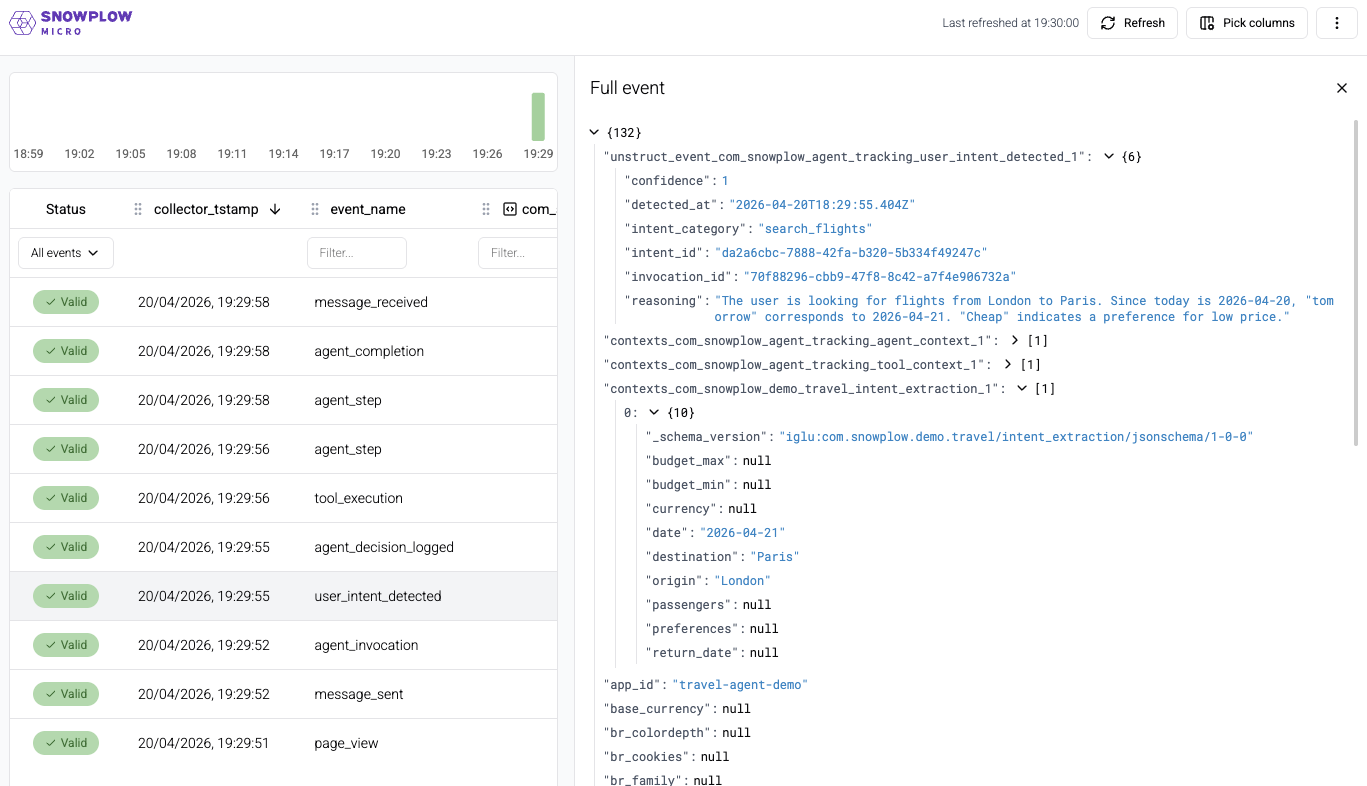
To test the default flow, send "Find cheap flights from London to Paris tomorrow"
- Open Snowplow Micro UI at http://localhost:9090/micro/ui and refresh after the agent responds
- Find the
user_intent_detectedevent - drill into it to see:intent_category: "search_flights"confidence: ~0.9 (this is a clear request)reasoning: the agent's explanation of how it interpreted the message- In the event's entities, find the
intent_extractioncustom entity:{ origin: "London", destination: "Paris", date: "2026-04-10", preferences: ["cheap"] }
- Find the
agent_decision_loggedevent - see:decision_type: "tool_selection"reasoning: "Will use search_flights with sort_by='price' since user said 'cheap'"considerations: the factors the agent weighed
- Find the
tool_executionforsearch_flights(this existed in v0.2) - Trace the full event chain through the Micro UI - all events share the same
invocation_id
To test the constraint handling, send "Find a flight to Tokyo for $20"
- Refresh the Micro UI after the agent responds
- Find the
user_intent_detectedevent - notice the confidence might be lower. Check theintent_extractionentity for the budget constraint noted inbudget_max - Find the
constraint_violationevent - drill into it to see:constraint_type: "budget"user_requirement: "$20 to Tokyo"reason_not_met: an explanation of why flights to Tokyo can't cost $20alternatives_considered: what other options the agent thought aboutrecommendation: what the agent suggests instead
- The agent still responds helpfully to the user with alternatives - tracking doesn't interrupt the conversation
You now have all three layers of tracking in place.
Schema reference
The schemas used in this stage are published on Iglu Central under vendor com.snowplow.agent.tracking, as before.
All the events have the invocation_id.
user_intent_detected event
The user_intent_detected event captures the agent's interpretation of what the user wants. intent_category identifies the intent type; confidence scores the agent's certainty (0–1); reasoning records the agent's explanation for its interpretation.
user_intent_detected
Eventiglu:com.snowplow.agent.tracking/user_intent_detected/jsonschema/1-0-0Example data
{
  "invocation_id": "7c9e6679-7425-40de-944b-e07fc1f90ae7",
  "intent_id": "f47ac10b-58cc-4372-a567-0e02b2c3d479",
  "intent_category": "search_flights",
  "confidence": 0.9,
  "reasoning": "User asked for cheap flights to Paris tomorrow, clearly a flight search request",
  "detected_at": "2024-01-15T10:30:00.000Z"
}
Properties and schema
- Table
- Complete JSON schema
| Property | Description |
|---|---|
invocation_idstring | Required. Unique identifier for the agent invocation |
intent_idstring | Required. Unique identifier for this detected intent |
intent_categorystring | Required. Category of user intent (application-defined) |
confidencenumber | Required. Confidence level (0-1) |
reasoningstring | Optional. Reasoning for this interpretation |
detected_atstring | Required. Timestamp when intent was detected |
{
  "$schema": "http://iglucentral.com/schemas/com.snowplowanalytics.self-desc/schema/jsonschema/1-0-0#",
  "description": "Agent self-tracking: logs the detected user intent category and confidence.",
  "self": {
    "vendor": "com.snowplow.agent.tracking",
    "name": "user_intent_detected",
    "format": "jsonschema",
    "version": "1-0-0"
  },
  "type": "object",
  "properties": {
    "invocation_id": {
      "type": "string",
      "description": "Unique identifier for the agent invocation",
      "format": "uuid"
    },
    "intent_id": {
      "type": "string",
      "description": "Unique identifier for this detected intent",
      "format": "uuid"
    },
    "intent_category": {
      "type": "string",
      "examples": [
        "search_flights",
        "submit_order",
        "ask_question",
        "cancel_booking",
        "get_recommendations"
      ],
      "description": "Category of user intent (application-defined)",
      "maxLength": 255
    },
    "confidence": {
      "type": "number",
      "minimum": 0,
      "maximum": 1,
      "description": "Confidence level (0-1)"
    },
    "reasoning": {
      "type": [
        "string",
        "null"
      ],
      "description": "Reasoning for this interpretation",
      "maxLength": 2000
    },
    "detected_at": {
      "type": "string",
      "format": "date-time",
      "description": "Timestamp when intent was detected"
    }
  },
  "required": [
    "invocation_id",
    "intent_id",
    "intent_category",
    "confidence",
    "detected_at"
  ],
  "additionalProperties": false
}
Warehouse query
- Snowflake
- BigQuery
- Databricks
- Redshift & Postgres
select
unstruct_event_com_snowplow_agent_tracking_user_intent_detected_1 user_intent_detected_1
from
atomic.events
where
events.collector_tstamp > getdate() - interval '1 hour'
and events.event = 'unstruct'
and events.event_name = 'user_intent_detected'
and events.event_vendor = 'com.snowplow.agent.tracking'
select
unstruct_event_com_snowplow_agent_tracking_user_intent_detected_1_0_0
from
PIPELINE_NAME.events events
where
events.collector_tstamp > timestamp_sub(current_timestamp(), interval 1 hour)
and events.event = 'unstruct'
and events.event_name = 'user_intent_detected'
and events.event_vendor = 'com.snowplow.agent.tracking'
select
unstruct_event_com_snowplow_agent_tracking_user_intent_detected_1
from
atomic.events events
where
events.collector_tstamp > timestampadd(HOUR, -1, current_timestamp())
and events.event = 'unstruct'
and events.event_name = 'user_intent_detected'
and events.event_vendor = 'com.snowplow.agent.tracking'
and unstruct_event_com_snowplow_agent_tracking_user_intent_detected_1 is not null
select
"user_intent_detected_1".*
from
atomic.events events
join atomic.com_snowplow_agent_tracking_user_intent_detected_1 "user_intent_detected_1"
  on "user_intent_detected_1".root_id = events.event_id and "user_intent_detected_1".root_tstamp = events.collector_tstamp
where
events.collector_tstamp > getdate() - interval '1 hour'
and "user_intent_detected_1".root_tstamp > getdate() - interval '1 hour'
and events.event = 'unstruct'
and events.event_name = 'user_intent_detected'
and events.event_vendor = 'com.snowplow.agent.tracking'
agent_decision_logged event
The agent_decision_logged event captures the reasoning behind a decision the agent is about to make. decision_type classifies the kind of decision; reasoning records the agent's explanation; considerations lists the factors it weighed.
agent_decision_logged
Eventiglu:com.snowplow.agent.tracking/agent_decision_logged/jsonschema/1-0-0Example data
{
  "invocation_id": "7c9e6679-7425-40de-944b-e07fc1f90ae7",
  "decision_id": "a3bb189e-8bf9-3888-9912-ace4e6543002",
  "decision_type": "tool_selection",
  "reasoning": "User wants cheap flights so I will use search_flights with sort_by='price' to surface the lowest fares first",
  "considerations": [
    "User specified 'cheap' as a preference",
    "sort_by='price' surfaces lowest fares first"
  ],
  "logged_at": "2024-01-15T10:30:00.500Z"
}
Properties and schema
- Table
- Complete JSON schema
| Property | Description |
|---|---|
invocation_idstring | Required. Unique identifier for the agent invocation |
decision_idstring | Required. Unique identifier for this decision |
decision_typestring | Required. Type of decision (application-defined) |
reasoningstring | Required. Natural language explanation of the decision |
considerationsarray | Optional. Factors the agent considered when making this decision |
logged_atstring | Required. Timestamp when decision was logged |
{
  "$schema": "http://iglucentral.com/schemas/com.snowplowanalytics.self-desc/schema/jsonschema/1-0-0#",
  "description": "Agent self-tracking: logs a decision the agent is about to make, including reasoning and context.",
  "self": {
    "vendor": "com.snowplow.agent.tracking",
    "name": "agent_decision_logged",
    "format": "jsonschema",
    "version": "1-0-0"
  },
  "type": "object",
  "properties": {
    "invocation_id": {
      "type": "string",
      "description": "Unique identifier for the agent invocation",
      "format": "uuid"
    },
    "decision_id": {
      "type": "string",
      "description": "Unique identifier for this decision",
      "format": "uuid"
    },
    "decision_type": {
      "type": "string",
      "examples": [
        "tool_selection",
        "parameter_reasoning",
        "result_interpretation",
        "clarification_needed",
        "constraint_handling"
      ],
      "description": "Type of decision (application-defined)",
      "maxLength": 255
    },
    "reasoning": {
      "type": "string",
      "description": "Natural language explanation of the decision",
      "maxLength": 2000
    },
    "considerations": {
      "type": [
        "array",
        "null"
      ],
      "description": "Factors the agent considered when making this decision",
      "items": {
        "type": "string",
        "maxLength": 2000
      }
    },
    "logged_at": {
      "type": "string",
      "format": "date-time",
      "description": "Timestamp when decision was logged"
    }
  },
  "required": [
    "invocation_id",
    "decision_id",
    "decision_type",
    "reasoning",
    "logged_at"
  ],
  "additionalProperties": false
}
Warehouse query
- Snowflake
- BigQuery
- Databricks
- Redshift & Postgres
select
unstruct_event_com_snowplow_agent_tracking_agent_decision_logged_1 agent_decision_logged_1
from
atomic.events
where
events.collector_tstamp > getdate() - interval '1 hour'
and events.event = 'unstruct'
and events.event_name = 'agent_decision_logged'
and events.event_vendor = 'com.snowplow.agent.tracking'
select
unstruct_event_com_snowplow_agent_tracking_agent_decision_logged_1_0_0
from
PIPELINE_NAME.events events
where
events.collector_tstamp > timestamp_sub(current_timestamp(), interval 1 hour)
and events.event = 'unstruct'
and events.event_name = 'agent_decision_logged'
and events.event_vendor = 'com.snowplow.agent.tracking'
select
unstruct_event_com_snowplow_agent_tracking_agent_decision_logged_1
from
atomic.events events
where
events.collector_tstamp > timestampadd(HOUR, -1, current_timestamp())
and events.event = 'unstruct'
and events.event_name = 'agent_decision_logged'
and events.event_vendor = 'com.snowplow.agent.tracking'
and unstruct_event_com_snowplow_agent_tracking_agent_decision_logged_1 is not null
select
"agent_decision_logged_1".*
from
atomic.events events
join atomic.com_snowplow_agent_tracking_agent_decision_logged_1 "agent_decision_logged_1"
  on "agent_decision_logged_1".root_id = events.event_id and "agent_decision_logged_1".root_tstamp = events.collector_tstamp
where
events.collector_tstamp > getdate() - interval '1 hour'
and "agent_decision_logged_1".root_tstamp > getdate() - interval '1 hour'
and events.event = 'unstruct'
and events.event_name = 'agent_decision_logged'
and events.event_vendor = 'com.snowplow.agent.tracking'
constraint_violation event
The constraint_violation event fires when the agent detects that a user's requirement cannot be met. constraint_type classifies the blocker; user_requirement records what was asked for; reason_not_met explains why it failed. alternatives_considered and recommendation capture what the agent explored and suggested instead.
constraint_violation
Eventiglu:com.snowplow.agent.tracking/constraint_violation/jsonschema/1-0-0Example data
{
  "invocation_id": "7c9e6679-7425-40de-944b-e07fc1f90ae7",
  "violation_id": "c56a4180-65aa-42ec-a945-5fd21dec0538",
  "constraint_type": "budget",
  "user_requirement": "Flight to Tokyo for $20",
  "reason_not_met": "No flights to Tokyo are available under $400 — the cheapest available fare is $412",
  "alternatives_considered": [
    "Nearby airports such as Osaka",
    "Flexible dates in the next 30 days",
    "One-stop routes via Seoul"
  ],
  "recommendation": "The lowest available fare is $412. Would you like to search with a higher budget or explore nearby destinations?",
  "violated_at": "2024-01-15T10:30:01.200Z"
}
Properties and schema
- Table
- Complete JSON schema
| Property | Description |
|---|---|
invocation_idstring | Required. Unique identifier for the agent invocation |
violation_idstring | Required. Unique identifier for this violation |
constraint_typestring | Required. Type of constraint that was violated (application-defined) |
user_requirementstring | Required. What the user requested |
reason_not_metstring | Required. Why it cannot be fulfilled |
alternatives_consideredarray | Optional. Alternative options considered |
recommendationstring | Optional. Recommended alternative |
violated_atstring | Required. Timestamp when violation was detected |
{
  "$schema": "http://iglucentral.com/schemas/com.snowplowanalytics.self-desc/schema/jsonschema/1-0-0#",
  "description": "Agent self-tracking: logs when a user requirement cannot be met due to a constraint.",
  "self": {
    "vendor": "com.snowplow.agent.tracking",
    "name": "constraint_violation",
    "format": "jsonschema",
    "version": "1-0-0"
  },
  "type": "object",
  "properties": {
    "invocation_id": {
      "type": "string",
      "description": "Unique identifier for the agent invocation",
      "format": "uuid"
    },
    "violation_id": {
      "type": "string",
      "description": "Unique identifier for this violation",
      "format": "uuid"
    },
    "constraint_type": {
      "type": "string",
      "examples": [
        "budget",
        "dates",
        "availability",
        "permissions",
        "rate_limit"
      ],
      "description": "Type of constraint that was violated (application-defined)",
      "maxLength": 255
    },
    "user_requirement": {
      "type": "string",
      "description": "What the user requested",
      "maxLength": 1000
    },
    "reason_not_met": {
      "type": "string",
      "description": "Why it cannot be fulfilled",
      "maxLength": 2000
    },
    "alternatives_considered": {
      "type": [
        "array",
        "null"
      ],
      "items": {
        "type": "string",
        "maxLength": 1000
      },
      "description": "Alternative options considered"
    },
    "recommendation": {
      "type": [
        "string",
        "null"
      ],
      "description": "Recommended alternative",
      "maxLength": 1000
    },
    "violated_at": {
      "type": "string",
      "format": "date-time",
      "description": "Timestamp when violation was detected"
    }
  },
  "required": [
    "invocation_id",
    "violation_id",
    "constraint_type",
    "user_requirement",
    "reason_not_met",
    "violated_at"
  ],
  "additionalProperties": false
}
Warehouse query
- Snowflake
- BigQuery
- Databricks
- Redshift & Postgres
select
unstruct_event_com_snowplow_agent_tracking_constraint_violation_1 constraint_violation_1
from
atomic.events
where
events.collector_tstamp > getdate() - interval '1 hour'
and events.event = 'unstruct'
and events.event_name = 'constraint_violation'
and events.event_vendor = 'com.snowplow.agent.tracking'
select
unstruct_event_com_snowplow_agent_tracking_constraint_violation_1_0_0
from
PIPELINE_NAME.events events
where
events.collector_tstamp > timestamp_sub(current_timestamp(), interval 1 hour)
and events.event = 'unstruct'
and events.event_name = 'constraint_violation'
and events.event_vendor = 'com.snowplow.agent.tracking'
select
unstruct_event_com_snowplow_agent_tracking_constraint_violation_1
from
atomic.events events
where
events.collector_tstamp > timestampadd(HOUR, -1, current_timestamp())
and events.event = 'unstruct'
and events.event_name = 'constraint_violation'
and events.event_vendor = 'com.snowplow.agent.tracking'
and unstruct_event_com_snowplow_agent_tracking_constraint_violation_1 is not null
select
"constraint_violation_1".*
from
atomic.events events
join atomic.com_snowplow_agent_tracking_constraint_violation_1 "constraint_violation_1"
  on "constraint_violation_1".root_id = events.event_id and "constraint_violation_1".root_tstamp = events.collector_tstamp
where
events.collector_tstamp > getdate() - interval '1 hour'
and "constraint_violation_1".root_tstamp > getdate() - interval '1 hour'
and events.event = 'unstruct'
and events.event_name = 'constraint_violation'
and events.event_vendor = 'com.snowplow.agent.tracking'