Define attributes
Attributes are defined as part of attribute groups. To create an attribute, you'll need to set:
- A name that describes the attribute
- Optionally, which event schema or event specification to calculate it from (leave empty to include all events)
- What property in the schema to consider for the calculation
- What kind of aggregation you want to calculate over time, e.g.
meanorlast
Attribute calculation starts when the definitions are published, and values are not backdated.
Configure the attribute
Every attribute requires an aggregation to calculate. You can optionally restrict which events are included — leave the event filter empty to include all event types. Most aggregations also operate on a property of those events. The time period and criteria settings are optional refinements.
In Console, open your attribute group and use the attribute configuration interface to fill in the fields. The time period and criteria settings are within More options.
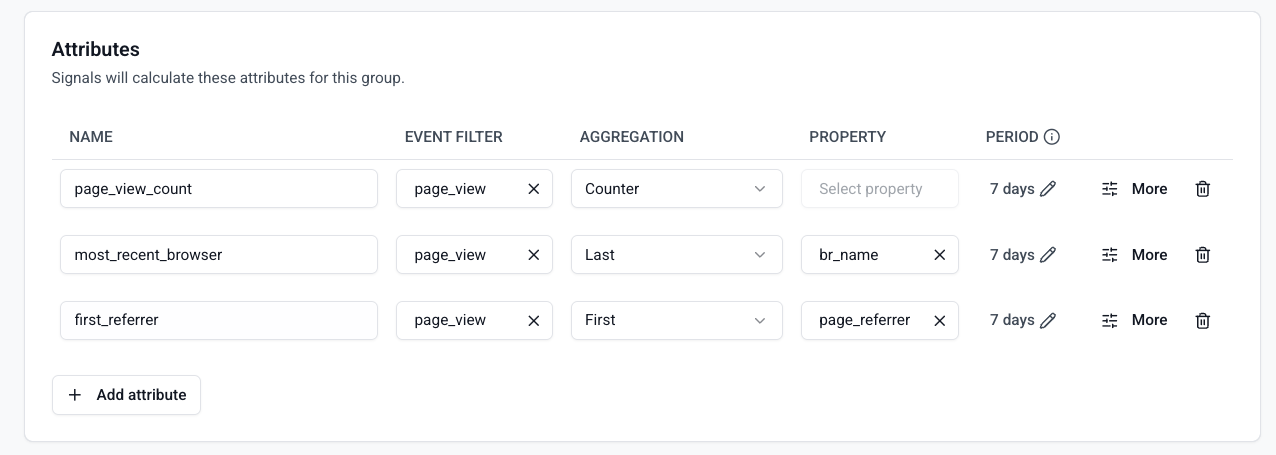
With the Python SDK, these settings are arguments to the Attribute class, listed in all attribute options.
Select events
Use the event filter to choose which event types to calculate the attribute from. The event filter is optional — leaving it empty means the attribute is calculated from all event types.
- Console
- Python SDK
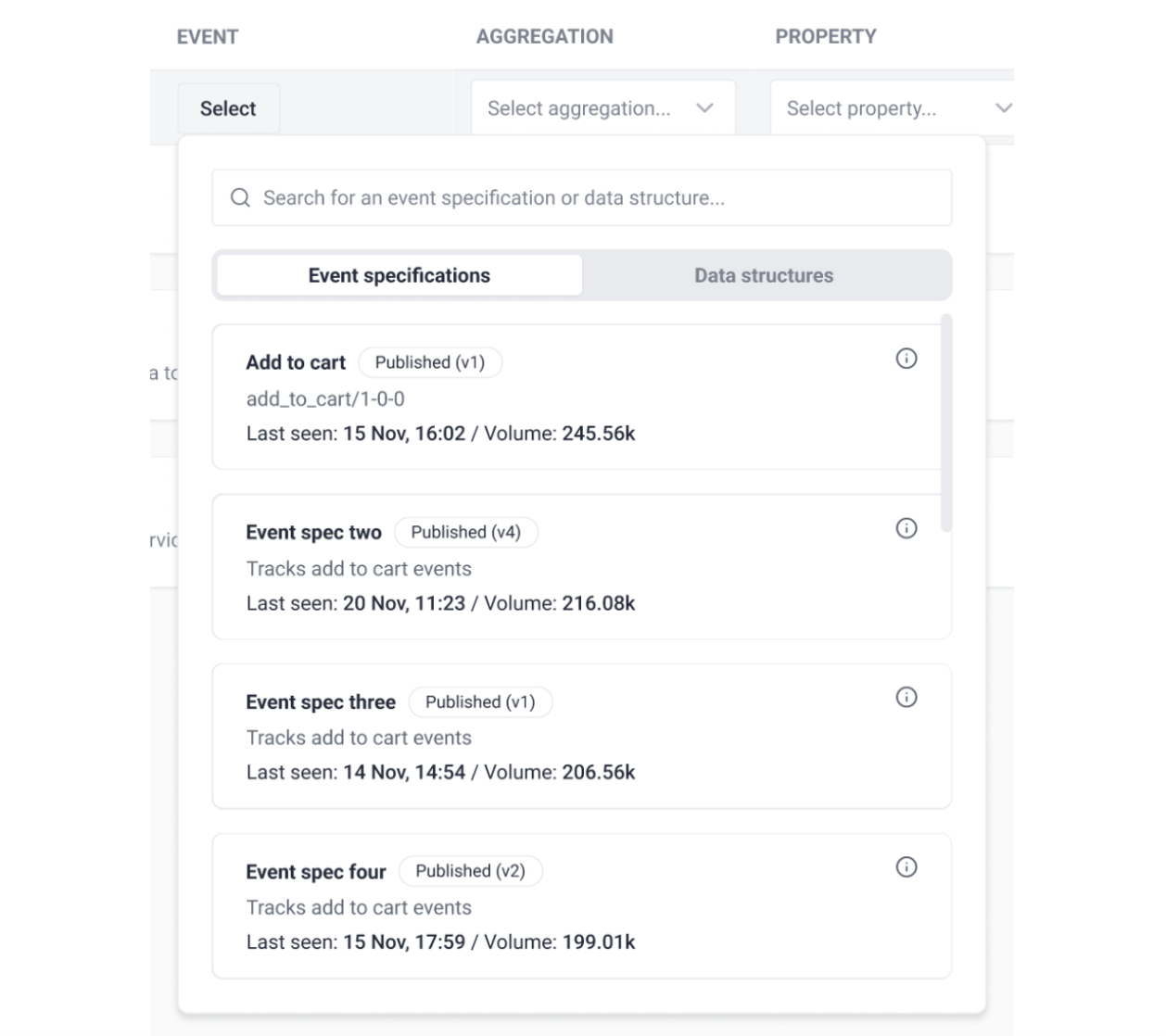
Click the dropdown to see the available events, listed by name and vendor:
- Event Specifications: select any event specification from an existing tracking plan.
- Snowplow events: select any built-in Snowplow or Iglu Central schema. For legacy reasons, to calculate an attribute from structured events find
event (com.google.analytics.measurement-protocol). - Custom events: select any schema or data structure available within your pipeline.
The search finds direct matches only, so use the exact name of the event, schema, or vendor.
To calculate an attribute across all event types — for example, a total event counter or the first value of an atomic field seen across your entire pipeline — leave the event filter empty. The attribute will then update for every event Signals processes, regardless of schema.
Once you've selected an event and version, click Confirm to add the attribute to your attribute group.
The events list describes the types of events the attribute is calculated from, as references to Snowplow event schemas. Pass an empty list (events=[]) to match all event types.
An Event accepts the following parameters:
| Argument | Description | Type |
|---|---|---|
name | event_name column in atomic.events table | string |
vendor | event_vendor column in atomic.events table | string |
version | event_version column in atomic.events table | string |
All parameters are optional and work as wildcards. Some examples:
# A specific event version
Event(
    name="destination",
    vendor="com.snowplowanalytics.snowplow.media",
    version="2-0-2"
)

# All versions of an event
Event(
    name="destination",
    vendor="com.snowplowanalytics.snowplow.media",
)

# All events for a vendor
Event(vendor="com.snowplowanalytics.snowplow.media")

# Built-in Snowplow events
sp_page_view = Event(name="page_view", vendor="com.snowplowanalytics.snowplow", version="1-0-0")
sp_page_ping = Event(name="page_ping", vendor="com.snowplowanalytics.snowplow", version="1-0-0")
# Structured events
sp_structured = Event(name="event", vendor="com.google.analytics", version="1-0-0")

# All event types (empty list — attribute fires for every event)
events=[]
Choose an aggregation
Signals supports the following aggregation types:
| Aggregation | Description | Required property type in schema | Notes |
|---|---|---|---|
| Counter | Count events | No property used for this aggregation | |
| Sum | Sum of property values | Numeric | |
| Min | Minimum property value | Numeric | |
| Max | Maximum property value | Numeric | |
| Mean | Average of property values | Numeric | |
| First | First property value seen | String, Numeric, Boolean | Earliest by derived_tstamp, not by arrival order |
| Last | Last property value seen | String, Numeric, Boolean | Latest by derived_tstamp, not by arrival order |
| Most Frequent | Most frequent property value seen | String, Numeric, Boolean | Tracks up to 100 distinct values; ties are broken arbitrarily |
| Least Frequent | Least frequent property value seen | String, Numeric, Boolean | Tracks up to 100 distinct values; ties are broken arbitrarily |
| Approx Count Distinct | Approximate distinct count (HyperLogLog) | String, Numeric, Boolean | Approximate, with a typical error around 1%. Don't use where an exact count matters |
| Category Count | Dictionary of unique values and their counts | String, Numeric, Boolean | Keeps the 100 highest-count values; lower-count values are dropped |
| Unique List | List of unique property values | String, Numeric, Boolean | Ordered oldest to newest by derived_tstamp, capped at 100 values. See below |
| Time Since Last | Duration since the most recent matching event | Always uses derived_tstamp | Requires time_unit. Result type must be float or double. See below |
| Time Since First | Duration since the earliest matching event | Always uses derived_tstamp | Requires time_unit. Result type must be float or double. See below |
A property isn't used for counter aggregation. To only count events with a specific property value, use a criteria filter.
Attributes calculated over high-cardinality properties, such as a product ID or a search term, can exceed the 100-value limits noted above. Consider a criteria filter to narrow the set of events, or a lower-cardinality property.
Unique list ordering
A unique list is ordered by when each value was most recently seen, oldest first. Seeing a value again doesn't add a second entry: it moves the existing entry to the end of the list. For example, viewing pages /home, /products, then /home again produces ["/products", "/home"].
This also determines which values are dropped once the list reaches 100 entries: the least recently seen value is removed first, so a frequently repeated value is retained even if it was first seen long ago.
Time since aggregations
The time_since_last and time_since_first aggregations measure how long ago the most recent or earliest matching event occurred. The result is a fractional duration in the unit you choose with the time_unit argument: s (seconds), min (minutes), h (hours), or d (days).
These aggregations always operate on the event's derived_tstamp property. You don't need to set a property - it defaults to derived_tstamp, and no other property is accepted. The result type must be float or double.
The value is recomputed at read time, so it reflects the elapsed time between the stored event timestamp and the moment the attribute is retrieved. The result is never negative - if the stored event timestamp is later than the retrieval time (which can happen with out-of-order events), the value is clamped at 0.
- Console
- Python SDK
Select the aggregation type from the dropdown in the attribute configuration interface.
Set the aggregation argument using the lowercase snake_case version of the aggregation name, e.g. "counter", "most_frequent", "approx_count_distinct".
Select a property
You can calculate attributes based on properties in any part of your events:
- Atomic properties: available for all events
- Event schema properties: properties within your chosen event
- Entity properties: properties from schemas tracked as entities with your chosen event
- Calculated properties: a value derived by combining other properties, described below
- Console
- Python SDK
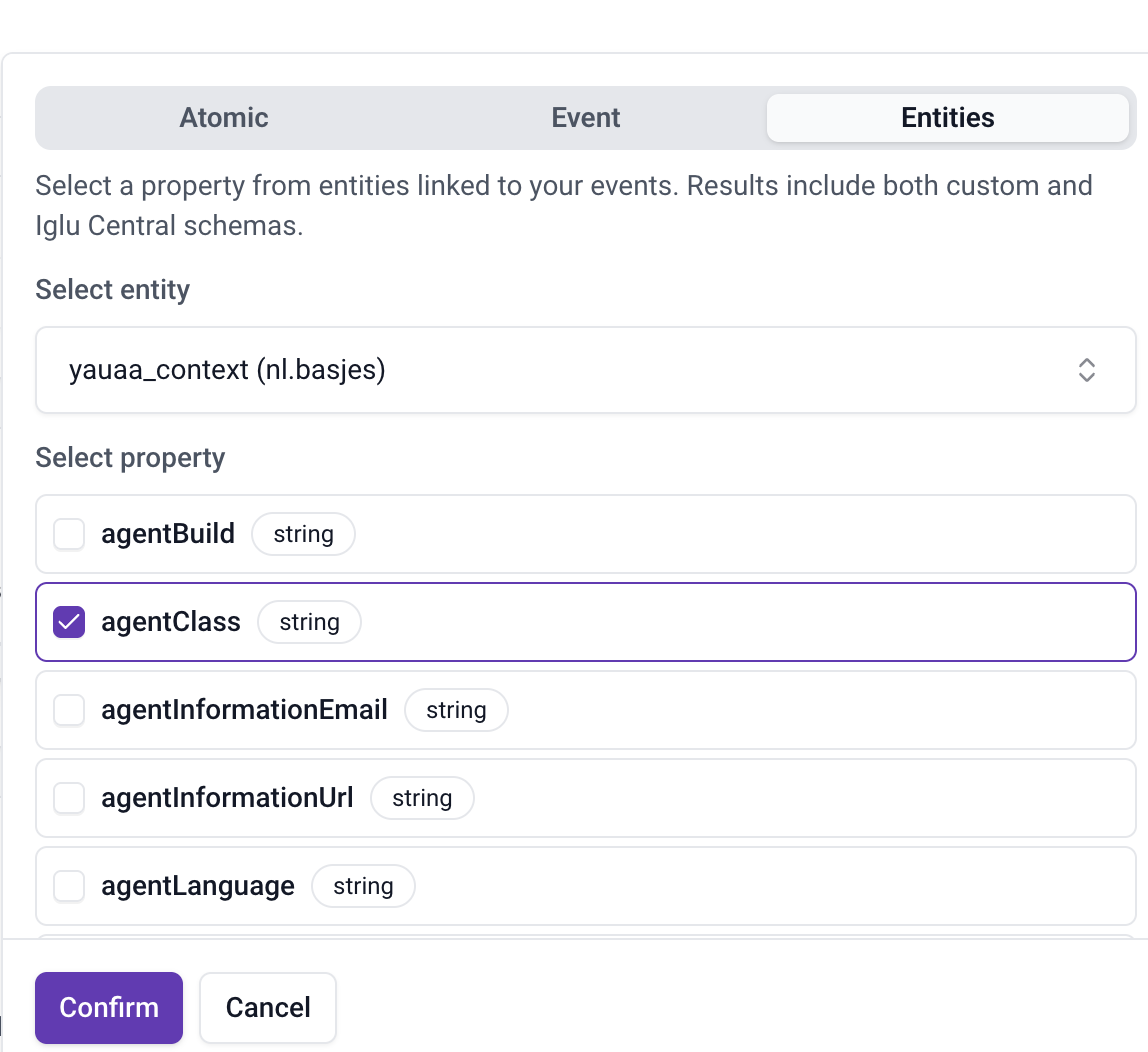
Click Confirm to specify the property for this attribute.
Use the property argument on Attribute with one of these helper classes:
AtomicProperty— targets atomic properties in the event payloadEventProperty— targets properties in the event data structureEntityProperty— targets properties in entity data structuresCalculatedProperty— combines several of the above into a derived value, described below
# Atomic property
AtomicProperty(name="app_id")

# Property in an event data structure
EventProperty(
    vendor="com.example",
    name="test_event",
    major_version=1,
    path="action"
)

# Property in an entity
EntityProperty(
    vendor="com.example",
    name="user_context",
    major_version=1,
    path="age"
)
Calculated properties
A calculated property combines the values of other properties from the same event into a single derived value, using one of a fixed set of operations. The properties you combine can mix atomic, event, and entity properties.
Calculated properties work in both aggregations and criteria. They aren't supported as attribute keys or in agentic contexts. A calculated property can't contain another calculated property.
The following operations are available:
| Operation | Input types | Output type | Null behavior |
|---|---|---|---|
concat | String, integer | String | Null properties are skipped, and the remaining values are joined. Null only if every property is null |
sum | Integer, number | Integer if every property is an integer, otherwise number | Null if any property is null |
product | Integer, number | Integer if every property is an integer, otherwise number | Null if any property is null |
min | Integer, number | Integer if every property is an integer, otherwise number | Null if any property is null |
max | Integer, number | Integer if every property is an integer, otherwise number | Null if any property is null |
coalesce | String, integer, number, or boolean, and every property must be the same type | Same as the properties | Returns the first non-null property, in order. Null only if every property is null |
concat accepts string and integer properties only. It accepts an optional separator argument, inserted between the non-null values and defaulting to an empty string. Setting a separator on any other operation is rejected.
Every operation except coalesce needs at least two properties, and no operation accepts more than 50.
A skipped concat property takes its separator with it. Concatenating experimentId and variantId with a - separator gives exp3-blue when both are populated, but exp3 when variantId is null, not exp3-.
For sum, product, min, and max, a null property isn't treated as zero: it makes the whole result null, and the event contributes nothing to the aggregation.
- Console
- Python SDK
In the property picker, select two or more properties using the checkboxes in the Atomic, Event, and Entities tabs. Selections are kept as you switch tabs, so you can combine properties from different sources. Once two are selected, a Calculated property panel appears.
In the panel:
- Drag the properties into the order you want. Order matters for
concat, which joins values in that order, and forcoalesce, which returns the first non-null value. - For a timestamp property, optionally choose a granularity next to its name in the panel to apply a date part.
- Choose an operation.
- For
concat, optionally enter a separator.
Click Confirm to use the calculated property for this attribute.
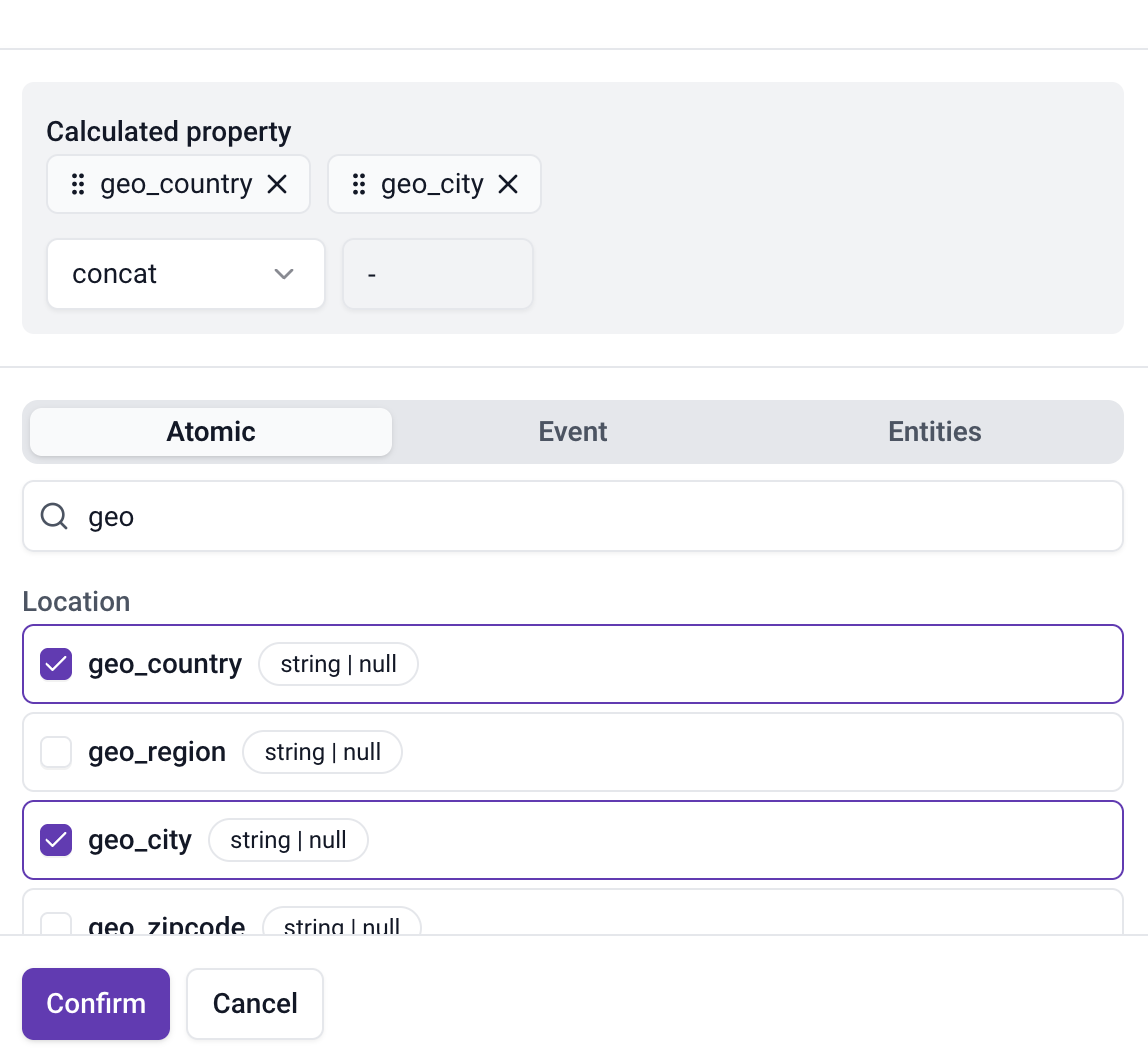
The picker only lists properties compatible with the attribute's aggregation, so choose the aggregation first. For example, to concatenate geo_country and geo_city as shown above, use an aggregation such as last or unique_list: numeric aggregations such as sum hide string properties.
The aggregation also decides which operations are offered. With sum, mean, min, or max, you can choose sum, product, min, max, or coalesce, but not concat. With time_since_last or time_since_first, you can only select one property, so calculated properties aren't available.
Use CalculatedProperty with an operation and a list of properties to combine. For example, to build an experiment and variant identifier from two event properties:
CalculatedProperty(
    operation="concat",
    separator="-",
    properties=[
        EventProperty(
            vendor="com.example",
            name="experiment_view",
            major_version=1,
            path="experimentId"
        ),
        EventProperty(
            vendor="com.example",
            name="experiment_view",
            major_version=1,
            path="variantId"
        ),
    ]
)
Apply a date part
When a property holds a date-time value, you can apply an optional date_part modifier to transform the timestamp before aggregation. This is useful for seasonality analysis (busiest hour of day, most active day of week) and active-period tracking (distinct active days or months).
There are two families of date part:
| Family | Date parts | Output | Example |
|---|---|---|---|
| Extract | hour_of_day, day_of_week, month_of_year | Integer (cyclical component) | hour_of_day on 2024-03-15T14:30:00 returns 14 |
| Truncate | active_day, active_week, active_month | Date string (truncated to boundary) | active_day on 2024-03-15T14:30:00 returns 2024-03-15 |
For day_of_week, values follow ISO 8601: 1 = Monday through 7 = Sunday.
Date parts are only valid on date-time properties. For atomic properties, this means the timestamp fields (derived_tstamp, collector_tstamp, dvce_created_tstamp, dvce_sent_tstamp, refr_dvce_tstamp, etl_tstamp, true_tstamp). For event and entity properties, the property's schema must declare format: date-time at the target path.
Not all aggregations support date parts. The following aggregations work with date_part:
| Aggregation | Example use |
|---|---|
| Most Frequent | Busiest hour of day, most common active day |
| Least Frequent | Quietest hour, rarest weekday |
| First | Hour of day of the earliest event |
| Last | Day of week of the most recent event |
| Unique List | List of distinct active days |
| Category Count | Hour-of-day histogram |
| Approx Count Distinct | Approximate number of distinct active days |
The declared attribute type must match the date part family's output:
- Extract date parts (
hour_of_day,day_of_week,month_of_year) requireint32orint64(orint32_list/int64_listforunique_list) - Truncate date parts (
active_day,active_week,active_month) requirestring(orstring_listforunique_list)
Both restrictions above — the supported aggregations and the required attribute type — apply to an attribute whose value is itself the date part. Inside a calculated property, each property you combine can carry its own date part, and neither restriction applies: the date part contributes its output type as one input to the operation, so any aggregation compatible with the operation's result works. For example, hour_of_day on a timestamp can be summed with an integer property, or active_day concatenated with a string property.
- Console
- Python SDK
Select a date part from the dropdown that appears when you choose a date-time property. Leave it unset to use the raw timestamp value.
Set the date_part argument on AtomicProperty, EventProperty, or EntityProperty:
# Most frequent hour of day from derived_tstamp
AtomicProperty(name="derived_tstamp", date_part="hour_of_day")

# Distinct active days from a custom event timestamp
EventProperty(
    vendor="com.example",
    name="session_heartbeat",
    major_version=1,
    path="heartbeat_time",
    date_part="active_day"
)
Set the period
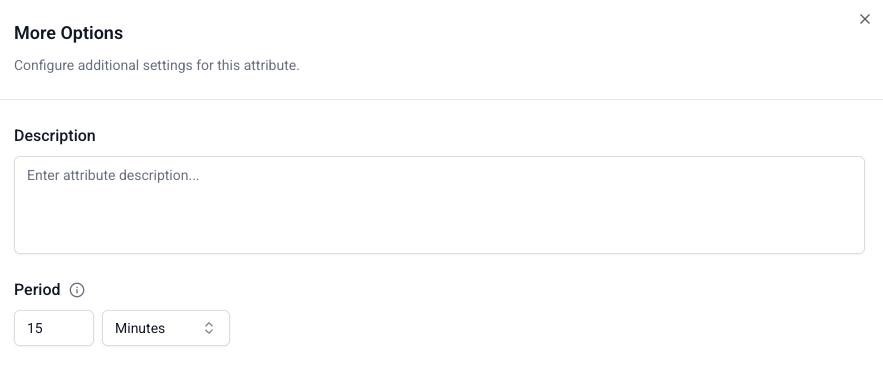
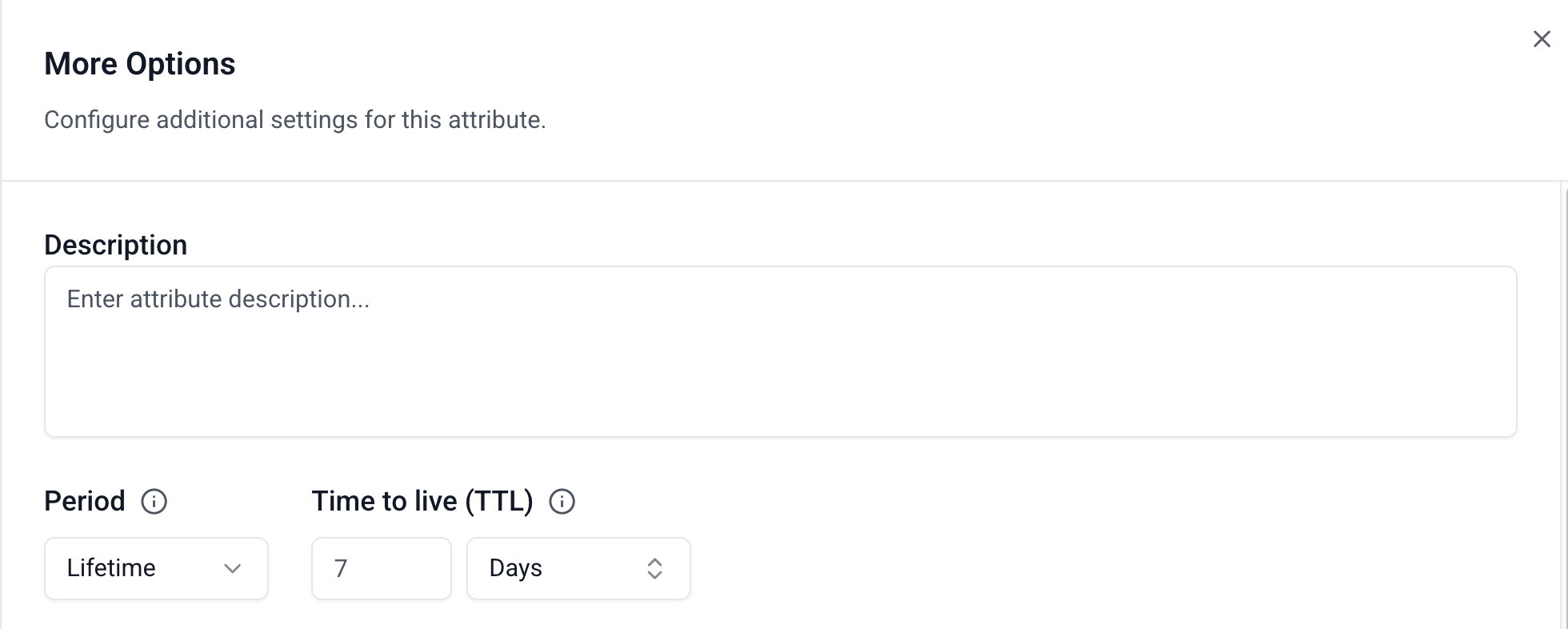
Every stream attribute has a period that controls the time window for the calculation. Choose a rolling time window (for example, 7 days or 15 minutes) to aggregate over recent events, or select Lifetime to aggregate over all available data.
- Console
- Python SDK
Select the period when creating or editing an attribute.
When you select a rolling time window, Signals only includes events within that window in the calculation:
When you select Lifetime, a Time to live (TTL) field appears. TTL controls how long a stale value is retained in the Profiles Store before it is deleted. The default is 7 days. If Signals processes a new event that updates the attribute, the TTL timer resets.
Set period on your Attribute using a Python timedelta. For lifetime attributes, omit period and set ttl instead:
from datetime import timedelta

# Rolling period
my_attribute = Attribute(
    ...,
    period=timedelta(minutes=10),
)

# Lifetime with TTL
my_lifetime_attribute = Attribute(
    ...,
    ttl=timedelta(days=7),
)
Filter with criteria
Use criteria to filter the events used to calculate an attribute. They allow you to be specific about which subsets of events should trigger attribute updates. For example, instead of counting all page views in a user's session, you may wish to calculate only views for the homepage, or a login page.
- Console
- Python SDK
Find the criteria option within More options.
Defining criteria has three steps:
- Select which property to filter on, similarly to the property selection for the attribute
- Choose which logical operator to use
- Enter the value to filter on
If you enter multiple criteria, you will have the option to require all or any of them to be met for the attribute to update.
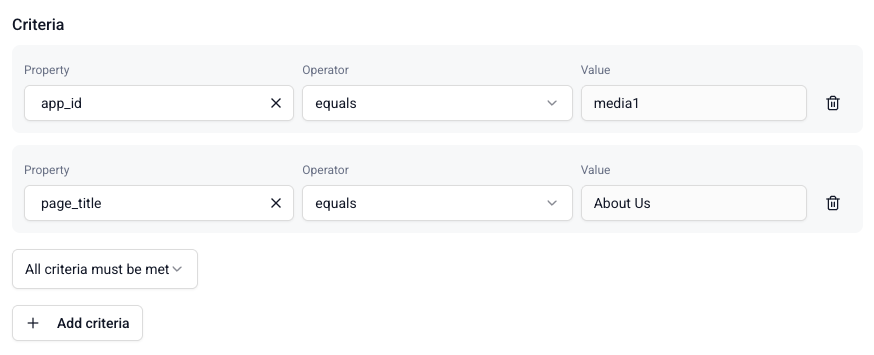
Click Done to save the criteria when you're finished.
The criteria argument takes a Criteria object, which contains Criterion conditions.
| Argument | Description | Type |
|---|---|---|
all | All conditions must be met | list of Criterion |
any | At least one condition must be met | list of Criterion |
Use Criterion operator methods to define filtering rules:
.eq— equality (=).neq— non-equality (!=).gt— greater than.gte— greater than or equal to.lt— less than.lte— less than or equal to.like— pattern match (LIKE).in_list— value in list (IN)
For example, to calculate an attribute for page views of either the FAQs or contact page:
from snowplow_signals import Criteria, Criterion, AtomicProperty

criteria = Criteria(
    any=[
        Criterion.like(AtomicProperty(name="page_url"), "%/faq%"),
        Criterion.like(AtomicProperty(name="page_url"), "%/contact-us%"),
    ]
)
All attribute options
The table below lists all available arguments for a Python SDK Attribute. The same options are available in the Console attribute configuration interface.
| Argument | Description | Type | Required? |
|---|---|---|---|
name | The name of the attribute | string | ✅ |
description | The description of the attribute | string | ❌ |
events | List of Snowplow Events to calculate the attribute from. Pass an empty list or omit to match all event types. | list of Event | ❌ |
aggregation | The calculation to perform | one of: counter, sum, min, max, mean, first, last, most_frequent, least_frequent, approx_count_distinct, category_count, unique_list, time_since_last, time_since_first | ✅ |
type | The type of the aggregation result | one of: bytes, string, int32, int64, double, float, bool, dict, unix_timestamp, bytes_list, string_list, int32_list, int64_list, double_list, float_list, bool_list, unix_timestamp_list | ✅ |
criteria | Filters to apply to events | Criteria | ❌ |
property | The property to use in the aggregation, or a calculated property combining several | AtomicProperty, EventProperty, EntityProperty, or CalculatedProperty | ❌ |
period | The time window over which to calculate the aggregation, or Lifetime to aggregate over all available data | timedelta | ❌ |
ttl | Time-to-live for lifetime attributes (no period). Falls back to the attribute group TTL if not set. Cannot be used together with period. | timedelta | ❌ |
time_unit | The unit for time_since_last/time_since_first results | one of: s, min, h, d | Required for time_since_last/time_since_first |
default_value | Default value if aggregation returns no results | ❌ |
Examples
The following examples show complete attribute configurations, using the Python SDK.
Minimal example
This is the minimum configuration needed to create an attribute:
from snowplow_signals import Attribute, Event

my_attribute = Attribute(
    name="button_click_counter",
    type="int32",
    events=[
        Event(
            vendor="com.snowplowanalytics.snowplow",
            name="button_click",
            version="1-0-0",
        )
    ],
    aggregation="counter"
)
Once applied and active, this definition triggers every time Signals processes an event with the schema iglu:com.snowplowanalytics.snowplow/button_click/jsonschema/1-0-0. The stored attribute starts at 0 and increases by 1 with every button_click event.
Filtered counter with a time window
Count button_click events only where the button id is generate_emoji_btn, over a rolling 10-minute window.
from snowplow_signals import Attribute, Event, Criteria, Criterion, EventProperty
from datetime import timedelta

button_click_counter_attribute = Attribute(
    name="emoji_button_click_counter",
    description="The number of clicks for the 'generate emoji' button",
    type="int32",
    events=[
        Event(
            vendor="com.snowplowanalytics.snowplow",
            name="button_click",
            version="1-0-0",
        )
    ],
    aggregation="counter",
    criteria=Criteria(
        all=[
            Criterion.eq(
                EventProperty(
                    vendor="com.snowplowanalytics.snowplow",
                    name="button_click",
                    major_version=1,
                    path="id"
                ),
                "generate_emoji_btn"
            )
        ]
    ),
    period=timedelta(minutes=10),
    default_value=0
)
Last atomic property value
Track the most recent referrer source using the mkt_medium atomic property, calculated from either a page view or a custom event.
from snowplow_signals import Attribute, Event, AtomicProperty

referrer_source_attribute = Attribute(
    name="referrer_source",
    description="Referrer",
    type="string",
    events=[
        Event(name="page_view", vendor="com.snowplowanalytics.snowplow", version="1-0-0"),
        Event(name="login_landing", vendor="com.business.example", version="1-0-0"),
    ],
    aggregation="last",
    property=AtomicProperty(name="mkt_medium"),
)
Sum of an entity property
Sum the price of product entities in ecommerce events, counting only transaction events.
from snowplow_signals import Attribute, Event, Criteria, Criterion, EntityProperty, EventProperty

my_new_attribute = Attribute(
    name="products_total_purchase_value",
    description="Total purchase value for all products",
    type="double",
    events=[
        Event(
            vendor="com.snowplowanalytics.snowplow.ecommerce",
            name="snowplow_ecommerce_action",
            version="1-0-2",
        )
    ],
    aggregation="sum",
    criteria=Criteria(
        all=[
            Criterion.eq(
                EventProperty(
                    vendor="com.snowplowanalytics.snowplow.ecommerce",
                    name="snowplow_ecommerce_action",
                    major_version=1,
                    path="type"
                ),
                "transaction"
            )
        ]
    ),
    property=EntityProperty(
        vendor="com.snowplowanalytics.snowplow.ecommerce",
        name="product",
        major_version=1,
        path="price",
    ),
    default_value=0
)
Time since last event
Track how many minutes have passed since the user's most recent page view.
from snowplow_signals import Attribute, Event

recency = Attribute(
    name="minutes_since_last_page_view",
    description="Minutes since the user's most recent page view",
    type="double",
    events=[
        Event(
            vendor="com.snowplowanalytics.snowplow",
            name="page_view",
            version="1-0-0",
        )
    ],
    aggregation="time_since_last",
    time_unit="min",
)
Global event counter
Count all events over a 30-day rolling window, regardless of event type. This is useful for overall engagement scoring - no event enumeration required.
from snowplow_signals import Attribute
from datetime import timedelta

n_events_30d = Attribute(
    name="n_events_30d",
    description="Total number of events in the last 30 days across all event types",
    type="int32",
    events=[],
    aggregation="counter",
    period=timedelta(days=30),
    default_value=0
)
Because events is empty, this attribute updates for every event Signals processes - page views, page pings, custom events, and any future event types are all included automatically.
First UTM medium across all events
Capture the first marketing medium seen for a user, checking all events that carry the mkt_medium atomic property.
from snowplow_signals import Attribute, AtomicProperty

first_utm_medium = Attribute(
    name="first_utm_medium",
    description="First marketing medium seen across all events",
    type="string",
    events=[],
    aggregation="first",
    property=AtomicProperty(name="mkt_medium"),
)
Without an event filter, this attribute captures mkt_medium from any event that includes it, so you don't need to enumerate every event schema that might carry UTM parameters.
Most frequent hour of day
Find the hour of the day when a user most commonly views pages, using a date_part modifier on derived_tstamp.
from snowplow_signals import Attribute, Event, AtomicProperty

peak_hour = Attribute(
    name="peak_page_view_hour",
    description="Hour of the day with the most page views",
    type="int32",
    events=[
        Event(
            vendor="com.snowplowanalytics.snowplow",
            name="page_view",
            version="1-0-0",
        )
    ],
    aggregation="most_frequent",
    property=AtomicProperty(name="derived_tstamp", date_part="hour_of_day"),
)
The hour_of_day date part extracts the hour (0-23) from each event's timestamp before aggregation. Because most_frequent is used, the result is the single hour with the highest event count. Use category_count instead to get a count per hour, covering the hours the user was active — an hour with no events has no key in the result, rather than a key set to zero.
Sum of several properties (order total)
Total what a user has spent, where each order event carries the subtotal, tax, and shipping as separate properties. A calculated property adds them together per event, and the sum aggregation then totals that across events.
from snowplow_signals import Attribute, Event, CalculatedProperty, EventProperty

total_spend = Attribute(
    name="total_spend",
    description="Total spent, including tax and shipping",
    type="double",
    events=[
        Event(
            vendor="com.example",
            name="order_complete",
            version="1-0-0",
        )
    ],
    aggregation="sum",
    property=CalculatedProperty(
        operation="sum",
        properties=[
            EventProperty(
                vendor="com.example",
                name="order_complete",
                major_version=1,
                path="subtotal"
            ),
            EventProperty(
                vendor="com.example",
                name="order_complete",
                major_version=1,
                path="tax"
            ),
            EventProperty(
                vendor="com.example",
                name="order_complete",
                major_version=1,
                path="shipping"
            ),
        ]
    ),
)
The two uses of sum do different jobs: the operation adds properties within one event, and the aggregation adds the results across events. If any property is null on an event, the calculated property is null and that event contributes nothing to the total.
Make sure tax and shipping are always tracked, as 0 where none applies. Otherwise, an order without tax or shipping is left out of total_spend entirely, not only that amount. A nested coalesce can't substitute a default, because a calculated property can't contain another calculated property.
The total is only as complete as its inputs. There's no subtraction operation, so for discounts, use a subtotal with discounts already taken off, or track the discount as a negative amount and add it as another property.
Adding amounts in different currencies doesn't give a meaningful total. If you sell in more than one currency, add criteria on the currency property to keep one attribute per currency, or sum amounts your tracking has already converted to a single currency.
Unique list of two properties (A/B test variants seen)
Track which A/B test variants a user has been exposed to, so you can personalize on what they've already seen. Each experiment_view event carries the experiment and the variant separately, and neither identifies the exposure on its own — it's the pair that does. Concatenating them into a single calculated property makes that pair the value the aggregation collects.
from snowplow_signals import Attribute, Event, CalculatedProperty, EventProperty

experiment_variants_seen = Attribute(
    name="experiment_variants_seen",
    description="Distinct experiment and variant combinations seen",
    type="string_list",
    events=[
        Event(
            vendor="com.example",
            name="experiment_view",
            version="1-0-0",
        )
    ],
    aggregation="unique_list",
    property=CalculatedProperty(
        operation="concat",
        separator="-",
        properties=[
            EventProperty(
                vendor="com.example",
                name="experiment_view",
                major_version=1,
                path="experimentId"
            ),
            EventProperty(
                vendor="com.example",
                name="experiment_view",
                major_version=1,
                path="variantId"
            ),
        ]
    ),
)
Each event contributes one entry, such as "exp3-blue", and unique_list keeps the distinct ones. If either property can be missing on an event, add criteria requiring both to be set: concat skips a null property, so an event with an experiment but no variant would otherwise contribute "exp3", colliding with any other event that produces "exp3".
Signals calculates attributes from events flowing through a Snowplow pipeline. If you don't have one, you can start on the Signals free tier. It needs no credit card.