Signals fundamentals
Signals introduces a new set of data governance concepts to Snowplow. As with schemas for Snowplow event data, Signals components are strictly defined, structured, and versioned.
Signals has four main configurable components:
- Attribute groups, for defining and calculating attributes
- Agentic contexts, for grounding agents in a user's recent session activity
- Services, for consuming calculated attributes in your applications
- Interventions, for consuming calculated attributes and triggering actions in your applications
Attribute groups are where you define the behavioral data you want to calculate. Each attribute group contains multiple attributes - the specific facts about user behavior you want to measure or take action on - along with the configuration that defines how to calculate them, and from what data. Attributes can only be defined within attribute groups; they are effectively properties of the attribute group.
Agentic contexts are a separate resource, for capturing a rolling window of session activity to ground an agent, along with instructions to guide it.
To use attributes to trigger actions such as in-app messages, discounts, or personalized journeys, use services or interventions.
Services provide a stable interface layer between your calculated attributes and your applications. Each service can contain multiple attribute groups, pinned to specific versions. You'd build the logic within your application for how to use the retrieved attributes.
Interventions are a separate abstraction for defining when to trigger actions in your application.

Architecture
Signals runs alongside a Snowplow pipeline, and is deployed into the same cloud. Your pipeline continues to process events as usual.
Snowflake, BigQuery, and Databricks are supported. You can also use Signals without the warehouse functionality.
Signals adds these infrastructure components:
- Profiles Store: stores calculated attributes and configurations
- Signals SDKs and API: allow you to manage and fetch attributes and interventions
- Streaming engine: computes attributes from Snowplow events in real time and sends them directly to the Profiles Store
- Batch engine: reads pre-calculated attribute values from your warehouse tables at a fixed interval and syncs them to the Profiles Store; also backfills historical data for stream attribute groups

Attribute groups
Attribute groups are where you define the data you want to calculate. Each attribute group is a versioned collection that specifies:
- The attributes to calculate - the specific behavioral facts about users
- The data source - whether to calculate from the real-time stream, or in batch from the warehouse
- The attribute key that provides the analytical context
- Other metadata such as description or owner
Types of attribute
Attributes describe what kind of calculation to perform, and what event data to evaluate. They can only exist within attribute groups.
Attributes can be categorized into four main types, depending on the type of user behavior you want to understand:
| Type | Description | Example |
|---|---|---|
| Period-based | Actions that happened within a configured period | products_added_to_cart_last_10_min |
| Lifetime | Calculated over all available data (subject to TTL) | total_product_price_clv |
| First touch | The first event or property that happened | first_mkt_source |
| Last touch | The most recent event or property that happened | last_device_class |
The period is configured on each attribute. For lifetime attributes, a TTL (time-to-live) controls how long stale values are retained. See Set the period for details.
Signals includes a range of different aggregations for calculating attributes, including mean, counter, or unique_list. See the full list in the attribute configuration page.
Any of these types can aggregate a single event, entity, or atomic property, or a calculated property: a value derived by combining several properties from the same event, such as adding a price and a tax together.
Attribute keys
An attribute key is an identifier that provides the analytical context for all attribute calculations within a group. For stream attribute groups, the identifier can be any property of a Snowplow event: an atomic field such as domain_userid, a property within a self-describing event, or a property within an entity. For warehouse attribute groups, the identifier is a column in your warehouse table.
To demonstrate the necessity of attribute keys, consider the attribute num_views_in_last_10_min. It represents a count of page view events, with a 10 minute time limit. This table lists some possible meanings of the attribute, based on the attribute key configured for its attribute group:
| Attribute | Attribute key | Description |
|---|---|---|
num_views_in_last_10_min | User | How many pages a user has viewed within the last 10 minutes |
num_views_in_last_10_min | Page | How many page views a page has received within the last 10 minutes |
num_views_in_last_10_min | Product | How many times a product has been viewed within the last 10 minutes |
num_views_in_last_10_min | App | How many page views occurred within an app in the last 10 minutes |
num_views_in_last_10_min | Device | How many page views came from a specific device in the last 10 minutes |
num_views_in_last_10_min | Marketing campaign | How many page views were generated by a campaign in the last 10 minutes |
num_views_in_last_10_min | Geographic region | How many page views came from users in one region within the last 10 minutes |
num_views_in_last_10_min | Customer segment | How many page views were generated by users in a segment within the last 10 minutes |
Each of these is likely to have a different calculated value.
You can define your own attribute keys, or use the built-in ones. Signals comes with predefined attribute keys for users and sessions. Their identifiers are from the out-of-the-box atomic user-related fields in all Snowplow events.
| Attribute key | Type |
|---|---|
user_id | string |
domain_userid | uuid |
network_userid | uuid |
domain_sessionid | uuid |
Data sources
Whether to compute attributes in real-time from the event stream or to sync pre-calculated values from your warehouse is an important decision. Broadly, you might use:
- Stream for real-time use cases, such as tracking the latest product a user viewed, or the number of page views in a session. You can optionally enable backfill to enrich stream attributes with historical data from your warehouse, such as a user's purchase history.
- Warehouse to bring in modeled data from your warehouse, such as transactional data or CRM attributes
This table summarizes the options for different types of processing:
| Feature | Stream | Stream with backfill | Warehouse |
|---|---|---|---|
| Real-time calculation | ✅ | ✅ | ❌ |
| Period-based calculations | ✅ | ✅ | ❌ |
| Lifetime calculations (within TTL) | ✅ from the point at which the attribute was defined | ✅ from the configured backfill start date | ❌ |
| Historical data | ❌ attributes are only calculated from the moment they are defined | ✅ backfilled from the atomic events table up to the publish timestamp | ✅ any pre-calculated data |
| Non-Snowplow data | ❌ | ❌ | ✅ |
| Warehouse connection required | ❌ | ✅ | ✅ |
Stream source
When Signals is deployed in your pipeline, the event stream is read by the streaming engine. All tracked events are inspected.
Real-time stream flow:
- Behavioral data event is received by Collector
- Event is enriched by Enrich
- The Signals stream engine reads from the events stream
- The stream engine checks if attributes are defined for the event
- Are there any attributes to calculate?
- No: nothing happens, and the process ends
- Yes: processing continues
- Signals evaluates and computes the attributes
- Updated attributes are pushed to the Profiles Store
Backfill
Stream attribute groups by default only calculate attributes from the moment they are published. If you would like to pre-populate your attributes with values from your warehouse, you can optionally enable backfill when creating the group. Backfilling stream attributes requires a warehouse connection.
When backfill is enabled, you select a start date. On publish, Signals uses your Snowplow atomic events table to calculate attribute values for all events from that date up to the publish timestamp, based on the load_tstamp column. The streaming engine starts immediately and processes all new events in real time. Backfill operates within this defined period and can take some time depending on data volume. Once backfill completes, only the streaming engine remains active.
Signals filters the events table on the load_tstamp column, the time an event was loaded into your warehouse. This column is typically the partition or cluster key on Snowplow-loaded event tables, so filtering on it lets queries prune partitions efficiently.
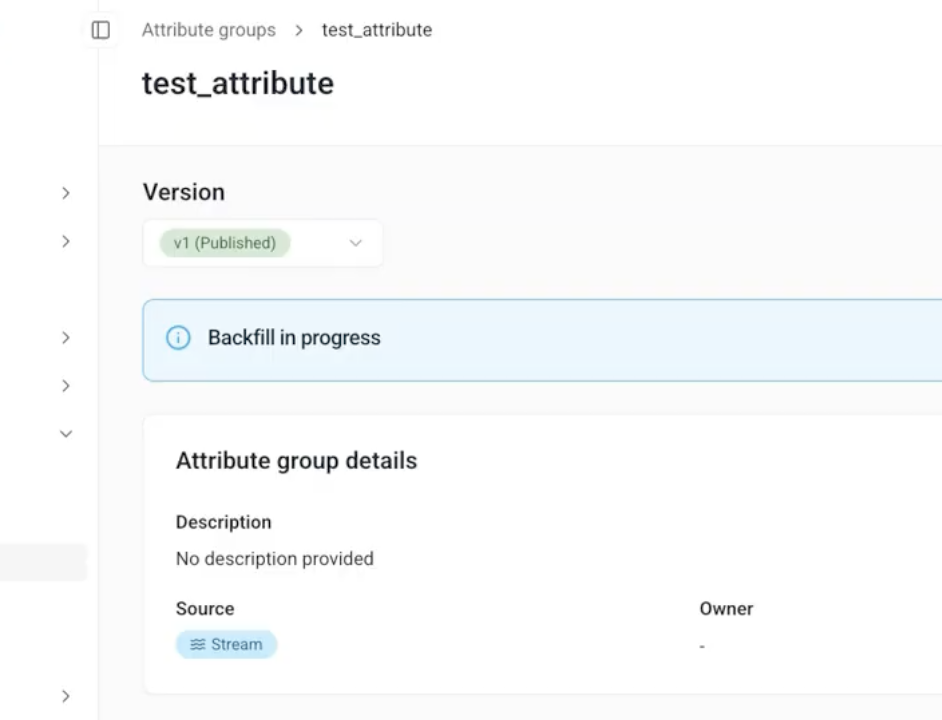
You can monitor progress in Snowplow Console on the attribute group's details page. While historical values are syncing, a status bar labeled Backfill in progress is shown. This status remains visible until the backfill period has completed.
Warehouse source
Use a warehouse source to sync tables of existing, pre-calculated values to the Profiles Store. The warehouse tables can be any data. For example, you may want to include transactional data or CRM attributes in your Signals use case.
Services
Services are where you define how to use the calculated attributes in your applications.
Rather than connecting applications directly to attribute groups, services allow you to consume specific attribute group versions. This provides a consistent set of consumable attributes. We strongly recommend using services in production applications.
By using services you can:
- Iterate on attribute definitions without worrying about breaking downstream processes
- Migrate to new attribute group versions by updating the service definition, without having to update the application code
Interventions
Interventions are opportunities to take actions to improve user outcomes. They're automated triggers fired by changes in attribute values, or by your own applications.
They can be thought of as "if-then" rules that run in real time. For example:
Ifa user has viewed five products in the last ten minutesThenautomatically send that user a personalized offer
In practice, this rule could work like this:
- User views product pages
- The application tracks the user behavior and sends events
- Signals evaluates the events and updates attribute values
- Signals checks whether the new attribute values meet any intervention conditions
- The attribute
product_view_count_last_10_minhas just been updated to5, matching the intervention's trigger criteria - The application receives the subscribed intervention payload
- The application sends a personalized offer to the user
Interventions are usually relevant only within a certain moment. Therefore, an intervention is sent only the first time the criteria are met.
Standard rule-based interventions can have multiple conditions, or trigger criteria, based on the values of different attributes.
Targeting
Interventions are targeted based on attribute keys, which determine both the scope and specificity of when they're delivered.
For individual-level targeting, use user-specific attribute keys. For example, use domain_userid to target individual users, or domain_sessionid to target users during specific sessions, when session-level conditions are met.
For broadcast-level targeting, use attribute keys related to the application context. For example, you could use campaign_id to target all users who arrived from a specific marketing campaign.
Interventions can have multiple attribute keys. By default, the intervention will target the attribute keys associated with their criteria attributes. See Define interventions for guidance on choosing custom targets.
Subscribing
To receive and take action on interventions, you'll need to subscribe to them within your application, and define the logic for how the application should react. Once subscribed, all triggered interventions are streamed to the consumer application.
Subscription is by attribute key, not by intervention: a subscription using a specific attribute key ID, for example a domain_userid ID for the current user, will receive all triggered interventions for that ID. See the delivery example for how targeting, subscription, and the send-once rule work together.
Types of intervention
Signals has two types of interventions: rule-based or direct.
Rule-based interventions are the default, and are:
- Based on attribute values
- Defined in advance via Snowplow Console, Python SDK, or API
- Triggered automatically when their criteria are met
Use cases include:
- Real-time personalization
- Agentic chatbots
- Dynamic pricing
Direct interventions are:
- Not based on attribute values or rules
- Configurable only via the Python SDK or API
- Sent directly on pushing an intervention configuration to Signals
Use cases for direct interventions include:
- Emergency notifications, e.g. system outages
- Real-time business decisions, e.g. breaking news
- Manual campaign targeting
- Sensitive communications requiring authentication or authorization
Agentic contexts
Agentic contexts capture a rolling window of a user's recent session activity, ready to hand to an agent so it can ground its responses in what the user is doing right now. Unlike attribute groups, they don't calculate or aggregate values: they log the raw events and properties you select, up to a configured limit on count and age.
Each agentic context also carries a free-text prompt, stored and returned alongside the activity, that tells the agent what to do with the data. Read the result as structured JSON, or as a plain-language narrative ready to drop into an LLM's context.
Agentic contexts follow the same draft-then-publish model as other Signals resources, but aren't versioned: there's a single published agentic context per name, and publishing a draft replaces it. Learn how to define an agentic context and retrieve one in your application.
Profiles Store
The Profiles Store is a database where Signals saves all your calculated attribute values. When Signals calculates attributes from your events or warehouse data, or syncs pre-calculated data, it stores them here organized by attribute group. Your applications retrieve these stored values using the Signals SDKs or API.
The Profiles Store keeps track of current attribute values, and automatically removes old data based on the TTL settings you configure. It acts as the central source of truth for your Signals deployment.
For an overview of what these attributes are used for, see real-time attributes on the Signals site.
Workflow
Using Signals follows these steps, and the rest of this documentation follows the same order. The quickstart runs through all of them with a coding agent.
- Set up Signals in Snowplow Console. This one-time task deploys the Signals infrastructure. Connecting a warehouse is optional, but you'll need one to backfill stream attributes, sync warehouse tables, or test definitions before publishing.
- Plan your use case. Decide which attributes to calculate and at what level, whether they come from the stream or the warehouse, and whether your application will pull attributes, react to interventions, or ground an agent with an agentic context.
- Define and publish your configuration. Create attribute groups, interventions, and agentic contexts in Console or with the Signals Python SDK, and group attribute groups into services. Signals only calculates attributes once you publish; see the configuration workflow.
- Take action in your application. Retrieve attributes, subscribe to interventions, or retrieve an agentic context using the SDKs or API.
Signals calculates attributes from events flowing through a Snowplow pipeline. If you don't have one, you can start on the Signals free tier. It needs no credit card.