Sync warehouse tables to Signals
To sync existing, pre-calculated attributes from your warehouse to Signals, configure an attribute group with a warehouse source. No additional modeling is required — the batch engine reads rows from your warehouse table at a fixed interval and sends them to the Profiles Store.
If your source data comes from Snowplow events, consider using a stream attribute group with the backfill option enabled instead. It gives you real-time updates from your event stream alongside historical backfill, without needing to maintain a separate warehouse table. Attributes that are fetched from a warehouse are best suited for pre-calculated values from non-Snowplow sources, or tables that already exist independently of your event pipeline.
Configure a warehouse source
- Console
- Python SDK
When creating an attribute group, select Warehouse as the data source.
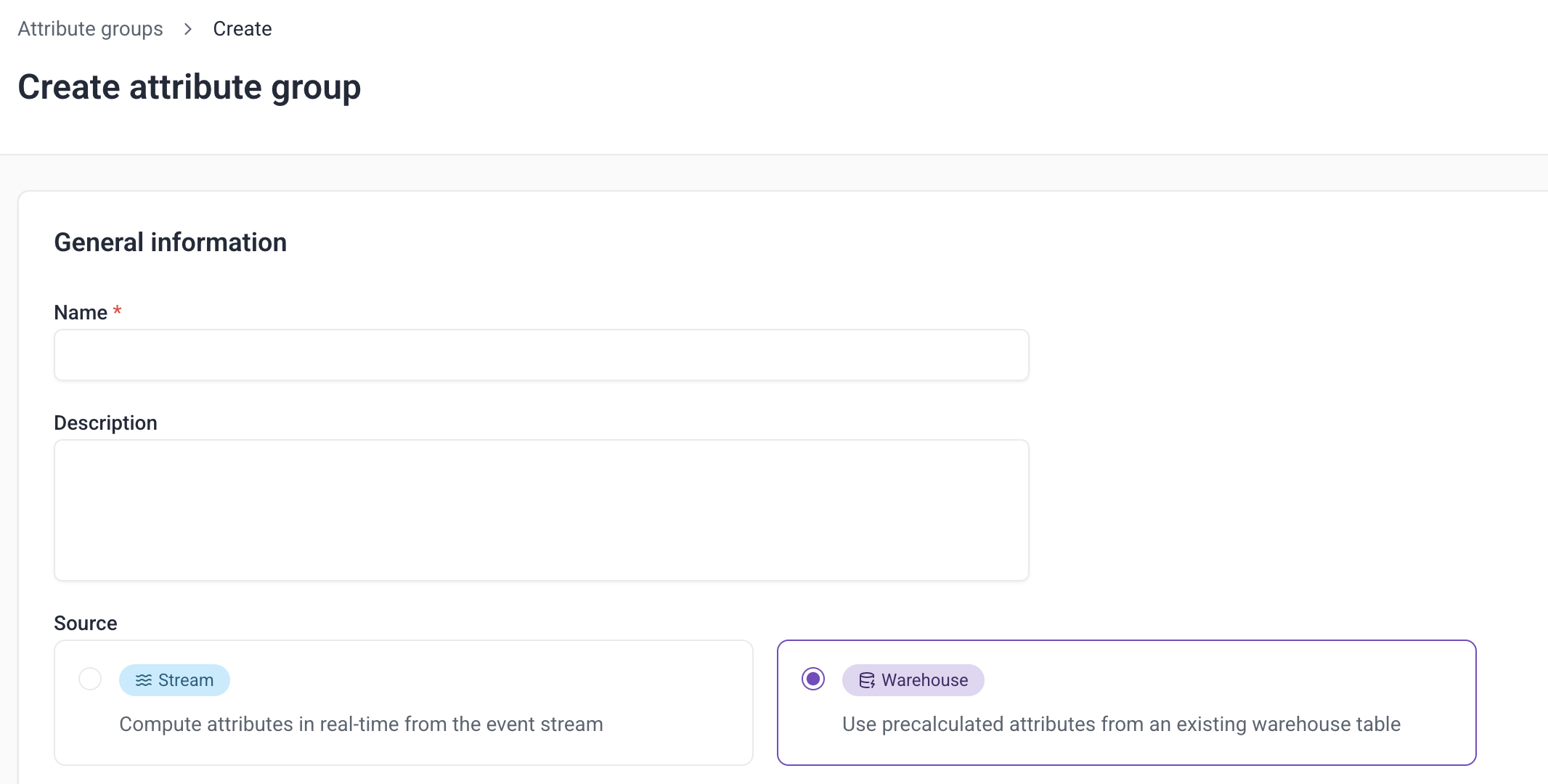
Provide the basic configuration
Select the Attribute key you have data for. The attribute key for the group must correspond to a column in the table that contains the key values.
Set the TTL to control how long the data persists in the Profiles Store.
Updates run hourly by default. Use the Sync frequency selector to sync less often (6h, 12h, or 24h).
You must also specify a Backfill start date: the earliest date from which Signals should read rows on the first sync.

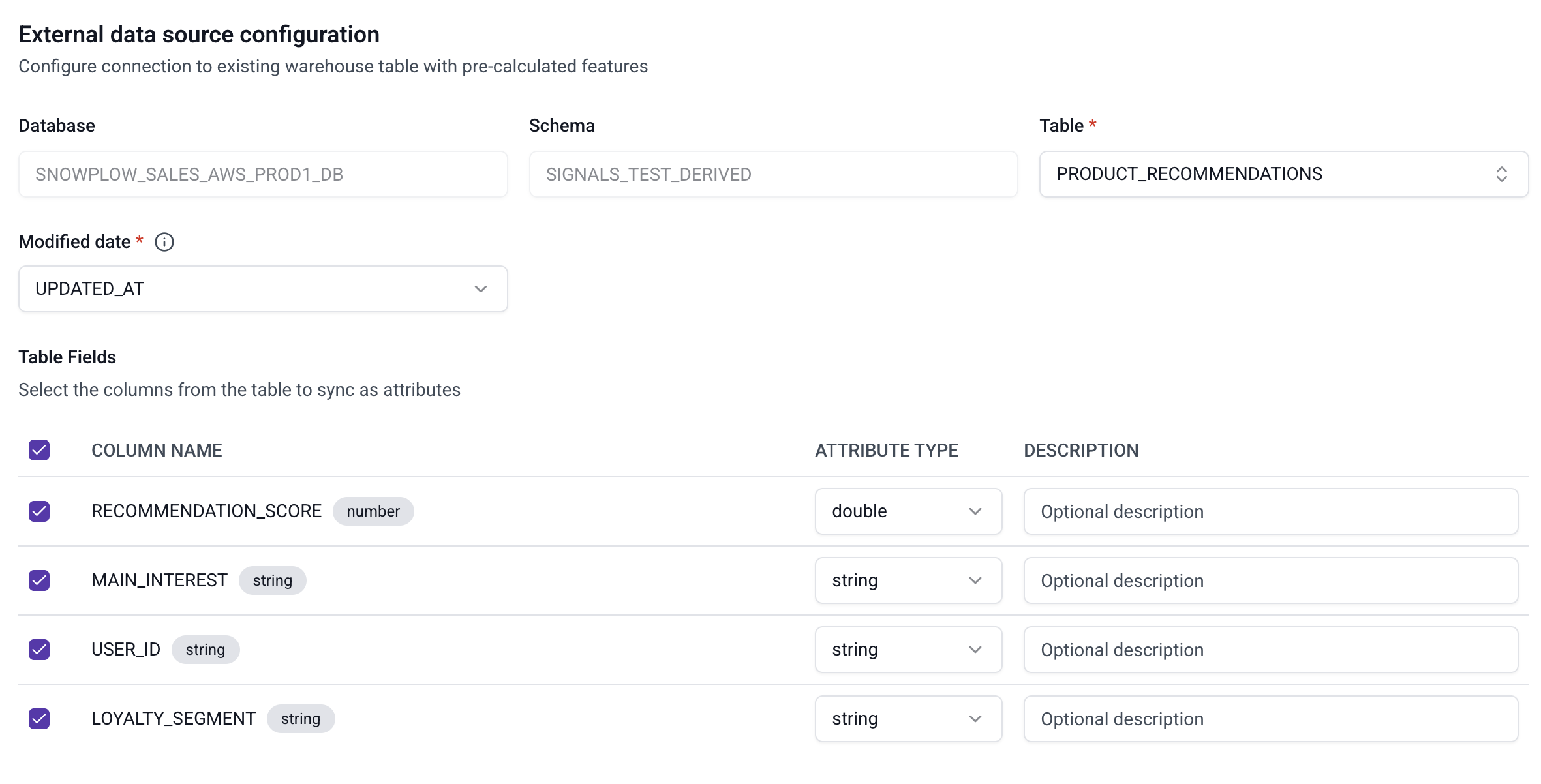
Define which fields to sync
Select which Table to sync from.
Choose the Modified date column: the column that tells when a particular row was last written or updated in the table (for example, a load_tstamp or updated_at column populated by your ETL process on every write). The Modified date column must be in UTC. A column in local time causes rows to be silently matched against the wrong sync window, with no error raised. If multiple rows exist for the same attribute key within a sync period, the engine uses the row with the latest Modified date value.
Don't use a business or event timestamp that doesn't change when a row is reloaded or updated. The batch engine won't be able to tell the row has changed, and the data may be missed.
Finally, select which Table fields you want to send to Signals.
Start by configuring which table to sync by specifying a BatchSource object.
from snowplow_signals import BatchSource

data_source = BatchSource(
    name="ecommerce_transaction_interactions_source",
    database="SNOWPLOW_DEV1",
    schema="SIGNALS",
    table="SNOWPLOW_ECOMMERCE_TRANSACTION_INTERACTIONS_FEATURES",
    timestamp_field="UPDATED_AT",
    owner="user@company.com",
)
The table below lists all available arguments for a BatchSource:
| Argument | Description | Type | Required? |
|---|---|---|---|
name | The name of the source | string | ✅ |
description | A description of the source | string | ❌ |
database | The database where the attributes are stored | string | ✅ |
schema | The schema for the table of interest | string | ✅ |
table | The table where the attributes are stored | string | ✅ |
timestamp_field | Primary timestamp of the attribute value, indicating data freshness | string | ✅ |
owner | The owner of the source | string | ❌ |
The batch engine uses timestamp_field as the change-watermark for incremental syncs — it must reflect when a row was actually last written or updated in the table (for example, a load_tstamp or updated_at column populated by your ETL process on every write), not a business or event timestamp that stays fixed once set. timestamp_field must be in UTC. A column in local time causes rows to be silently matched against the wrong sync window, with no error raised.
If multiple rows exist for the same attribute key within a sync period, the engine uses the row with the greatest timestamp_field value.
Don't use a business or event timestamp that doesn't change when a row is reloaded or updated. The batch engine won't be able to tell the row has changed, and the data may be missed.
Define which fields to sync
Use ExternalBatchAttributeGroup to define which source table and fields to use. Instead of attributes, this class uses fields — abstractions over the warehouse columns.
You must set backfill_since_tstamp to tell the batch engine the earliest timestamp from which to read rows on the first sync. Without this, no historical data will be loaded.
The attribute key must correspond to a column in the source table. The example below uses the built-in domain_userid key, so the table must have a domain_userid column. To key on a different column, define a custom attribute key with external_column set to the column name.
from datetime import datetime, timedelta, timezone
from snowplow_signals import ExternalBatchAttributeGroup, domain_userid, Field

attribute_group = ExternalBatchAttributeGroup(
    name="ecommerce_transaction_interactions_attributes",
    version=1,
    attribute_key=domain_userid,
    owner="user@company.com",
    batch_source=data_source,
    backfill_since_tstamp=datetime(2026, 6, 1, tzinfo=timezone.utc),
    refresh_rate=timedelta(hours=6),
    fields=[
        Field(name="TOTAL_TRANSACTIONS", type="int32"),
        Field(name="TOTAL_REVENUE", type="int32"),
        Field(name="AVG_TRANSACTION_REVENUE", type="int32"),
    ],
)
The table below lists all available arguments for ExternalBatchAttributeGroup:
| Argument | Description | Type | Required? |
|---|---|---|---|
name | The name of the attribute group | string | ✅ |
version | The version of the attribute group | int | ✅ |
attribute_key | The key used to identify profiles. Its name must match a column in the source table | AttributeKey | ✅ |
batch_source | The BatchSource defining the warehouse table to sync from | BatchSource | ✅ |
backfill_since_tstamp | The earliest timestamp from which to read rows on the first sync. Accepts tz-aware or naive UTC datetime; tz-aware is recommended. | datetime | ✅ |
refresh_rate | How frequently the attribute group should be synced (e.g. timedelta(hours=1), timedelta(hours=6), timedelta(days=1)). Defaults to hourly. | timedelta | ❌ |
fields | The list of Field objects defining which columns to sync | list | ✅ |
description | A description of the attribute group | string | ❌ |
owner | The owner of the attribute group | string | ❌ |
The table below lists all available arguments for a Field:
| Argument | Description | Type | Required? |
|---|---|---|---|
name | The name of the field | string | ✅ |
description | A description of the field | string | ❌ |
type | The type of the field | one of: bytes, string, int32, int64, double, float, bool, unix_timestamp, bytes_list, string_list, int32_list, int64_list, double_list, float_list, bool_list, unix_timestamp_list | ✅ |
To understand why the same definition runs in both the streaming and batch engines, see Signals vs a feature store on the Signals site.
Signals calculates attributes from events flowing through a Snowplow pipeline. If you don't have one, you can start on the Signals free tier. It needs no credit card.