Calculate attributes per person with identity resolution
The same person often reaches you through more than one identifier. For example, a user browses anonymously with a domain_userid cookie, then logs in with a user_id. Attributes keyed on domain_userid or user_id keep that activity in separate profiles.
With identity resolution, Signals calculates attributes against the Snowplow ID that Identities assigns to each person, so all of their activity counts toward one profile. Your application keeps reading with whichever identifier it already has, and Signals returns that person's attributes.
If Identities is already set up on your pipeline, setting up identity resolution takes three steps, with no changes to your application or its reads:
- Select up to three lookup identifiers on the built-in
snowplow_idattribute key, such asdomain_useridanduser_id. - Create stream attribute groups keyed on
snowplow_id, and publish them. - Read attributes as before, with a lookup identifier as the attribute key.
Attributes start empty and build up from the events processed after you publish the attribute group, so a lifetime attribute covers only the activity since then.
Identity resolution works best today for people who browse anonymously and then log in on the same device, and for people who move between your own sites. Logging in to an existing account from another device is partly supported, with full support coming soon. See Supported use cases for what a read returns in each case.
How identity resolution works
Identities resolves each event to a Snowplow ID and attaches it to the event in the identity entity. Signals includes a built-in snowplow_id attribute key that reads the Snowplow ID from that entity, so you can calculate attributes per person instead of per device or per session.
Your application doesn't need to know the Snowplow ID, and shouldn't rely on it: when Identities merges two Snowplow IDs, the person is represented by the one that's kept. Instead, to read attributes keyed on snowplow_id, you choose up to three lookup identifiers from the identifiers in your Identities configuration. These are the identifiers your application can read attributes by. Each read uses one identifier, so selecting several lets each part of your application read the same person with the identifier it has. For example, your website can read by the domain_userid cookie, and your backend by the user_id of a logged-in user.
When you read by a lookup identifier, Signals returns the attributes of the person that identifier was most recently seen with on your events.

For examples of what a read returns, see Supported use cases.
Before you start
To use identity resolution, you need Identities set up on the same pipeline as your Signals deployment, with the identifiers you want to read by in its configuration, and that configuration finished deploying. You can set it up yourself in Console. See Configure Identities, and for advice on picking identifiers, Choosing identifiers.
Configure the snowplow_id attribute key
Select the lookup identifiers on the built-in snowplow_id attribute key, then create stream attribute groups that use snowplow_id as their key. The selection applies to all attribute groups keyed on snowplow_id in your deployment.
Decide which identifiers to use
You can select up to three lookup identifiers. Each lookup identifier adds a write to every event that carries it, so the number is limited, and may be raised later. If you need more, contact Snowplow Support.
Choose the identifiers your application has at the moment it reads attributes. They usually fall into three roles, and each one behaves differently:
| Role | Examples | Appears on | What a read by it returns |
|---|---|---|---|
| Anonymous ID | domain_userid, a mobile device ID, or your own device or cookie ID | Nearly every event | The person who used the device most recently |
| Known ID | user_id, or your own customer ID field | Events after the user logs in | The logged-in person, once they've logged in since you selected it |
| Occasional ID | A hashed email address, a loyalty card number, or another field the user provides now and then | Only the events that capture it, such as a newsletter signup or checkout | The person it was last seen with, which can be out of date until it appears on another event |
The names depend on your Identities configuration. For example, your known ID might be a custom field called acme_customer_id.
Some identifiers are shared by many people. For example, offices, households, and mobile networks put many people behind one IP address. A read by a shared identifier returns whoever was most recently seen with it, which might not be the person making the request. Select one only if that's acceptable for your use case.
Each event that carries an identifier keeps it linked to its person for as long as your attributes keep their data. Anonymous and known IDs appear often enough to stay linked. An occasional ID, such as a hashed email captured once at signup, can stop resolving between appearances.
Select lookup identifiers
Select the lookup identifiers on the snowplow_id attribute key.
- Console
- Python SDK
- Snowplow Assistant
Navigate to Signals > Attribute keys in Console and open the snowplow_id key. The Lookup identifiers card lists the identifiers from your pipeline's Identities configuration, in priority order, with the property each one is read from.
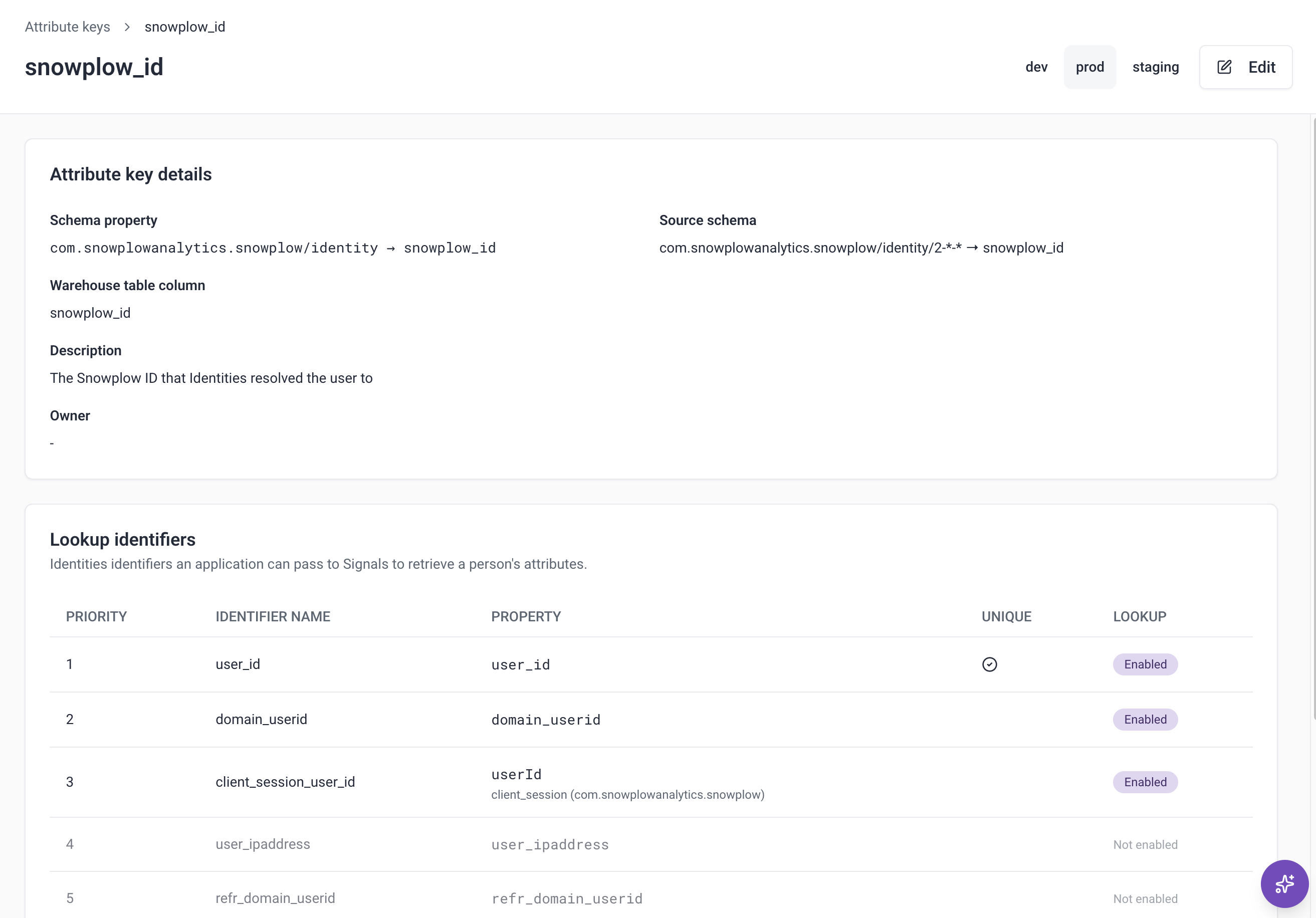
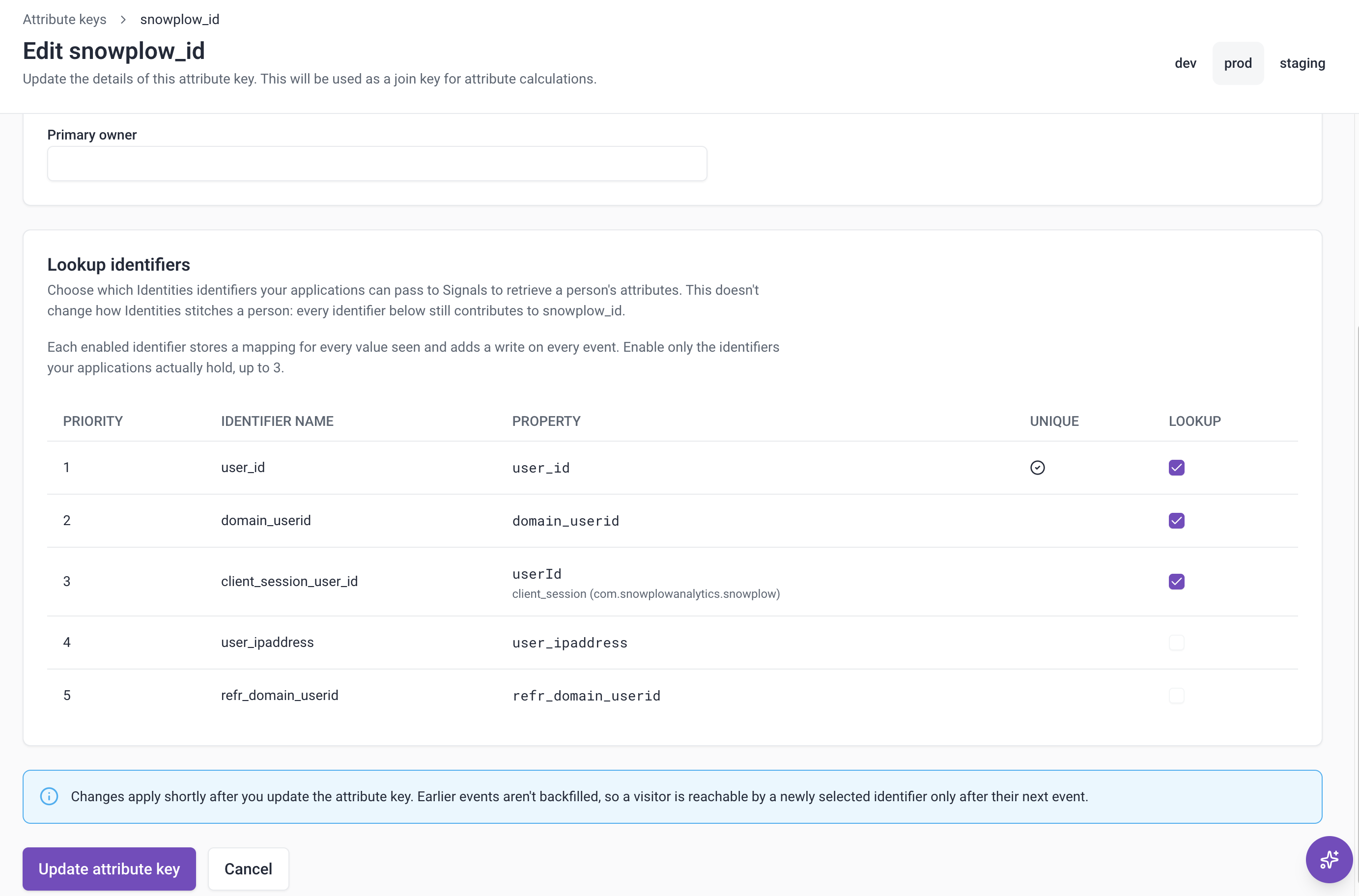
To select lookup identifiers:
- Click Edit. If no identifiers are enabled yet, you can click Enable identifiers instead.
- Under Lookup identifiers, select up to three identifiers.
- Click Update attribute key.
Console flags the snowplow_id key when its selection and your Identities configuration don't match:
| Console shows | Cause | What to do |
|---|---|---|
| Requires Identities in the attribute keys list | Your pipeline doesn't have Identities set up | Click Configure to set up Identities. See Configure Identities |
| Needs attention in the attribute keys list | A selected identifier was removed from your Identities configuration | Open the key and click Remove from this key, or add the identifier back in Identities. You can't change the selection until you do |
| Identifiers are still enabled without Identities on the key | Identities was removed from your pipeline while identifiers were selected | Click Clear identifiers |
The Configure button only appears if you have permission to create or edit the Identities configuration.
Publish an AttributeKey named snowplow_id, with lookup_identifiers set to the names of up to three identifiers from your Identities configuration:
from snowplow_signals import AttributeKey, Signals

sp_signals = Signals({{ config }})

sp_signals.publish([
    AttributeKey(name="snowplow_id", lookup_identifiers=["domain_userid", "user_id"]),
])
The SDK fills in the rest of the built-in key's definition, so don't set property or key.
Every name must be in your current Identities configuration. If one isn't, for example because of a typo or because you've removed it from Identities, Signals rejects the change with an HTTP 422 error that names it.
Publishing snowplow_id without lookup_identifiers keeps the current selection, including one made in Console. To remove every lookup identifier, set lookup_identifiers to an empty list.
Ask the Snowplow Assistant in Console to select the lookup identifiers, naming the identifiers you want, for example:
Let my application read snowplow_id attributes by domain_userid and user_id.
The Assistant asks you to approve the change before it saves it. You can ask the same of an agent connected to the Snowplow MCP server.
After you change the selection, a new lookup identifier resolves from the next event that carries it. You don't need to republish your attribute groups. If you remove a lookup identifier, reads by it return an HTTP 400 error immediately.
Create attribute groups keyed on snowplow_id
To calculate attributes per person, create a stream attribute group and select snowplow_id as its attribute key.
In the Python SDK, set attribute_key to the built-in snowplow_id:
from snowplow_signals import StreamAttributeGroup, snowplow_id

person_attribute_group = StreamAttributeGroup(
    name="person_attributes",
    version=1,
    attribute_key=snowplow_id,
    owner="user@company.com",
    attributes=[page_view_count],
)
Retrieve attributes by a lookup identifier
Read attributes keyed on snowplow_id the same way as any other attributes, using a service or an attribute group. Set attribute_key to the lookup identifier's name, such as domain_userid, and identifier to its value:
- Python
- Node.js
attributes = sp_signals.get_service_attributes(
    name="my_service",
    attribute_key="domain_userid",
    identifier="218e8926-3858-431d-b2ed-66da03a1cbe5",
)
const attributes = await signals.getServiceAttributes({
  name: "my_service",
  attribute_key: "domain_userid",
  identifier: "218e8926-3858-431d-b2ed-66da03a1cbe5",
});
A read returns the attributes of the person the identifier was most recently seen with. If Signals hasn't seen the identifier on an event yet, or its link has expired, each attribute is null. Reading by any attribute key other than snowplow_id or one of its lookup identifiers returns an HTTP 400 error that lists the ones you can use.
If your pipeline uses the PII pseudonymization enrichment on a lookup identifier, such as user_id or domain_userid, Signals receives the pseudonymized value and links that to the Snowplow ID. Read by the value as it appears in your enriched events. A read by the original value returns null for each attribute. The same applies to any attribute key whose field is pseudonymized.
After a merge, an identifier keeps returning the Snowplow ID that isn't kept until it appears on another event.
Signals links an identifier to a person based on the identifiers that arrive on your events, and doesn't check who sent them. If someone sends events from their own browser that carry another user's identifier, such as that user's email address, Identities can link their browser's domain_userid to the other user's Snowplow ID. A read by that domain_userid then returns the other user's attributes.
Reading attributes needs an API key, so reads run on your backend. Before your backend shows a person's attributes to the user, or acts on them in a reply, check that the identifier belongs to that user, for example a user_id from an authenticated session. Treat reads by an anonymous ID as unverified.
Supported use cases
Identity resolution is being released in stages. This table shows which use cases are supported.
| Use case | Scenario | Status |
|---|---|---|
| Anonymous to known | A user browses anonymously, then logs in | ✅ Supported |
| Cross-domain | A user moves between your sites | ✅ Supported for first visits. ⚠️ Partly supported for returning visitors |
| Shared device | Several people use the same device | ✅ Supported, with user_id as a unique identifier |
| Cross-device | A user switches between devices or browsers | ⚠️ Partly supported |
The known limitations at the end of this section apply to all of them.
The examples show what a read returns for one lookup identifier of each role: domain_userid as the anonymous ID, user_id as the known ID, and hashed_email as the occasional ID. In the Returns column, a Snowplow ID such as sp_001 stands for the attributes calculated for that Snowplow ID.
Anonymous to known
Supported. A user browses anonymously, then logs in to a new account, or to an account they've already logged in to on this device. Identities links the user_id to the device's Snowplow ID, so all of the user's activity, including the browsing from before the login, counts toward one Snowplow ID.

Example: sign up after browsing
| Event | Identifiers | Snowplow ID |
|---|---|---|
| Browse a product page | domain_userid (d123) | sp_001 |
| Sign up and log in | domain_userid (d123), user_id (u001) | sp_001 |
| Subscribe to the newsletter | domain_userid (d123), user_id (u001), hashed_email (3f9a…c21e) | sp_001 |
| Read by | Returns |
|---|---|
domain_userid (d123) | sp_001, from the first event onward |
user_id (u001) | sp_001, including the product page view from before the login, once the login event has arrived |
hashed_email (3f9a…c21e) | sp_001, once the newsletter event has arrived. Before that, null |
Cross-domain
Supported. A user moves from one of your sites to another with a different cookie domain. With cross-domain tracking enabled in Identities, the second site's domain_userid is linked to the first site's Snowplow ID, so the activity on both sites counts toward one Snowplow ID.
If the user has visited the second site before, its domain_userid already has its own Snowplow ID, and Identities merges the two. In that case, the cross-device limitations apply.

Example: follow a link to a sister site
| Event | Identifiers | Snowplow ID |
|---|---|---|
Log in on brandA.com | domain_userid (dA1), user_id (u001) | sp_001 |
Follow a link to brandB.com for the first time | domain_userid (dB1), refr_domain_userid (dA1) | sp_001 |
| Read by | Returns |
|---|---|
domain_userid (dA1) or domain_userid (dB1) | sp_001, with the activity on both sites |
user_id (u001) | sp_001, with the activity on both sites, even though the user hasn't logged in on brandB.com |
hashed_email | Not captured in this example. It works as in anonymous to known |
Shared device
Supported when user_id is marked as a unique identifier in Identities. Each person who logs in keeps their own Snowplow ID. Reads by a known or occasional ID return the right person. Reads by the device's anonymous ID return whoever used the device most recently.
To stop one person's anonymous activity counting toward the next, reset identifiers on logout.

Example: two people log in on a family tablet
| Event | Identifiers | Snowplow ID |
|---|---|---|
| Ann logs in and checks out on the family tablet | domain_userid (d123), user_id (u001), hashed_email (3f9a…c21e) | sp_001 |
| Ben logs in on the same tablet | domain_userid (d123), user_id (u002) | sp_002 |
| Read by | Returns |
|---|---|
domain_userid (d123) | sp_002, Ben, who used the tablet last |
user_id (u001) or hashed_email (3f9a…c21e) | sp_001, Ann |
user_id (u002) | sp_002, Ben |
Cross-device
Partly supported. A user browses anonymously on a device or browser that isn't linked to their account yet, for example a new phone or a browser with cleared cookies, then logs in to their existing account. The device already has its own Snowplow ID, so Identities merges the two and keeps the older one. All new activity counts toward the Snowplow ID that's kept.
What isn't supported:
- Activity from before the merge stays split: attributes calculated under the Snowplow ID that isn't kept aren't added to the one that's kept.
- Identifiers switch over only when they next appear: an identifier that hasn't appeared on an event since the merge keeps returning the Snowplow ID that isn't kept until it does. For an anonymous ID, this is usually the first event of a returning visit. For an occasional ID, such as a hashed email, it can last until the user next provides it.

Example: log in on a new phone
| Event | Identifiers | Snowplow ID |
|---|---|---|
| Earlier, on the website | domain_userid (d123), user_id (u001), hashed_email (3f9a…c21e) | sp_001 |
| Browse the app anonymously on a new phone | domain_userid (p456) | sp_002 |
| Log in on the phone | domain_userid (p456), user_id (u001) | sp_001, after merging sp_002 into it |
| Read by | Returns |
|---|---|
domain_userid (d123), user_id (u001), or hashed_email (3f9a…c21e) | sp_001: the website activity and everything from the login onward, without the phone browsing from before the login |
domain_userid (p456) | Before the login, sp_002: the phone browsing only. From the login onward, the same as the row above |
If the device's Snowplow ID is the older one, for example because the user browsed the app before creating their account on the website, the device's ID is kept instead. The account's activity from before the merge is then the part that's missing.
Example: return to a laptop after logging in on a phone
| Event | Identifiers | Snowplow ID |
|---|---|---|
| Last week: browse the app on the phone without logging in | domain_userid (p012) | sp_001 |
| Monday: sign up on the laptop | domain_userid (l789), user_id (u001), hashed_email (3f9a…c21e) | sp_002 |
| Tuesday: log in on the phone, which has an older Snowplow ID | domain_userid (p012), user_id (u001) | sp_001, after merging sp_002 into it |
| Wednesday: first page view back on the laptop | domain_userid (l789) | sp_001 |
| Read by | Returns on Wednesday |
|---|---|
user_id (u001) or domain_userid (p012) | sp_001: the phone activity and everything since Tuesday, without Monday's laptop activity |
domain_userid (l789) | Before the page view, sp_002: Monday's laptop activity only. After it, the same as the row above |
hashed_email (3f9a…c21e) | sp_002: Monday's laptop activity only, until an event with the hashed email arrives |
Known limitations
The following limitations apply to every use case. They're temporary, and Snowplow is working on removing them:
- No backfill: attributes keyed on
snowplow_idinclude only events processed after you publish the attribute group, so they start empty and build up over time. An identifier can read them only after it appears on an event sent after you select it as a lookup identifier. - Occasional IDs can expire: an identifier that doesn't appear on an event for longer than your attributes keep their data stops resolving. See Decide which identifiers to use.
- Stream attribute groups only: attribute groups keyed on
snowplow_idcan't use a warehouse source or backfill. - Interventions can't target
snowplow_id: an intervention with criteria on attributes keyed onsnowplow_idneeds a target your application has, such asdomain_userid. Signals delivers it to the device whose event triggered it. If you don't set a target, Signals rejects the intervention. - Deleting by identifier doesn't delete the person's attributes: to delete data, call the Signals API's
DELETE /api/v1/{attribute_key}/{identifier}endpoint. Deleting by a lookup identifier stops it resolving to the person, but the attributes calculated for their Snowplow ID remain. To delete the person's attributes, usesnowplow_idas the attribute key and their Snowplow ID as the identifier. You can find it on their events in the identity entity. Reads by their lookup identifiers then returnnull. Deleting doesn't remove the person from Identities, so new events calculate their attributes again under the same Snowplow ID.
Signals calculates attributes from events flowing through a Snowplow pipeline. If you don't have one, you can start on the Signals free tier. It needs no credit card.