Define attribute keys
An attribute key is the identifier that attributes are calculated against. All attribute groups need an attribute key.
Signals includes four built-in attribute keys, based on commonly used identifiers from the atomic user-related fields in all Snowplow events.
- Console
- Python SDK
The built-in attribute keys are available to select when creating an attribute group in Snowplow Console: domain_userid, domain_sessionid, network_userid, and user_id.
Import the built-in attribute keys directly:
from snowplow_signals import (
    domain_userid,
    domain_sessionid,
    user_id,
    network_userid,
)
Custom attribute keys
You can define custom attribute keys to calculate attributes against identifiers other than the built-in ones. How you specify the key depends on the attribute group data source.
For stream attribute groups, the key can be any property in your events:
- Atomic properties: fields of the core Snowplow event, available for all events
- Event schema properties: properties within a self-describing event
- Entity properties: properties from schemas tracked as entities
For warehouse attribute groups, the attributes are pre-calculated in your warehouse table, so the key isn't based on event properties. Instead, define the attribute key using the name of the table column that contains the key values.
- Console
- Python SDK
Navigate to Signals > Attribute keys in Console. Click the Create attribute key button.
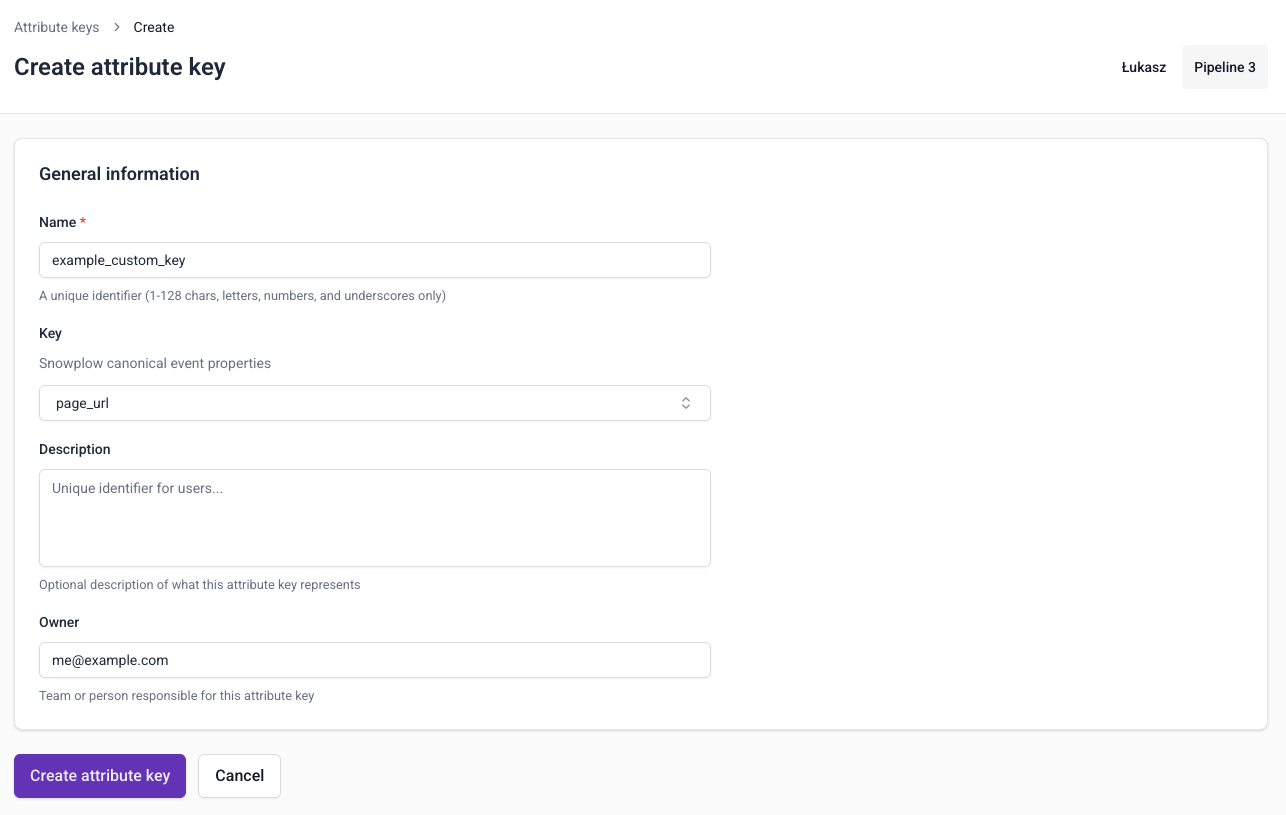
You will need to provide:
- A unique name
- An optional description
- An optional email address for the primary owner or maintainer
- Which property you want to calculate attributes against: an atomic field, or a property from an event or entity schema
- For keys used with warehouse attribute groups, provide the name of the table column that contains the key values instead
To edit or delete a custom attribute key, go to the key details page and click the Edit button, or the ⋮ button followed by Delete.
Use the AttributeKey class to define a custom attribute key. For stream attribute groups, specify the property with the same property classes used for defining attributes: AtomicProperty, EventProperty, or EntityProperty.
from snowplow_signals import AttributeKey, AtomicProperty

app_id_attribute_key = AttributeKey(
    name="app_id_attribute_key",
    description="The id for the app",
    property=AtomicProperty(name="app_id"),
)
The table below lists all available arguments:
| Argument | Description | Type | Required? |
|---|---|---|---|
property | The property to calculate attributes against, for stream attribute groups | AtomicProperty, EventProperty, or EntityProperty | Either property or external_column |
external_column | The column in your warehouse table that contains the key values, for warehouse attribute groups | string | Either property or external_column |
name | The name of the attribute key (derived from property or external_column if not set) | string | ❌ |
description | A description of the attribute key | string | ❌ |
owner | The owner of the attribute key | string | ❌ |
ttl | Time attributes for this key will live in the Profiles Store | timedelta | ❌ |
Earlier versions of the SDK used a key argument that accepted atomic properties only. It's deprecated: use property instead.
Here's a full example using a property from a custom user entity:
from datetime import timedelta
from snowplow_signals import AttributeKey, EntityProperty

customer_tier_attribute_key = AttributeKey(
    name="customer_tier_attribute_key",
    description="Attribute key for analyzing behavior by customer tier",
    property=EntityProperty(
        vendor="com.example",
        name="user",
        major_version=1,
        path="tier",
    ),
    owner="analytics-team@company.com",
    ttl=timedelta(days=365),
)
For warehouse attribute groups, use external_column to define the key from the table column that contains the key values:
from snowplow_signals import AttributeKey

customer_id_attribute_key = AttributeKey(
    external_column="CUSTOMER_ID",
    description="Attribute key for the customer ID column in the transactions table",
)
The key's name is set to the column name automatically. If you set both, they must match.
Custom attribute keys are used in attribute groups in the same way as built-in keys.
Signals calculates attributes from events flowing through a Snowplow pipeline. If you don't have one, you can start on the Signals free tier. It needs no credit card.