For AI agents: a Markdown version of this page is at https://docs.snowplow.io/docs/get-started/tracking.md. The index of all documentation pages is at https://docs.snowplow.io/llms.txt, and the index for this section is at https://docs.snowplow.io/docs/cdi/llms.txt.
Track your first events
Once your pipeline is set up, add a tracker to your application to send events to it. This page sets up the web tracker on a website and tracks page views.
Choose your platform:
- Web: follow this page
- iOS and Android: set up the native mobile trackers
- Python: set up the Python tracker
- Node.js and other server trackers: compare the trackers
If you use Snowplow CDI, you can ask your coding agent to add the tracker instead of copying the snippet by hand. Connected to the Snowplow MCP server, it reads your pipeline details, adds the tracker to your application, and checks that the events arrive. For example: "Add the Snowplow JavaScript tracker to this app, track page views, and confirm the events reach my pipeline."
Install the Snowplow MCP server and skills in your coding agent, such as Claude Code, Cursor, or Codex, with npx plugins add snowplow/skills. In Console, the Snowplow Assistant has the same tools.
Get your Collector URL
The tracker sends events to your Collector URL.
- CDI Private Managed Cloud
- CDI Cloud
- Snowplow Self-Hosted
You can find the Collector URL (Collector endpoint) in Console.
You can find the Collector URL (Collector endpoint) in Console.
Use the Collector URL you chose when deploying your Snowplow Self-Hosted pipeline.
If you have not yet configured an SSL certificate and a custom domain name for your Collector, you can use http://<collector_dns_name> (http, not https), where collector_dns_name is the output of the pipeline Terraform module.
Install the tracker
Install the tracker from npm if your site is built with a framework such as React, Angular, or Vue. Otherwise, add the JavaScript tag to your pages.
- Browser (npm)
- JavaScript (tag)
Install the @snowplow/browser-tracker package with your package manager:
npm install @snowplow/browser-tracker
Then import it, and create a tracker by calling newTracker with your Collector URL. This creates a module-level instance of the tracker, so you don't need to keep a reference to it.
import { newTracker, trackPageView } from '@snowplow/browser-tracker';

newTracker('sp1', '{{collector_url}}', {
  appId: 'my-app-id',
  plugins: [],
});
Get a tag snippet for your deployment:
- CDI Private Managed Cloud
- CDI Cloud
- Snowplow Self-Hosted
Go to the tag generator screen in Console, fill in the necessary parameters, and copy the snippet at the bottom.
You can find the pre-generated snippet in the Getting started section of Console.
Follow the JavaScript tracker quick start guide to create your snippet.
The snippet loads the tracker and creates an instance with your Collector URL:
window.snowplow('newTracker', 'sp1', '{{collector_url}}', {
  appId: 'my-app-id'
})
There are two common ways to deploy the snippet:
- If you have access to the source code of your site, paste the snippet into the
<head>HTML section and deploy the changes. - If you use Google Tag Manager, create a Custom HTML tag, paste the snippet into it, and set it to fire on All Pages or a trigger of your choosing. You can preview the tag to send some events before publishing it.
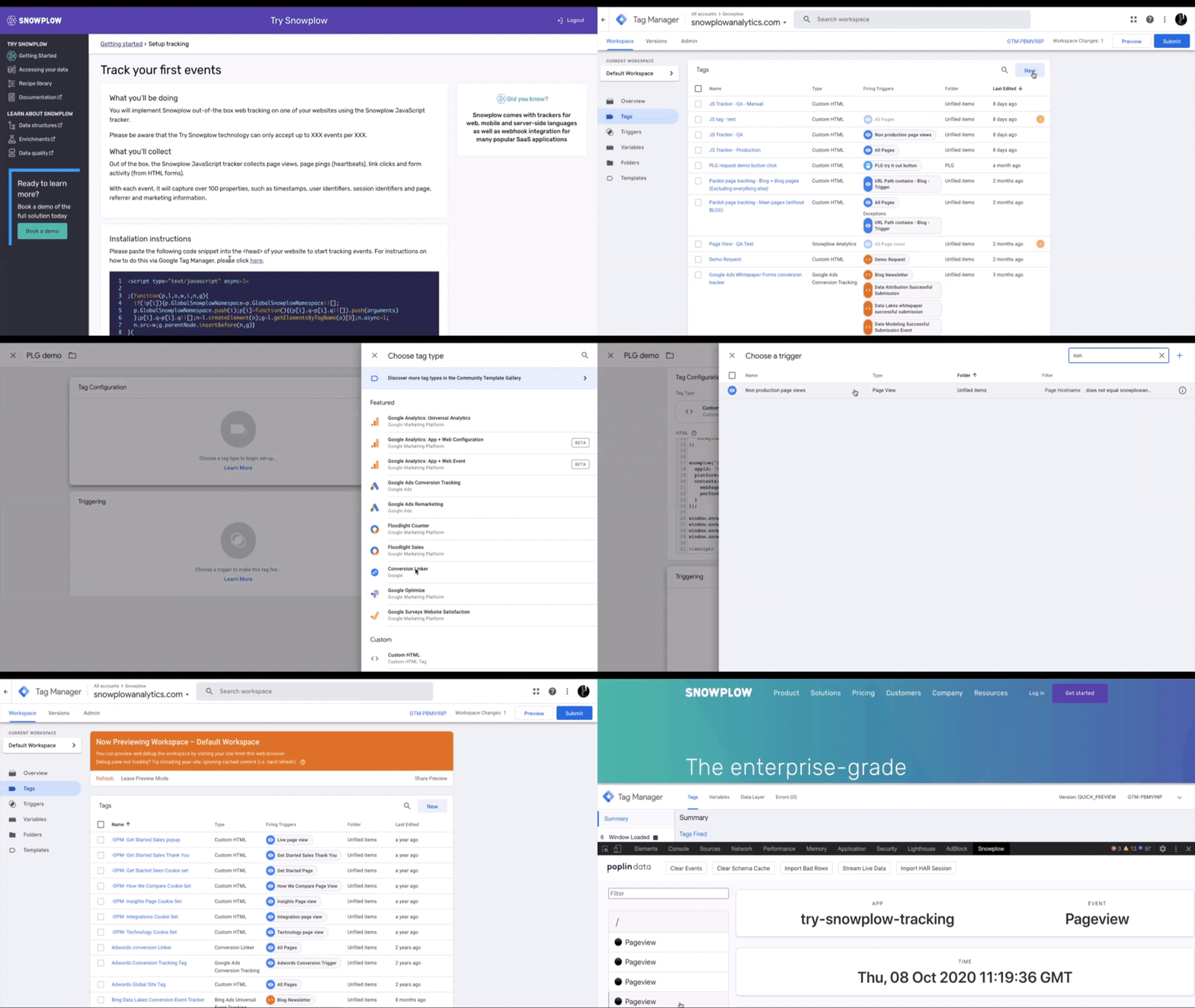
To make sure that your tracking is well configured for strong first-party cookies and resilient against the impact of ad-blockers, see cookies and ad-blockers.
Track page views
Creating the tracker doesn't send any events. Call trackPageView to track a page view:
- Browser (npm)
- JavaScript (tag)
trackPageView();
window.snowplow('trackPageView');
In a single-page application, call trackPageView again each time the route changes. See page views for the options.
Check your events
Install Snowplow Inspector in your browser, open your site, and check that a page view event is sent to your Collector.
It might take a few minutes for events to reach your destination, such as a data warehouse. This depends on which destination and loader you have configured.
For other platforms, see the mobile native trackers or the full list of trackers. To send test events from the command line in the tracker protocol format, use Snowplow CLI.
Send a quick test from this page
To test your pipeline before you add a tracker, use the box below to send some data, including failed events, to your Collector.
To use this tool, you need a Collector URL that starts with https://, not http://, because web browsers block traffic from HTTPS sites, such as this one, to non-HTTPS resources.
This tool uses the following tracking code:
window.snowplow('trackSelfDescribingEvent',
  {
    event: {
      schema: 'iglu:com.snowplowanalytics.snowplow/add_to_cart/jsonschema/1-0-0',
      data: { sku: 'ASO01043', unitPrice: 49.95, quantity: 1000 }
    }
  }
)
window.snowplow('trackSelfDescribingEvent',
  {
    event: {
      schema: 'iglu:com.snowplowanalytics.snowplow/link_click/jsonschema/1-0-1',
      data: {
        targetUrl: 'https://snowplow.io'
      }
    }
  }
)
window.snowplow('trackSelfDescribingEvent',
  {
    event: {
      schema: 'iglu:com.snowplowanalytics.mobile/deep_link/jsonschema/1-0-0',
      data: {
        url: 'https://snowplowanalytics.com'
      }
    }
  }
)
window.snowplow('trackSelfDescribingEvent',
  {
    event: {
      schema: 'iglu:com.snowplowanalytics.snowplow/link_click/jsonschema/1-0-1',
      data: {
        targetUrl: 'https://snowplow.io'
      }
    },
    context: [
      {
        schema: 'iglu:com.snowplowanalytics.snowplow/web_page/jsonschema/1-0-0',
        data: {
          id: '6a2a8c7c-8e7a-4e9f-9b4c-0f4f9a3f35a9'
        }
      }
    ]
  }
)
window.snowplow('trackPageView', undefined)
window.snowplow('trackPageView', { title: 'My custom page title' })

// Bad Events
window.snowplow('trackSelfDescribingEvent',
  {
    event: {
      schema: 'iglu:com.fake_event/event/jsonschema/1-0-0',
      data: { foo: 'bar' }
    }
  }
)
window.snowplow('trackSelfDescribingEvent',
  {
    event: {
      schema: '',
      data: {}
    }
  }
)
window.snowplow('trackSelfDescribingEvent',
  {
    event: {
      schema: 'iglu:com.snowplowanalytics.snowplow/link_click/jsonschema/1-0-1',
      data: {
        invalidProperty: "This schema doesn't have this property"
      }
    }
  }
)
An application ID is sent with each event. Pick a value that makes it easy to filter out these test events from your data later, for example WHERE app_id != 'test'.