Event specification validation
Event specification validation checks whether incoming events conform to the instructions defined in the event specifications you have published.
The pipeline runs validation on events that arrive with an event_specification entity already attached, typically from a tracker using Snowtype version 0.17.0 or later (see Validate against a new specification version for the upgrade steps). For events that arrive without one, the pipeline runs event specification inference instead. Each event takes one path or the other; the two paths are mutually exclusive per event. Inference never produces a validation entity, even when an event would have failed validation.
When an event fails validation, the pipeline attaches an entity to it describing the failure. By default, the pipeline still enriches and delivers events that fail validation alongside successful ones; only the validation entity reflects the failure. You don't need to change your tracking implementation, as validation runs against newly published specifications immediately.
The pipeline still delivers events that fail validation as enriched events. The pipeline records the failure in the validation entity, but does not route the event to failed events, unless you configure the tracking plan to send invalid events to failed events.
In your warehouse, three cases are possible:
- Failed validation: the event has both an
event_specificationentity and anevent_specification_validationentity. Inspect the validation entity for the specific findings. - Passed validation, or matched by inference: the event has an
event_specificationentity but noevent_specification_validationentity. Either the event was Snowtype-tracked and passed validation, or the pipeline matched it to a specification by inference. - Not associated with a specification: the event has neither entity. No specification was attached at tracking time, and the pipeline did not match the event to a published specification.
These cases assume the default Data quality rules setting. If the tracking plan sends invalid events to failed events, events that fail validation don't reach your warehouse events table.
Console shows how many events fall into each of these cases for every tracking plan and event specification, without a warehouse query. See Monitor tracking plan data quality in Console.
Validation entity
The pipeline attaches an event_specification_validation entity to events that fail validation. It also attaches one when it cannot find the declared specification, either because it was never published or because its instructions are not valid, which stops the pipeline from loading it.
event_specification_validation
Entityiglu:com.snowplowanalytics.snowplow/event_specification_validation/jsonschema/1-0-0Example data
{
  "isValid": false,
  "errors": [
    {
      "message": "Property 'currency' does not match the allowed values.",
      "schema": "iglu:com.acme/add_to_cart/jsonschema/1-0-0",
      "path": "$.currency"
    }
  ]
}
Properties and schema
- Table
- Complete JSON schema
| Property | Description |
|---|---|
isValidboolean | Required. Whether the event passed validation against its event specification. |
errorsarray | Optional. A list of validation errors. |
{
  "$schema": "http://iglucentral.com/schemas/com.snowplowanalytics.self-desc/schema/jsonschema/1-0-0#",
  "self": {
    "vendor": "com.snowplowanalytics.snowplow",
    "name": "event_specification_validation",
    "format": "jsonschema",
    "version": "1-0-0"
  },
  "description": "Validation result for an event against its declared event specification version.",
  "type": "object",
  "properties": {
    "isValid": {
      "type": "boolean",
      "description": "Whether the event passed validation against its event specification."
    },
    "errors": {
      "type": "array",
      "items": {
        "type": "object",
        "properties": {
          "message": {
            "type": "string",
            "description": "Human-readable error description."
          },
          "schema": {
            "type": [
              "string",
              "null"
            ],
            "description": "Iglu schema URI of the entity or event that caused the error."
          },
          "path": {
            "type": [
              "string",
              "null"
            ],
            "description": "JSON path to the property that failed validation."
          }
        },
        "required": [
          "message"
        ]
      },
      "description": "A list of validation errors."
    }
  },
  "required": [
    "isValid"
  ]
}
The pipeline only attaches the entity on failure, so isValid is always false.
Each finding in the errors array includes a human-readable message, the Iglu schema URI of the entity or event that caused the error (when applicable), and the JSON path to the property that failed validation (when applicable).
Events that pass validation receive no entity. Use the entity's presence in your warehouse to identify events that failed validation.
Understand what the pipeline validates
The pipeline evaluates each event against three categories of check defined in its specification, in addition to the schema validation that always runs as part of enrichment:
- Event property instructions: property-level instructions defined on the event data structure, such as expected values or ranges
- Entity cardinality: how many of each entity listed in the specification must be present on the event. Cardinality is checked per entity schema.
- Entity property instructions: property-level instructions defined on each entity data structure listed in the specification
If the event payload itself fails its schema validation, the pipeline doesn't evaluate event property instructions because the payload is no longer available to the validation step. Entity cardinality and entity property instructions still run, and the pipeline attaches a validation entity only if one of those entity checks fails.
Examples
Consider a published specification "Add to cart" that defines:
- Event:
add_to_cart(iglu:com.acme/add_to_cart/jsonschema/1-0-0) with the instructioncurrency = "USD" - Required entity:
product(iglu:com.acme/product/jsonschema/1-0-0) with cardinality of exactly one
The add_to_cart data structure's schema permits currency to be either "USD" or "EUR". The specification narrows it to "USD", so the event property instruction catches values that the underlying schema would otherwise accept.
Example 1
An add_to_cart event arrives with:
- An
event_specificationentity attached referring to this specification - An event payload where
currency = "USD" - A single
productentity
The event passes all checks: no validation entity is attached.
Example 2
An add_to_cart event arrives with an event payload where currency = "EUR".
The data structure's schema accepts the value, but the specification's event property instruction does not. The pipeline attaches a validation entity with isValid: false, and an error identifying the event schema and the violated instruction.
Example 3
An add_to_cart event arrives with:
- An event payload where
currency = "USD" - Two
productentities
The event fails the entity cardinality check. The pipeline attaches a validation entity with isValid: false, and an error identifying the product entity schema and the cardinality it does not meet.
Validate against a new specification version
A Snowtype-tracked event declares a specific (id, version) pair in its event_specification entity, and the pipeline validates each event against that event specification version. Snowtype attaches the version field starting in version 0.17.0; events tracked with earlier Snowtype versions don't produce a validation entity.
- Update the Snowtype dependency in your package manager or CI configuration to 0.17.0 or later
- Regenerate the tracker code with
snowtype generate, either manually or as part of your build pipeline - Publish the relevant event specifications; pipelines don't validate against drafts. To validate against a draft before publishing, use a development environment.
- Deploy the regenerated tracker code
When you publish a new version of a specification, events from existing tracker code continue to declare the previous version, validating against its instructions. The new version applies once you regenerate your tracker code with Snowtype and deploy the updated tracker code, after which new events declare and validate against the new version.
Different versions of a specification can coexist. Each event validates against the version it declares, whether the variation comes from a rolling update, from different applications using different versions, or from different deployment stages.
Send invalid events to failed events
Each tracking plan has a Data quality rules setting that controls where events that fail validation go. In the Console, open the tracking plan and select Data quality rules. You need the Edit permission on tracking plans to change this setting.
The default is Send to valid events and mark as violation, which keeps those events with your enriched ones. Select Send to failed events as validation error to route them to failed events instead, keeping events that don't conform to their specifications out of your warehouse events table.
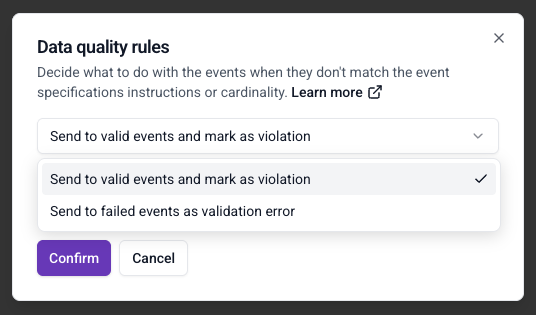
The setting applies to all event specifications in the tracking plan and all their versions. Changes take effect within a few minutes, with no new specification version to publish and no tracking code to redeploy.
These events appear in failed events as enrichment failures from the event specification enrichment. They keep both the event_specification and event_specification_validation entities, so you can inspect why each event failed. In Console, they count as failed events rather than events with violations.
If the pipeline cannot find the specification an event declares, that event stays with your enriched events, even when the tracking plan sends invalid events to failed events.