Configure Snowtype sources and output options
Snowtype reads from the configuration file you created with snowtype init to determine which schemas to generate code for, and what language the code should be generated in. You can combine multiple source types in a single configuration.
We originally called tracking plans "data products". You'll still find the old term used in some existing APIs and CLI commands.
Configuration file structure
The configuration file is a JSON object with the following structure:
{
    "organizationId": "a654321b-c111-33d3-e321-1f123456789g",
    "tracker": "@snowplow/browser-tracker",
    "language": "typescript",
    "outpath": "./src/snowtype",
    "dataProductIds": [
      "a123456b-c222-11d1-e123-1f12345678dp"
    ],
    "eventSpecificationIds": [
      "a123456b-c222-11d1-e123-1f123456789g"
    ],
    "dataStructures": ["iglu:com.myorg/custom_web_page/jsonschema/1-1-0"],
    "igluCentralSchemas": ["iglu:com.snowplowanalytics.snowplow/web_page/jsonschema/1-0-0"],
    "repositories": ["../data-structures"]
}
The organizationId, tracker, language, and outpath options will be pre-filled based on your answers to the snowtype init prompts.
Check out the configuration reference page for more details on the available options, including the supported trackers.
Add sources
Add sources to your configuration manually by editing the file, or with snowtype patch. The command will prompt you for the source type and ID, then update your configuration file:
npx snowtype patch
You can also pass in the source details directly:
# Add event specifications
npx snowtype patch --eventSpecificationIds <id1> <id2>

# Add data products
npx snowtype patch --dataProductIds <id1> <id2>

# Add data structures
npx snowtype patch --dataStructures iglu:com.example/my_entity/jsonschema/1-0-0

# Add Iglu Central schemas
npx snowtype patch --igluCentralSchemas iglu:com.snowplowanalytics.snowplow/web_page/jsonschema/1-0-0

# Add local schema repositories
npx snowtype patch --repositories ./local-schemas
You can disable automatic regeneration in your configuration file by setting regenerateOnPatch to false.
Tracking plans
A tracking plan groups related event specifications together. Adding a tracking plan to your configuration generates code for all of its event specifications at once.
To find the tracking plan ID, click Implement tracking on the tracking plan page in Console to get the command directly:
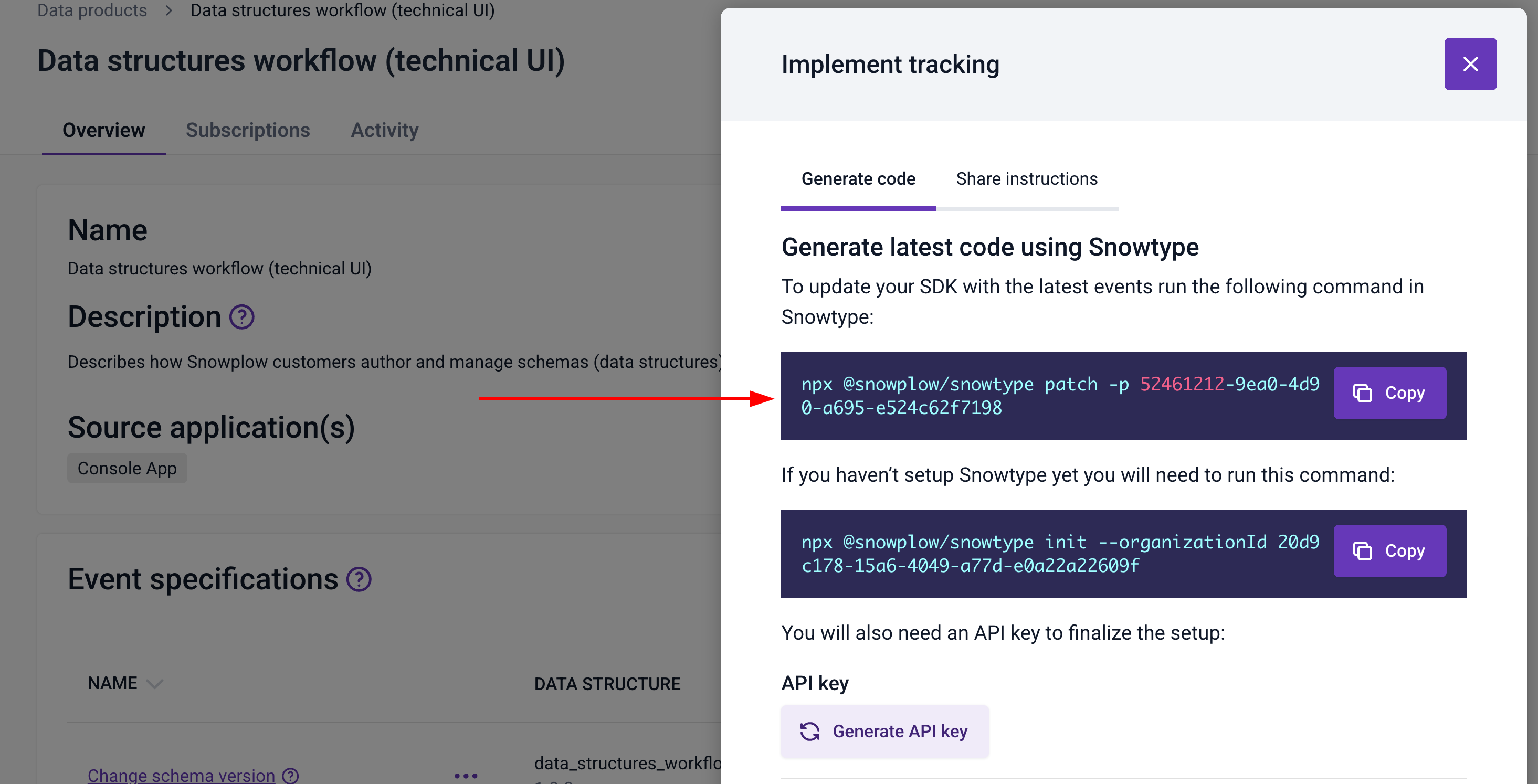
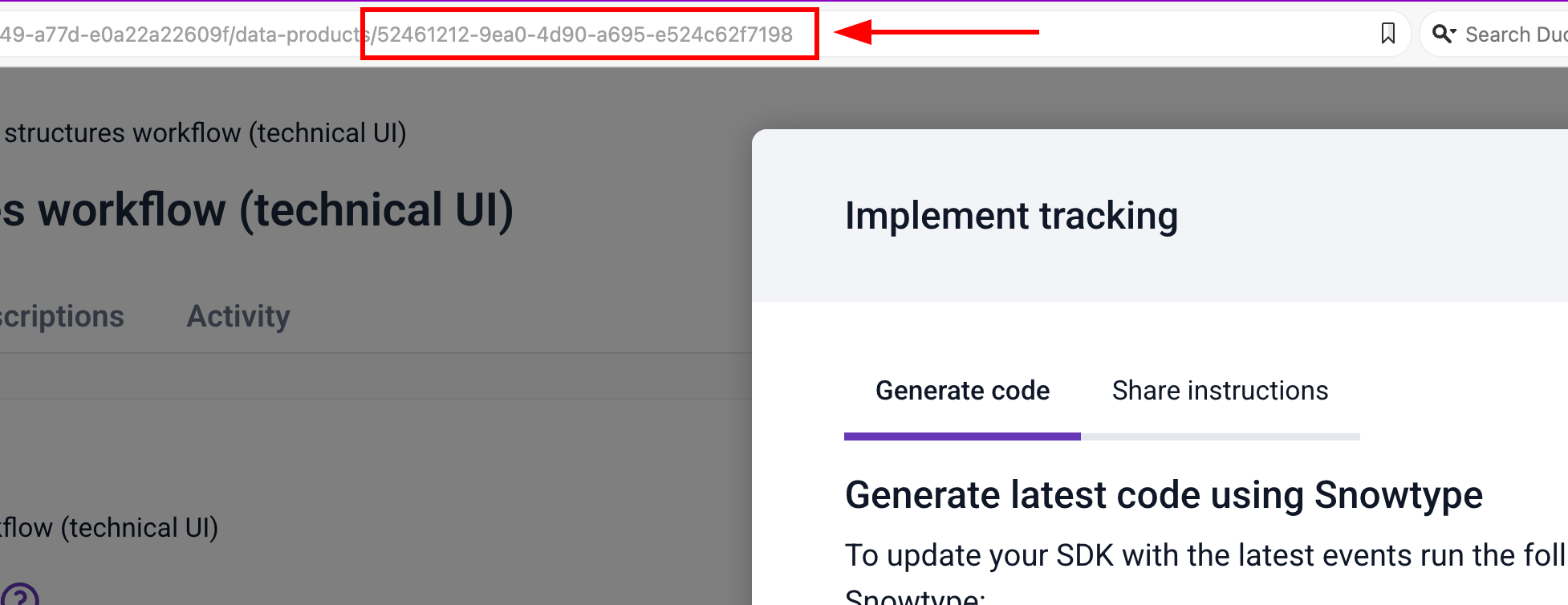
You can also copy the ID from the URL bar and add it to the dataProductIds array in your configuration file. The ID is the last part of the URL after /data-products/:
{
  "dataProductIds": ["dp-id-1", "dp-id-2"]
}
Event specifications
You can add individual event specifications if you don't need the full tracking plan. Find the event specification ID on its page in Console. The ID is the last part of the URL after /event-specifications/:
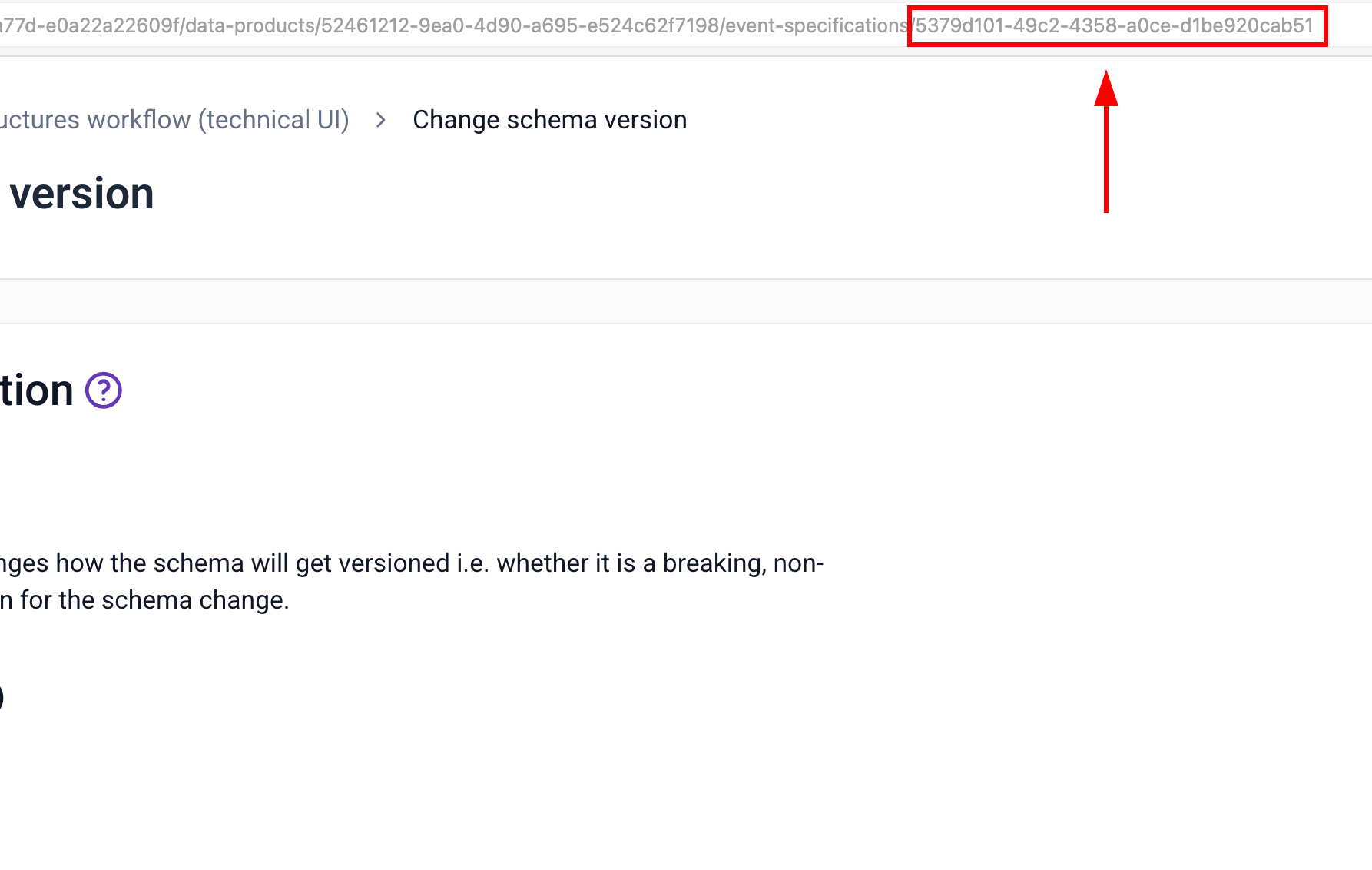
Add the ID to the eventSpecificationIds array in your configuration file:
{
  "eventSpecificationIds": ["es-id-1", "es-id-2"]
}
Data structures
To generate code for a specific data structure, you need its schema tracking URI. Find it on the data structure page in Console, under the Overview tab:
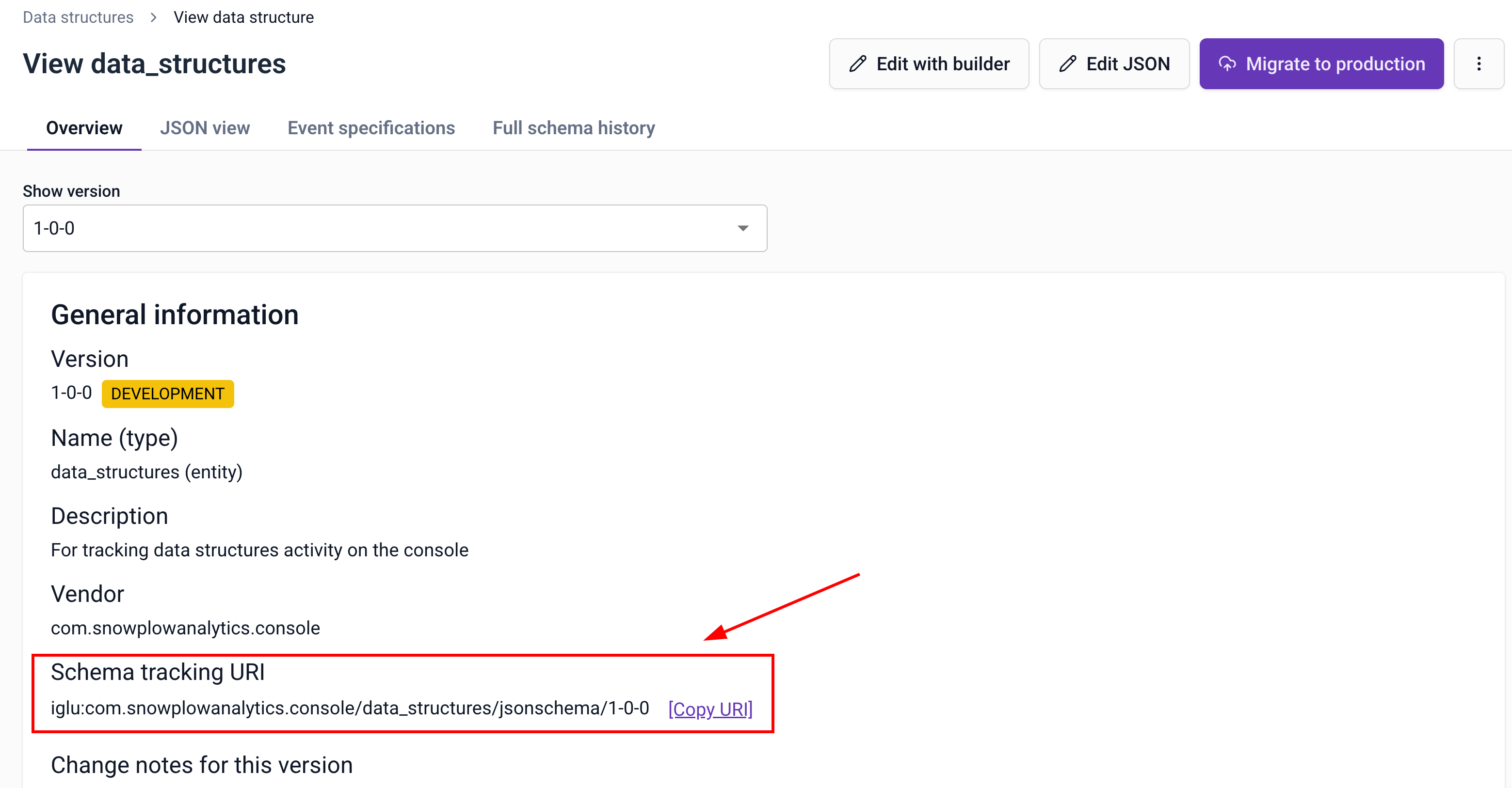
Add the URI to the dataStructures array in your configuration file:
{
  "dataStructures": [
    "iglu:com.example/my_event/jsonschema/1-0-0"
  ]
}
Iglu Central schemas
Iglu Central hosts schemas that you can use in your tracking. Find the schema tracking URI on the Iglu Central website under General Information:
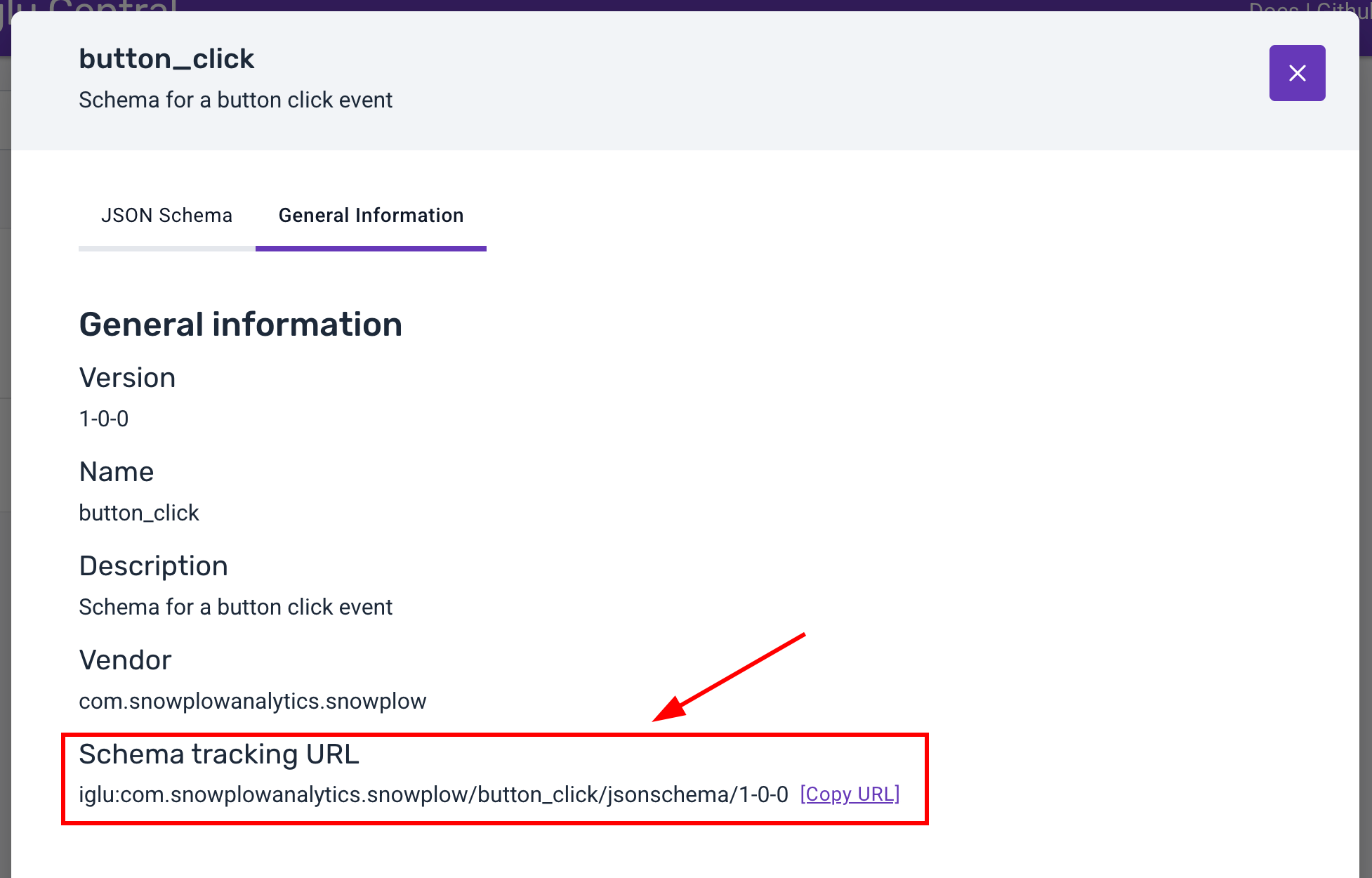
Add the URI to the igluCentralSchemas array in your configuration file:
{
  "igluCentralSchemas": [
    "iglu:com.snowplowanalytics.snowplow/web_page/jsonschema/1-0-0"
  ]
}
Local data structure repositories
If you manage schemas locally using Snowplow CLI, you can point Snowtype at your local repository paths. Add them to the repositories array:
{
  "repositories": ["./schemas"]
}
You can pass in the path to the data structures directly, or the Snowplow CLI directory root.
// This is fine
"repositories": ["./my-snowplow-tracking"]

// This also works
"repositories": ["./my-snowplow-tracking/data-structures"]

// This won't do anything
"repositories": ["./my-snowplow-tracking/data-products"]
Provide the path relative to the location of your configuration file.
Snowtype can only create tracking code for local data structures, not for local tracking plans (data products).