Client-side schema and event specification validation
Using Snowtype you can get notified, at runtime, if tracked events don't match their schema definitions, or the rules defined in their event specification. This allows you to catch errors before they reach production.
When enabled, every event sent through Snowtype generated code is checked at runtime against:
- Schema rules: does the event or entity data match the schema definition?
- Cardinality rules: does the event include the correct number of each entity, as defined in the event specification?
- Property rules: do entity values match the constraints defined in the event specification?
This feature is available for the Browser tracker only, in both JavaScript and TypeScript.
Generate code with validations
To use validation, you'll first need to install three Ajv packages: ajv@8, ajv-formats@2 and ajv-draft-04@1.
# Example using npm
npm install ajv@8 ajv-formats@2 ajv-draft-04@1
To opt-in to client-side validation, include the --validations flag when you are generating your code.
npx snowtype generate --validations
You can also enable validations permanently in your configuration file instead of passing the flag each time.
Snowtype will generate:
- A
validations.tsfile that contains the schema details for all the listed sources - Additional helper functions
- Additional processing for each
trackfunction - Additional processing for each
trackXSpecfunction
All the changes are under the hood, and don't affect how you call the generated functions. Continue to track events as normal, and any validation errors will appear in the browser console.
Updated track functions
To validate schemas, Snowtype adds extra code to the generated track functions.
The highlighted lines in this example show the changed or additional code:
// Ajv helper functions omitted for brevity

/**
 * Track a Snowplow event for WebPage.
 * Schema for a web page
 */
export function trackWebPage<T extends {} = any>(webPage: WebPage & ContextsOrTimestamp<T>, trackers?: string[]){
    const { context, timestamp, __esId, ...data } = webPage as typeof webPage & EventSpecIdInput;
    const event: SelfDescribingJson = {
        schema: 'iglu:com.snowplowanalytics.snowplow/web_page/jsonschema/1-0-0',
        data
    };
    [event].concat(context || []).forEach(s => validateSchema(s, __esId));
    trackSelfDescribingEvent({
        event,
        context,
        timestamp,
    }, trackers);
}
Updated trackXSpec functions
To validate event specification instructions and cardinality rules, Snowtype adds extra code to the generated trackXSpec functions.
The highlighted lines in this example show the changed or additional code:
// Ajv helper functions omitted for brevity

/**
 * Tracks a UserLogIn event specification.
 * ID: a965caf1-88a6-4a89-9aea-cc92516a9d56
 */
export function trackUserLogInSpec(userLogIn: Login & ContextsOrTimestamp<User | UserAuthentication>, trackers?: string[]){
    const eventSpecificationContext = createEventSpecification({
        id: 'a965caf1-88a6-4a89-9aea-cc92516a9d56',
        version: 8,
        name: 'User Log In',
        data_product_id: '57471841-aa79-445d-b4f7-1cbd073a3188',
        data_product_name: 'Checkout Flow - Example',
        data_product_domain: 'Marketing'
    });
    validateEntityRules(
        'a965caf1-88a6-4a89-9aea-cc92516a9d56' as keyof typeof entityRules,
        userLogIn.context as unknown as SelfDescribingJson[]
    );
    const context = Array.isArray(userLogIn.context)
        ? [...userLogIn.context, eventSpecificationContext]
        : [eventSpecificationContext];

    const modifiedUserLogIn = {
        ...userLogIn,
        context,
        /* Used for runtime validation only */
        __esId: 'a965caf1-88a6-4a89-9aea-cc92516a9d56'
    };

    trackLogin<User | UserAuthentication | EventSpecification>(modifiedUserLogIn, trackers);
}
Bundle size consideration
Because of the additional libraries required for client-side validation, using validation will increase your application bundle size.
For this reason, we recommend using validation only in development and test environments.
Schema validation
When you call a generated trackX function, it will validate the event data against the schema. It will also validate any attached entities, as long as Snowtype has a reference of their schemas in the validations.ts file.
For JavaScript projects, this type of validation is especially useful given the lack of types. For TypeScript, it's an additional layer of protection that can also catch mistakes in dynamic or loosely typed values.
Your app will raise a Snowtype Schema Validation error warning in the browser console if a property violates the schema. In this example, the property id is expected to be a string, but the value 1 is passed instead. The erroneous value can be found under errors[n].data, and a stack trace pointing to the calling function is also provided:
![Browser console showing a "Snowtype Schema Validation error" warning where the id property received 1 (a number) instead of the expected string type, with the invalid value shown under errors[n].data and a stack trace pointing to the calling function](/assets/images/validation-0a7cf374318205444a962c9a69fbc40d.png)
Entity cardinality rule validation
Cardinality rules define how many of a given entity an event specification expects. For example:
- Exactly 1
- At least 1
- Between 1 and 2
With client-side validation enabled, your Snowtype code will check these rules at runtime. If the event includes the wrong amount of a required entity, a Snowtype Entity Cardinality Rules error warning appears in the browser console.
For example, with a product entity that has a cardinality rule of "Exactly 1":
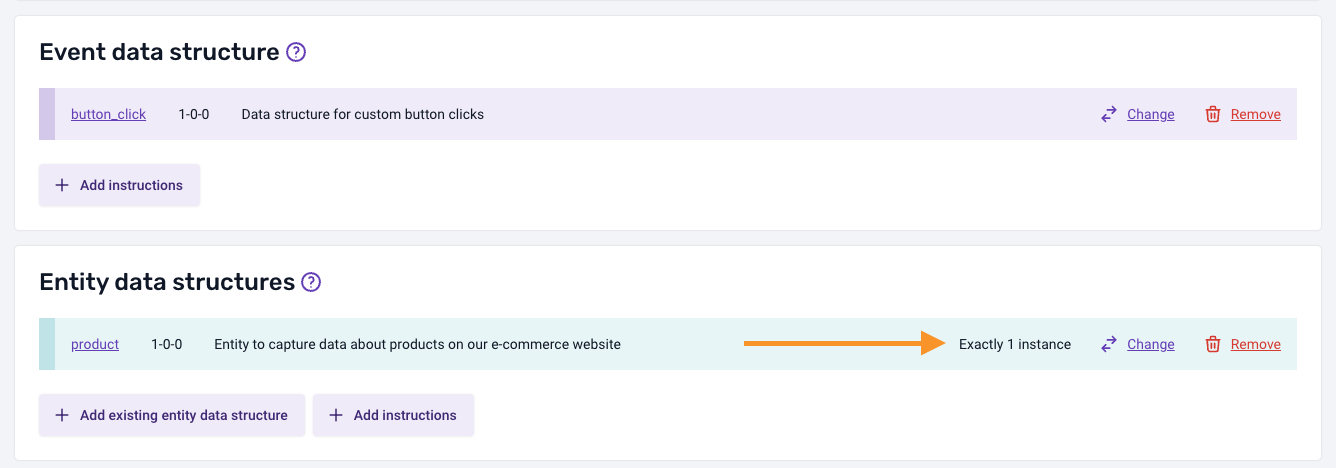
This code satisfies the rule:
trackButtonClickSpec({
    label: "Product click",
    context: [createProduct({ name: "Product", price: 1, quantity: 1 })],
});
Adding a second product entity violates the rule:
trackButtonClickSpec({
    label: "Product click",
    context: [
        createProduct({ name: "Product", price: 1, quantity: 1 }),
        // This violates the cardinality rule of Exactly 1
        createProduct({ name: "Product 2", price: 1, quantity: 1 }),
    ],
});
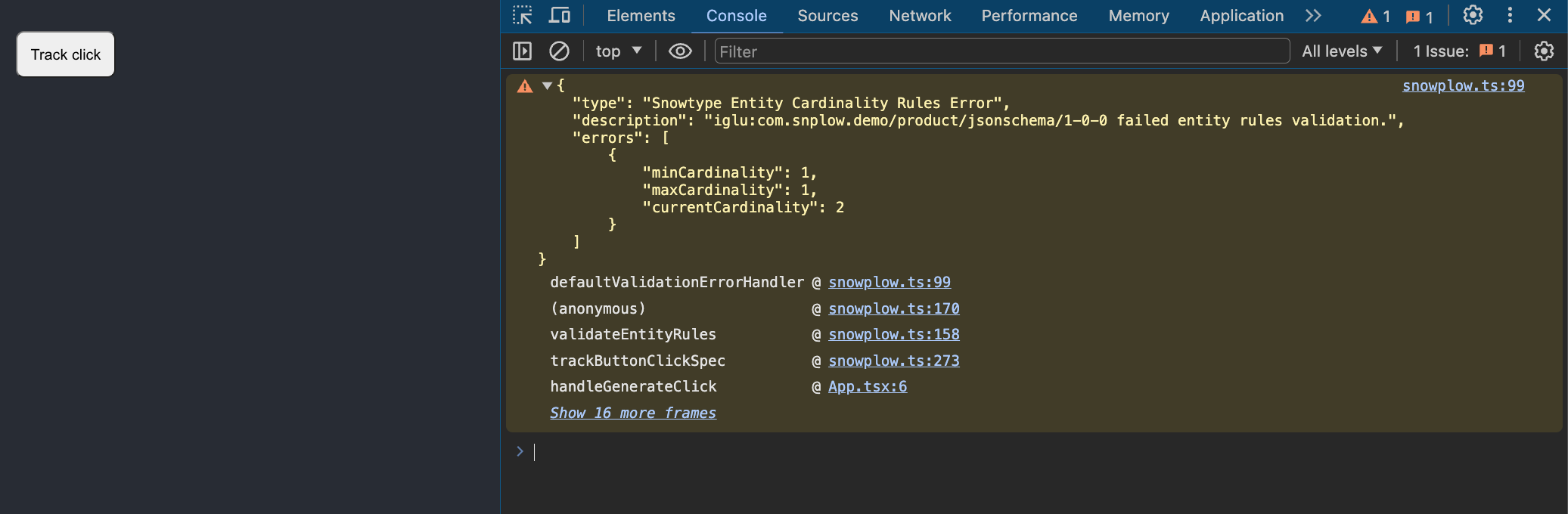
The warning includes the minCardinality and maxCardinality expected, the currentCardinality i.e. how many were actually passed, and a stack trace.
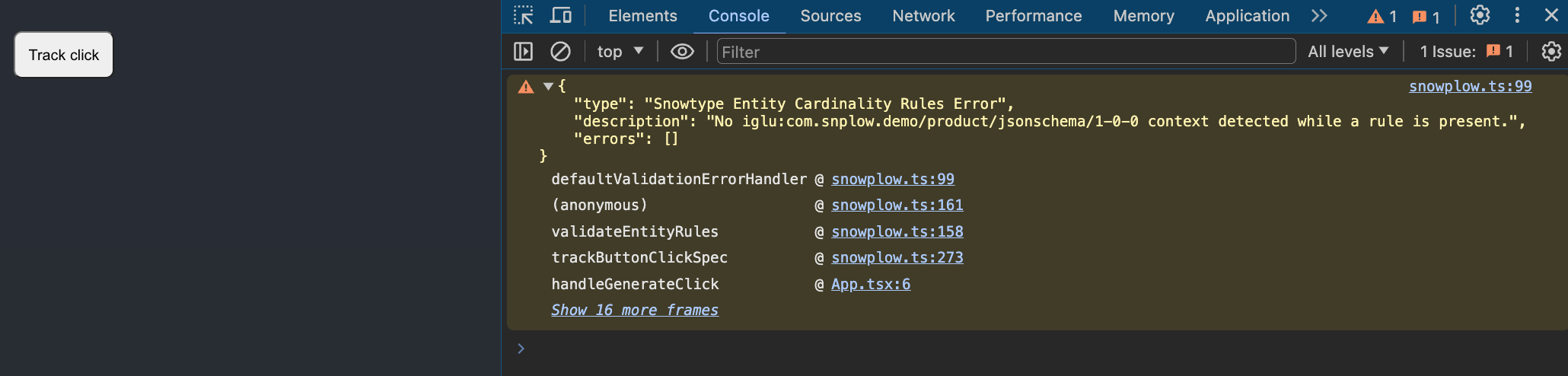
A warning also appears when a required entity is missing entirely:
Property instructions validation
Property rule instructions are constraints you define on event or entity properties within an event specification.
Snowtype creates types for property rules for all trackers. This additional runtime validation layer can catch any mistakes that slip through, such as when using dynamic values.
In this example event specification, the category property of the product entity must be either "related" or "cross-sell".
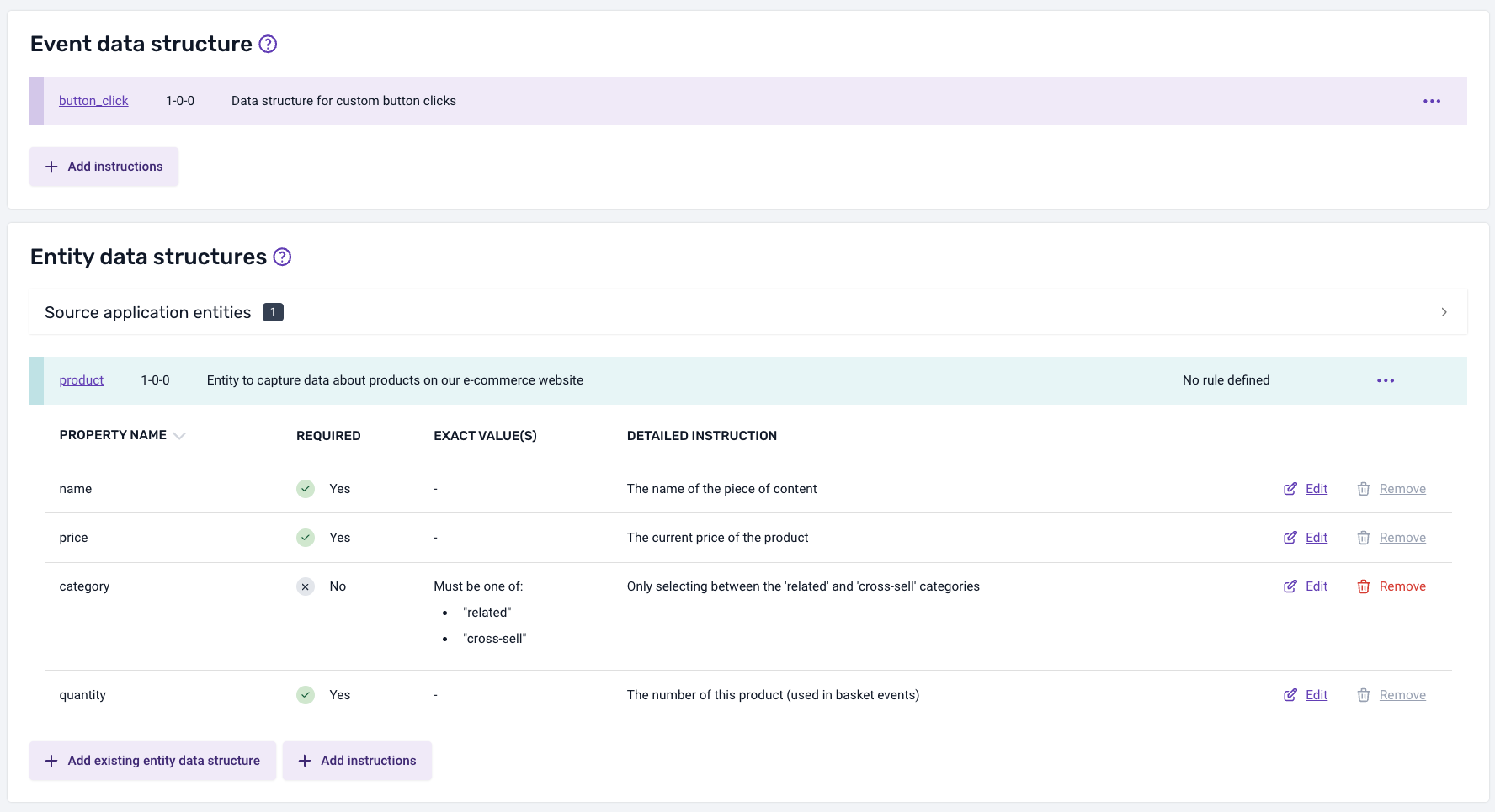
This code satisfies the property rule:
trackRelatedSpec({
    label: "Related product",
    context: [
        createProductRelated({
            category: "cross-sell",
            name: "product",
            quantity: 1,
            price: 10,
        }),
    ],
});
Passing a value outside the allowed set triggers a Snowtype Schema Validation error warning:
trackRelatedSpec({
    label: "Related product",
    context: [
        createProductRelated({
            // "cross-sells" has a typo and is not a valid category
            category: "cross-sells",
            name: "product",
            quantity: 1,
            price: 10,
        }),
    ],
});
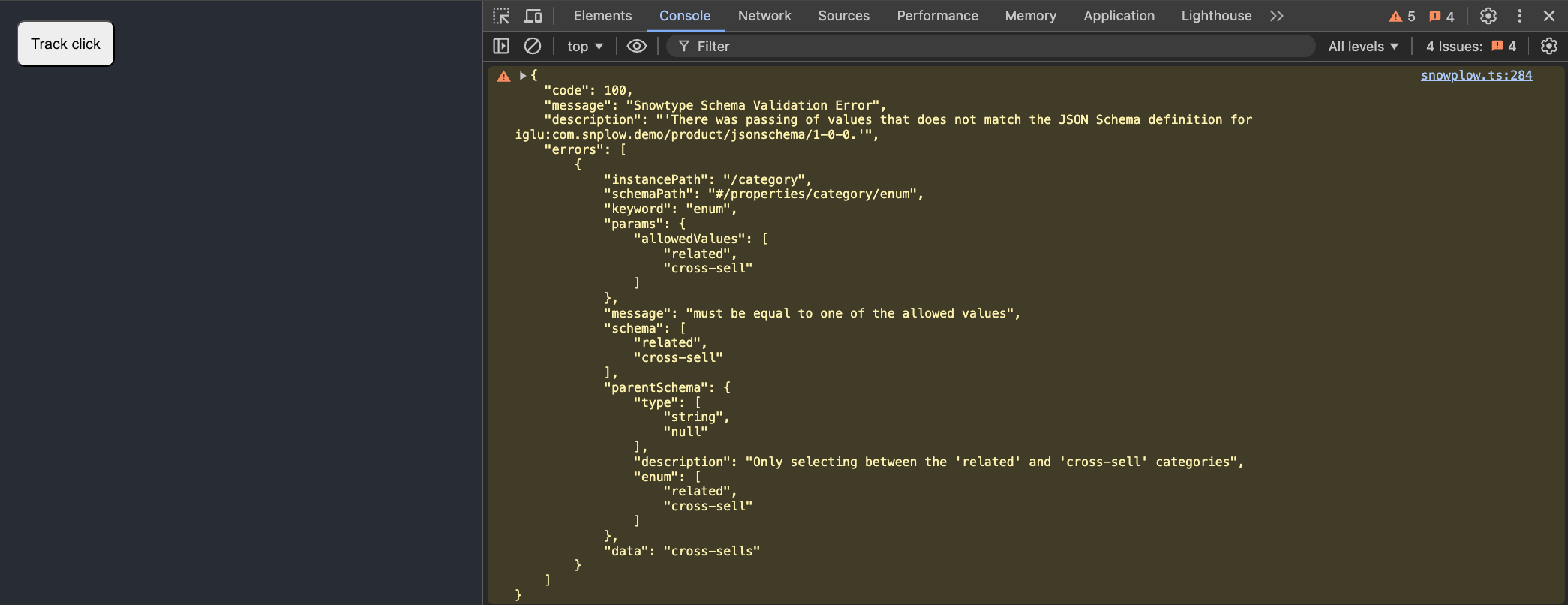
Custom violation handlers
By default, violations are logged to the browser console using console.warn. You can override this behavior with a custom violationsHandler using the snowtype.setOptions API:
import { snowtype } from "{{outpath}}/snowplow";

function myViolationsHandler(error) {
    // Custom violation handling logic
}

snowtype.setOptions({ violationsHandler: myViolationsHandler });
The error argument has the following shape:
type ErrorType = {
    /** Error code number (e.g. 100, 200, 201) */
    code: number;
    /** Error message */
    message: string;
    /** Description of the violation */
    description: string;
    /** Details of the violations */
    errors: (ErrorObject | Record<string, unknown>)[];
};
This is useful for:
- Unit testing: throw an
Errorso that tests fail automatically when a violation occurs - Error monitoring: report violations to a service like Sentry in staging or production
When NODE_ENV is set to test, as many testing libraries do automatically, the default handler throws an Error instead of logging a warning. This means tracking violations will cause your tests to fail without any extra configuration.
Pipeline validation and pattern
When you run snowtype generate, Snowtype will print a warning if it detects pattern (regex) properties in any of your schemas:
✔: Code generated, writing...
⚠ Warning: Some schemas appear to have attributes that can have inconsistent validations between the pipeline and client-side validation.
The Snowplow pipeline uses Java/Scala regex, while client-side validation uses JavaScript regex. This can lead to differences in validation results, especially for complex regex patterns. In most cases, you can ignore this warning.